SQL Server Integration Services
A Microsoft platform for building enterprise-level data integration and data transformations solutions.
This browser is no longer supported.
Upgrade to Microsoft Edge to take advantage of the latest features, security updates, and technical support.
' cx='32' cy='32' r='32' /%3E%3Ctext x='50%25' y='55%25' dominant-baseline='middle' text-anchor='middle' fill='%23FFF' %3EKS%3C/text%3E%3C/svg%3E)
i have to deploy SSIS project developed in visual studio 2019 into SQL server 2017. i have newly adde some execute sql tasks and rebuild the solution. Then I try to deploy it in SSMS it got the error as
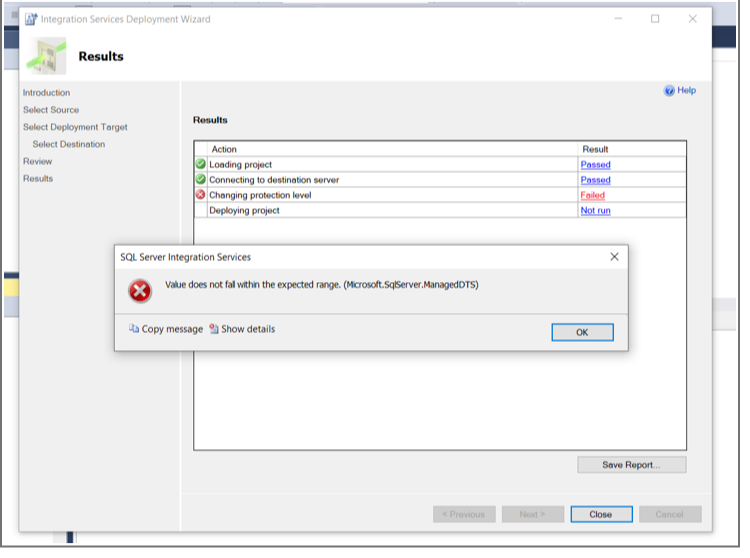
value doesn't fall within expected range (microsoft.sqlserver.ManagedDTS). after removing those execute sql task, the project deployed successfully. i restarted visual studio. But still error persists.
Kindly provide me with perfect solution for this.
' cx='32' cy='32' r='32' /%3E%3Ctext x='50%25' y='55%25' dominant-baseline='middle' text-anchor='middle' fill='%23FFF' %3EV%3C/text%3E%3C/svg%3E)
While exporting SSIS pkg from SQL Server Management Studio I’m getting error like Value does not fall within the expected range.(Microsoft.sql server.ManagedDTS) .
Can you please help me on this
Thanks in Advance
Veena
' cx='32' cy='32' r='32' /%3E%3Ctext x='50%25' y='55%25' dominant-baseline='middle' text-anchor='middle' fill='%23FFF' %3EYK%3C/text%3E%3C/svg%3E)
Hi @Kaveya S ,
(1) You need to check SSIS Project ProtectionLevel setting value.
It is recommended to set it as DontSaveSensitive.
It may ask you to set the same ProtectionLevel value for each SSIS package in the project.
(2) Please ensure that you are using SQL Server Integration Services Projects extension for VS2019 v3.16, and ignore v.4. versions.
(3) If you are using SSIS Script Task, please check that VS2019 .Net Framework version is installed on the SSIS run-time server.
(4) Please ensure that SSIS project TargetServerVersion is matching SSIS run-time version on the server.

Hi,
I opened SSIS project and packages. all have same protection level DONTSaveSensitive. But still error persists
I updated the answer.
Check it out.
thanks
i will check these and update
HI, still error didn't get solved tried out all those solutions.
Please add to the original questions screen shots of the problematic SSIS Execute SQL Task, specifically its two tabs:
There is a possibility that parameters data types and/or values don't match data types of the database table(s).
Thanks. I will try it out.

Hi @Kaveya S ,
The error message tells us that you need to change protection level.
See access-control-for-sensitive-data-in-packages.
Regards,
Zoe Hui
If the answer is helpful, please click "Accept Answer" and upvote it.
thanks. But i already did this. still error occurs.