Community Center | Not monitored
Tag not monitored by Microsoft.

This browser is no longer supported.
Upgrade to Microsoft Edge to take advantage of the latest features, security updates, and technical support.
' cx='32' cy='32' r='32' /%3E%3Ctext x='50%25' y='55%25' dominant-baseline='middle' text-anchor='middle' fill='%23FFF' %3EIT%3C/text%3E%3C/svg%3E)
Hey, im new to powerapps and im trying to create a desk-booking software. Ive already created a button with this function: If(IsBlank(TableBookings),Patch(TableBookings, Defaults(TableBookings), {Name: User().FullName, Date: Today(), Table: 1}),If(IsEmpty(TableBookings),Patch(TableBookings, Defaults(TableBookings), {Name: User().FullName, Date: Today(), Table: 1}),Remove(TableBookings, First(TableBookings))));
I must change 'Date: Today()' to Set(SelectedDate). am i right?
So when i click it theres a new entry in a tablelist.
Now i try to add a calendar. So when u click on the calendar and select a date, the new entry is made with a specific date. But i dont get it. I tried DatePicker, CalendarBlank and the calendar layout. Wich one do i use and where do i put my code in? Everytime i got an error.
Hopefully somebody can help me, and hopefully you guys understand my question. My grammar is really bad.
You sincerely
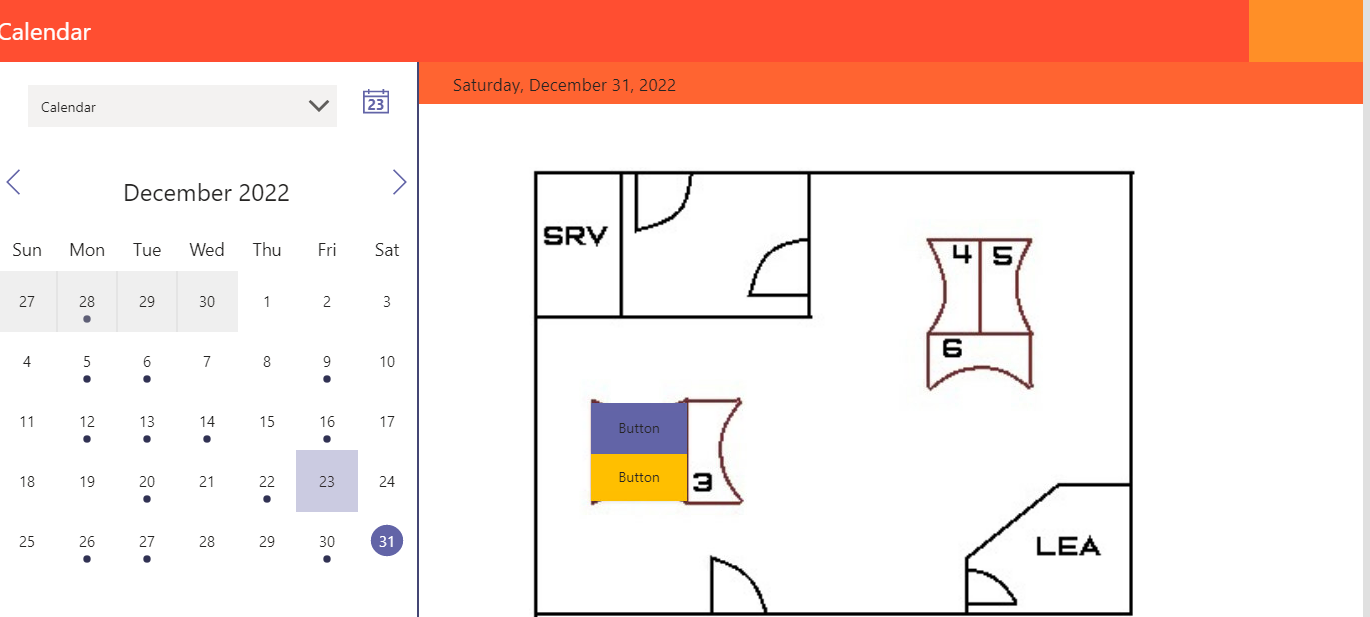
That is how it should look. But if u got other suggestions i hear to them

Hi @Im Tobi
Unfortunately PowerApps is not supported on this forum at this time. It is best that you reach out to PowerApps experts at https://powerusers.microsoft.com/t5/Forums/ct-p/PA_Comm_Forums and they will gladly assist with more expertise.
----------------------------------------------
If this is helpful please accept answer.