Azure Storage
Globally unique resources that provide access to data management services and serve as the parent namespace for the services.
This browser is no longer supported.
Upgrade to Microsoft Edge to take advantage of the latest features, security updates, and technical support.
' cx='32' cy='32' r='32' /%3E%3Ctext x='50%25' y='55%25' dominant-baseline='middle' text-anchor='middle' fill='%23FFF' %3ETH%3C/text%3E%3C/svg%3E)
Hello Experts,
I have deployed a docker container as a web app. If I use WEBSITES_ENABLE_PERSISTENT_APP_STORAGE the data gets stored in the app storage. However, I want to use Azure File Share for better results.
My container basically is a database application that uses XAMPP server. The database files are stored in the location: /opt/lampp/var/mysql in the case of my container which uses Ubuntu.
The contents of this directory are as follows:
a214daf4f291.err a214daf4f291.pid aria_log.00000001 aria_log_control
ib_logfile0 ib_logfile1 ibdata1 ibtmp1 multi-master.info
mysql mysql.sock performance_schema phpmyadmin test
where the last lines correspond to folders.
I am able to connect to the file share, but the result is as follows:
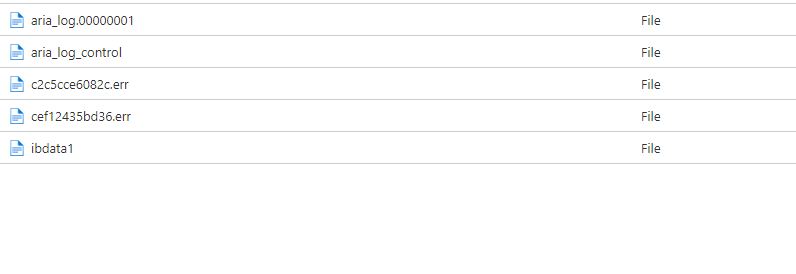
I am not able to figure out why all files and folders inside the mysql directory are not getting stored in the Azure file share. I deployed the web app using a docker compose file as follows:
----------
version: '3.3'
services:
db:
image: testosreg.azurecr.io/webimage
volumes:
- db-data:/opt/lampp/var/mysql
volumes:
db-data:
----------
where db-data is the name of the Azure Storage Mount for the web app.
I followed this video for deploying the web app: https://www.youtube.com/watch?v=q7J050yovuo
Any help or suggestions in this regard?

@Tejas Hegde Firstly, Apologies for the delay response! We are looking into this thread