Developer technologies | Windows Presentation Foundation
A part of the .NET Framework that provides a unified programming model for building line-of-business desktop applications on Windows.
This browser is no longer supported.
Upgrade to Microsoft Edge to take advantage of the latest features, security updates, and technical support.
' cx='32' cy='32' r='32' /%3E%3Ctext x='50%25' y='55%25' dominant-baseline='middle' text-anchor='middle' fill='%23FFF' %3EMK%3C/text%3E%3C/svg%3E)
Hi there, I have a WPF application where I use a ComboBox. My ComboBox ItemSource is bind to a List <> which I populate from C# in background.
Here is the C# code of that List<> :
// Main code
         List<AudioDevice> devices = new List<AudioDevice>();
     HRESULT hr = HRESULT.E_FAIL;
     Guid CLSID_MMDeviceEnumerator = new Guid("{BCDE0395-E52F-467C-8E3D-C4579291692E}");
     Type MMDeviceEnumeratorType = Type.GetTypeFromCLSID(CLSID_MMDeviceEnumerator, true);
     object MMDeviceEnumerator = Activator.CreateInstance(MMDeviceEnumeratorType);
     IMMDeviceEnumerator pMMDeviceEnumerator = (IMMDeviceEnumerator)MMDeviceEnumerator;
     if (pMMDeviceEnumerator != null)
     {
         string sIdDefaultRender = null;
         string sIdDefaultCapture = null;
         IMMDevice pDefaultDevice = null;
         hr = pMMDeviceEnumerator.GetDefaultAudioEndpoint(EDataFlow.eRender, ERole.eConsole, out pDefaultDevice);
         if (hr == HRESULT.S_OK)
         {
             IntPtr hGlobal = Marshal.AllocHGlobal(260);
             hr = pDefaultDevice.GetId(out hGlobal);
             sIdDefaultRender = Marshal.PtrToStringUni(hGlobal);
             Marshal.FreeHGlobal(hGlobal);
             Marshal.ReleaseComObject(pDefaultDevice);
         }
         hr = pMMDeviceEnumerator.GetDefaultAudioEndpoint(EDataFlow.eCapture, ERole.eConsole, out pDefaultDevice);
         if (hr == HRESULT.S_OK)
         {
             IntPtr hGlobal = Marshal.AllocHGlobal(260);
             hr = pDefaultDevice.GetId(out hGlobal);
             sIdDefaultCapture = Marshal.PtrToStringUni(hGlobal);
             Marshal.FreeHGlobal(hGlobal);
             Marshal.ReleaseComObject(pDefaultDevice);
         }
         IMMDeviceCollection pDeviceCollection = null;
         hr = pMMDeviceEnumerator.EnumAudioEndpoints(EDataFlow.eAll, DEVICE_STATE_ACTIVE | DEVICE_STATE_UNPLUGGED, out pDeviceCollection);
         if (hr == HRESULT.S_OK)
         {
             uint nDevices = 0;
             hr = pDeviceCollection.GetCount(out nDevices);
             devices.Add(new AudioDevice() { Name = "System default", Direction = "Playback", Id = sIdDefaultRender, Default = true });
             for (uint i = 0; i < nDevices; i++)
             {
                 IMMDevice pDevice = null;
                 hr = pDeviceCollection.Item(i, out pDevice);
                 if (hr == HRESULT.S_OK)
                 {
                     IPropertyStore pPropertyStore = null;
                     hr = pDevice.OpenPropertyStore(STGM_READ, out pPropertyStore);
                     if (hr == HRESULT.S_OK)
                     {
                         string sFriendlyName = null;
                         string sDesc = null;
                         PROPVARIANT pv = new PROPVARIANT();
                         hr = pPropertyStore.GetValue(ref PKEY_Device_FriendlyName, out pv);
                         if (hr == HRESULT.S_OK)
                         {
                             sFriendlyName = Marshal.PtrToStringUni(pv.pwszVal);
                         }
                         hr = pPropertyStore.GetValue(ref PKEY_Device_DeviceDesc, out pv);
                         if (hr == HRESULT.S_OK)
                         {
                             sDesc = Marshal.PtrToStringUni(pv.pwszVal);
                         }
                         IntPtr hGlobal = Marshal.AllocHGlobal(260);
                         hr = pDevice.GetId(out hGlobal);
                         string sId = Marshal.PtrToStringUni(hGlobal);
                         Marshal.FreeHGlobal(hGlobal);
                         IMMEndpoint pEndpoint = null;
                         pEndpoint = (IMMEndpoint)pDevice;
                         EDataFlow eDirection = EDataFlow.eAll;
                         hr = pEndpoint.GetDataFlow(out eDirection);
                         //System.Diagnostics.Trace.WriteLine("\tDirection : " + eDirection.ToString());
                         string sDirection = "";
                         if (eDirection == EDataFlow.eRender)
                             sDirection = "Playback";
                         else if (eDirection == EDataFlow.eCapture)
                             sDirection = "Recording";
                         int nState = 0;
                         hr = pDevice.GetState(out nState);
                         if ((nState == DEVICE_STATE_ACTIVE))
                         {
                             devices.Add(new AudioDevice() { Name = sFriendlyName, Direction = sDirection, Id = sId, Default = (sId == sIdDefaultRender || (sId == sIdDefaultCapture)) });
                             //sFriendlyName += (sId == sIdDefaultRender || sId == sIdDefaultCapture) ? " (System default)" : "";
                             //devices.Add(new AudioDevice() { Name = sFriendlyName, Direction = sDirection, Default = (sId == sIdDefaultRender || (sId == sIdDefaultCapture)) });
                             ////devices.Add(new AudioDevice() { Name = sFriendlyName, Direction = sDirection, Default = (sId == sIdDefaultRender || (sId == sIdDefaultCapture)) });
                         }
                         Marshal.ReleaseComObject(pPropertyStore);
                     }
                     Marshal.ReleaseComObject(pDevice);
                 }
             }
             devices.Insert(devices.Count - 0, new AudioDevice() { Name = "Selected application ...", Direction = "Recording", Id = "Idlast", Default = false });
         }
         Marshal.ReleaseComObject(pDeviceCollection);
         ListCollectionView lcv = new ListCollectionView(devices);
         lcv.GroupDescriptions.Add(new PropertyGroupDescription("Direction"));
         this.cmb1.ItemsSource = lcv;
     }
 }
 public class AudioDevice
         {
             public string Name { get; set; }
             public string Direction { get; set; }
             public string Id { get; set; }
             public bool Default { get; set; }

         }
If you carefully see the code then You see this line this.cmb1.ItemsSource = lcv; That means the List<> is added as ItemSource of the ComboBox, Now, I have a control template for comboBoxItem, my ComboBoxitem control template have lots of visual customisation and effects according to my choice.
Here is my ComboBoxItem controltemplate :
<Style x:Key="ItemStyleOne" TargetType="{x:Type ComboBoxItem}">
             <Setter Property="SnapsToDevicePixels" Value="True"/>
             <Setter Property="UseLayoutRounding" Value="True"/>
             <Setter Property="RenderOptions.BitmapScalingMode" Value="NearestNeighbor"/>
             <Setter Property="RenderOptions.ClearTypeHint" Value="Enabled"/>
             <Setter Property="Template">
                 <Setter.Value>
                     <ControlTemplate TargetType="{x:Type ComboBoxItem}">
                         <Grid>
                             <Border x:Name="gd" Background="{Binding RelativeSource={RelativeSource FindAncestor, AncestorType={x:Type ComboBox}},Path=Background}" BorderThickness="0" SnapsToDevicePixels="True" UseLayoutRounding="True" RenderOptions.BitmapScalingMode="NearestNeighbor" RenderOptions.ClearTypeHint="Enabled">
                                 <ContentPresenter
                                 Name="ContentSite" Margin="25, 3, 0, 11" VerticalAlignment="Center">
                                     <ContentPresenter.ContentTemplate>
                                     <DataTemplate>
                                          <TextBlock SnapsToDevicePixels="True" UseLayoutRounding="True" RenderOptions.BitmapScalingMode="HighQuality" RenderOptions.EdgeMode="Aliased">

                                                 <Run Text="{Binding Name}"/>
                                             </TextBlock>
                                     </DataTemplate>
                                 </ContentPresenter.ContentTemplate>
                                 </ContentPresenter>
                             </Border>
                             <Rectangle x:Name="Border1" Width="12" Height="10" Margin="-220,-7,0,0"          RenderOptions.BitmapScalingMode="HighQuality" RenderOptions.ClearTypeHint="Auto" SnapsToDevicePixels="True" RenderOptions.EdgeMode="Unspecified">
                                 <Rectangle.Fill>
                                     <DrawingBrush>
                                         <DrawingBrush.Drawing>
                                             <DrawingGroup>
                                                 <DrawingGroup.Children>
                                                     <GeometryDrawing Brush="#d0021b" Geometry="M95.118,21.399L86.601,12.882C85.422,11.703,83.523,11.703,82.344,12.882L38.799,58.854 13.839,33.882C12.648,32.691,10.716,32.691,9.52499999999999,33.882L0.896999999999991,42.516C-0.294000000000009,43.704,-0.294000000000009,45.636,0.896999999999991,46.83L36.396,83.154C37.083,83.844 38.016,84.081 38.913,83.964 39.84,84.102 40.806,83.868 41.517,83.154L95.118,25.659C96.294,24.483,96.294,22.575,95.118,21.399z">
                                                         <GeometryDrawing.Pen>
                                                             <Pen LineJoin="Round" Brush="#d0021b" Thickness="2.5"/>
                                                         </GeometryDrawing.Pen>
                                                     </GeometryDrawing>
                                                 </DrawingGroup.Children>
                                             </DrawingGroup>
                                         </DrawingBrush.Drawing>
                                     </DrawingBrush>
                                 </Rectangle.Fill>
                             </Rectangle>
                         </Grid>
                         <ControlTemplate.Triggers>
                             <Trigger Property="ComboBoxItem.IsMouseOver" Value="True">
                                 <Setter TargetName="gd" Property="Background" Value="#3c3c3c"></Setter>
                                 <Setter TargetName="gd" Property="TextElement.Foreground" Value="#ffffff"></Setter>
                                 <Setter TargetName="gd" Property="SnapsToDevicePixels" Value="True"/>
                                 <Setter TargetName="gd" Property="UseLayoutRounding" Value="True"/>
                                 <Setter TargetName="gd" Property="RenderOptions.BitmapScalingMode" Value="NearestNeighbor"/>
                                 <Setter TargetName="gd" Property="RenderOptions.ClearTypeHint" Value="Enabled"/>
                                 <Setter TargetName="Border1" Property="Visibility" Value="Collapsed"/>
                             </Trigger>
                             <Trigger Property="ComboBoxItem.IsMouseOver" Value="False">
                                 <!--<Setter TargetName="gd" Property="Background" Value="#3c3c3c"></Setter>
                                 <Setter TargetName="gd" Property="TextElement.Foreground" Value="#ffffff"></Setter>
                                 <Setter TargetName="gd" Property="SnapsToDevicePixels" Value="True"/>
                                 <Setter TargetName="gd" Property="UseLayoutRounding" Value="True"/>
                                 <Setter TargetName="gd" Property="RenderOptions.BitmapScalingMode" Value="NearestNeighbor"/>
                                 <Setter TargetName="gd" Property="RenderOptions.ClearTypeHint" Value="Enabled"/>-->
                                 <Setter TargetName="Border1" Property="Visibility" Value="Hidden"/>
                             </Trigger>
                             <Trigger Property="ComboBoxItem.IsSelected" Value="True">
                                 <Setter TargetName="Border1" Property="Visibility" Value="Visible"/>
                                 <!--<Setter TargetName="gd" Property="SnapsToDevicePixels" Value="True"/>
                                 <Setter TargetName="gd" Property="UseLayoutRounding" Value="True"/>
                                 <Setter TargetName="gd" Property="RenderOptions.BitmapScalingMode" Value="NearestNeighbor"/>
                                 <Setter TargetName="gd" Property="RenderOptions.ClearTypeHint" Value="Enabled"/>-->
                             </Trigger>
                         </ControlTemplate.Triggers>
                     </ControlTemplate>
                 </Setter.Value>
             </Setter>
         </Style>
After adding this controltemplate in my ComboBoxitem my comboBox looks amazing. This is how I add this ComboBoxItem Style="{StaticResource ItemStyle}" ,
The code I given, is to show available audio devices in a computer systems.
But in this case my ComboBox content is added from a List<> not from a ComboBox item, all of my code is perfect and I can run successfully.
But my problem is, my ComboBox can not refresh at run time. I give an example, suppose I have three audio devices and I run my Application, my application successfully detect the three devices but If I add more devices at that time, suppose I add two more devices that means total five devices but still my application is showing three devices but it only showing five devices if I restart my application.
How Can I refresh that? I know that, updating and refreshing ComboBox is too much easy, if my Combobox Item source is binded from a ViewModel and if I implement INotifyPropertyChanged event there, but in my case the ComboBox item source is from a List<>. That's why it's too much difficult.

Hi,
instead if List<AudioDevice> use ObservableCollection<AudioDevice> an instead if "this.cmb1.ItemsSource = lcv;" use property and Binding.
Thank you very much for your reply. Can you please give me the answer with full source code? if you do then I definitely accept your answer.
' cx='32' cy='32' r='32' /%3E%3Ctext x='50%25' y='55%25' dominant-baseline='middle' text-anchor='middle' fill='%23FFF' %3EHL%3C/text%3E%3C/svg%3E)
Hi, @MERUN KUMAR MAITY . Have you checked my answer to see if it meets your requirements? I have the complete code in my answer.
Thank you very much sir, for your valuable answer but I can not understand your code because your code is not totally complete..it's partially completed. Should I put my default List<AudioDevice> code in if (flag != null) statement block? I know my question is very childish to you but I am very weak in C#. Kindly complete the full source code, don't leave anything..give proper comment documentation so, that I can accept your answer.
Hi,
use instead of new instance of list in every update the same instance of list in every update.

Thank you very much, I understand the theory but if you complete your code, so that I can fully understand it. By the way, your answer is brilliant, because most of the time in this situation people rush to implement the INotifyPropertyChanged event but your trick is awesome.
Kindly complete your code and give me proper instruction so that I can accept your answer.
Hi,
another way is to use binding. If you use ObservableCollection INotifyPropertyChanged is not nessecary.:
<Window x:Class="WpfApp1.Window038"
...
  <StackPanel>
    <Button Content="Next Device" Margin="10" Click="Update"/>
    <ComboBox Margin="10" ItemsSource="{Binding Devices}"/>
  </StackPanel>
</Window>

	public partial class Window038 : Window
	{
		public Window038()
		{
			InitializeComponent();
			this.DataContext = this;
			cvs.Source = devices;
		}

		ObservableCollection<AudioDevice> devices = new ObservableCollection<AudioDevice>();
		private CollectionViewSource cvs = new CollectionViewSource();

		public ICollectionView Devices { get => cvs.View; }

		private void Update(object sender, RoutedEventArgs e)
		{
			// Main code
... your code
          Marshal.ReleaseComObject(pDeviceCollection);
          // ListCollectionView lcv = new ListCollectionView(devices);
          // lcv.GroupDescriptions.Add(new PropertyGroupDescription("Direction"));
          // this.cmb1.ItemsSource = lcv;
...
Your code is not working..
Hi,
the demo works for me. I don't know what did you do.
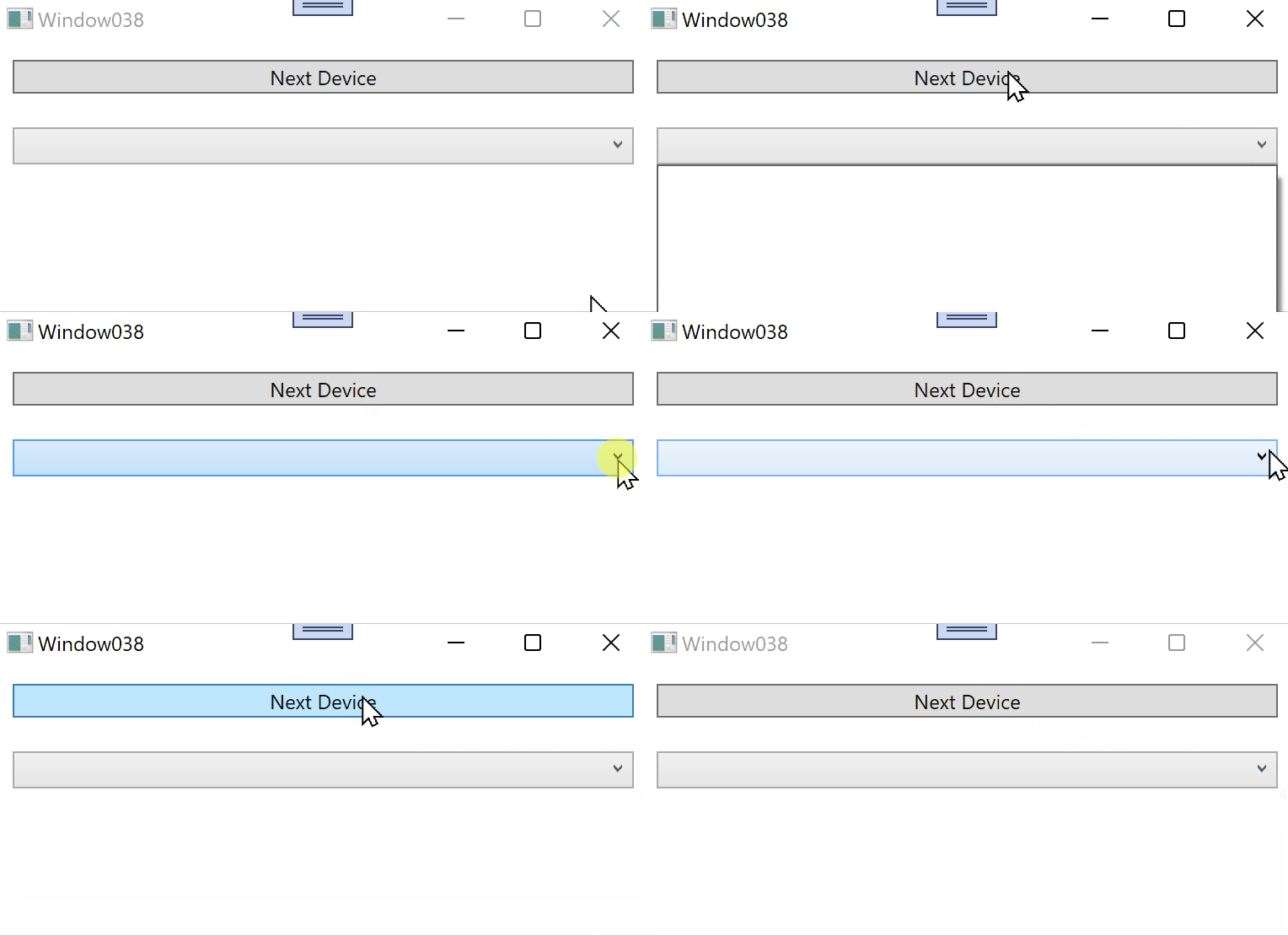
Hi, I love your first option where you try to update the list, Can update the full code so, that I can taste it and if it's working then I can accept your answer.
Dear sir, finally I solved my problem by using your first method where you say
use instead of new instance of list in every update the same instance of list in every update.
But I have one last question? Can you please reply.
Which last question? Please, start new thread.
You could use ObservableCollection<AudioDevice> instead of List. And implement the INotifyPropertyChanged interface to complete the view update.
Here is an example made with reference to your code, you can refer to it. The button in it simulates a collection update.
Xaml:
  <StackPanel>
        <Button x:Name="btn" Click="btn_Click" Height="30" Content=" add item"/>
        <ComboBox  x:Name="cmb1" Width="200" Height="60" ItemContainerStyle="{StaticResource ItemStyleOne}" />
    </StackPanel>
Codebehind:
The result:

----------------------------------------------------------------------------
If the response is helpful, please click "Accept Answer" and upvote it.
Note: Please follow the steps in our documentation to enable e-mail notifications if you want to receive the related email notification for this thread.
Thank you very much sir, for your valuable answer but I can not understand your code because your code is not totally complete..it's partially completed. Should I put my default List<AudioDevice> code in if (flag != null) statement block? I know my question is very childish to you but I am very weak in C#. Kindly complete the full source code, don't leave anything..give proper comment documentation so, that I can accept your answer.
Hi,@MERUN KUMAR MAITY . I think so. In my code, flag is used to count the ComBoxItems that are added. You could use your way to distinguish each newly added ComBoxItem.