
Creating AlwaysON group

Mikhail Firsov 1,881 Reputation points
2022-12-27T10:48:58.23+00:00

Hello!

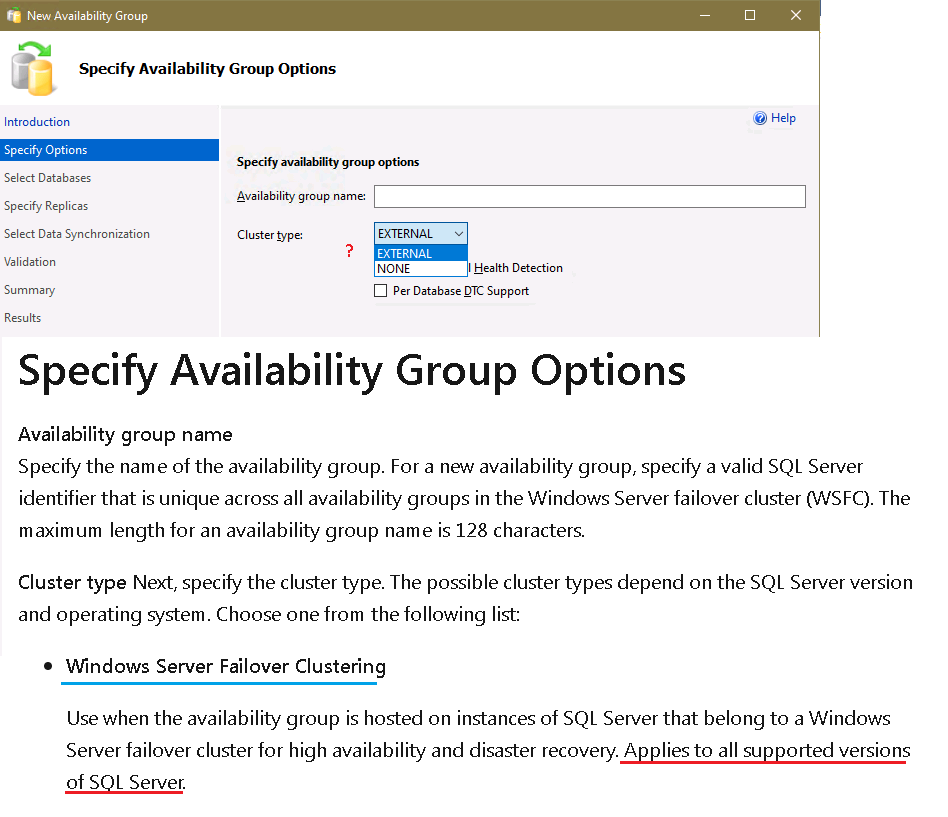
There's a windows failover cluster up and running and when starting the AlwaysON wizard on one of the clustered servers I see the following options:

274209-117.png

Q1: Why is the WFC option is missing if it "Applies to all supported versions of SQL Server." according to this ?

And when it comes to the adding replicas the only available mode for the failover is manual:
274210-124.png

Q2: Why does the wizard "say" this replica can only use manual failover if there's no such restriction for the basic groups as described here: ?

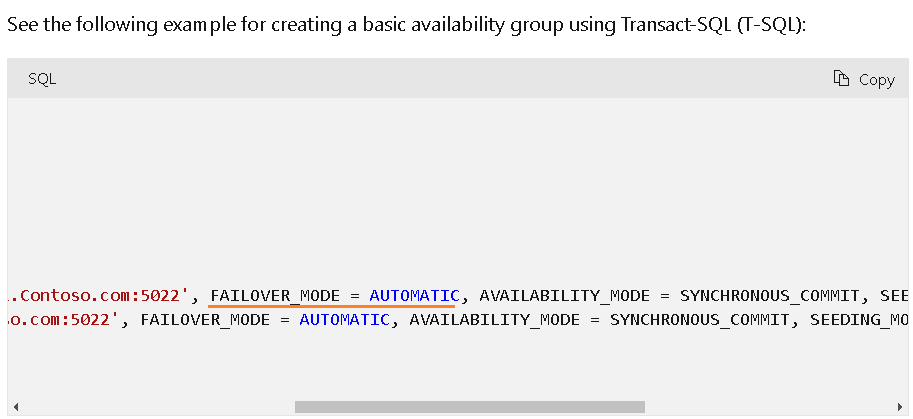
Furthermore, the PS example reads as follows:

274312-125.png

OS = Windows Server 2022, SQL Server = 2019 Standard

Thank you in advance,
Michael

SQL Server | Other
0 comments No comments
{count} votes

Answer accepted by question author
  1. Seeya Xi-MSFT 16,676 Reputation points
    2022-12-28T04:17:02.317+00:00

    Hi @Mikhail Firsov ,

    Q1: Why is the WSFC option is missing if it "Applies to all supported versions of SQL Server."

    This is abnormal. First, you need to have a healthy cluster. Second, you need to disable AlwaysOn feature in SQLServer Configuration Manager and enable it again.

    Q2: Why does the wizard "say" this replica can only use manual failover if there's no such restriction for the basic groups as described here: ?

    This is because the type you chose is not a cluster, so it will not support automatic failover. In my environment, selecting the cluster type brings up the option for automatic failover. Selecting the None type brings up the Manual like you screenshot.

    Best regards,
    Seeya


    If the answer is the right solution, please click "Accept Answer" and kindly upvote it. If you have extra questions about this answer, please click "Comment".
    Note: Please follow the steps in our documentation to enable e-mail notifications if you want to receive the related email notification for this thread.

    0 comments No comments

1 additional answer

Sort by: Most helpful
  1. Mikhail Firsov 1,881 Reputation points
    2022-12-28T07:29:35.463+00:00

    Hi SeeyaXi-msft,

    Seems to be a glitch in SQL Server while reading cluster configuration: even after clean OS install + cluster configuration the WFC option was missing. Disabling/enabling AO feature does solve the problem - thank you for the help!

    Regards,
    Michael

    0 comments No comments

Your answer

Answers can be marked as 'Accepted' by the question author and 'Recommended' by moderators, which helps users know the answer solved the author's problem.