Microsoft 365 and Office | SharePoint Server | For business
A family of Microsoft on-premises document management and storage systems.

This browser is no longer supported.
Upgrade to Microsoft Edge to take advantage of the latest features, security updates, and technical support.
' cx='32' cy='32' r='32' /%3E%3Ctext x='50%25' y='55%25' dominant-baseline='middle' text-anchor='middle' fill='%23FFF' %3EA%3C/text%3E%3C/svg%3E)
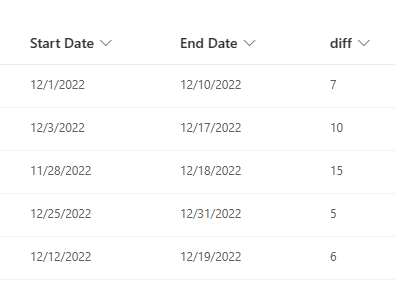
I'm trying to calculate the number of working days between 2 dates [Start Date] and [End Date], given 2 dates. means that I want to exclude the weekends, just count the working days(Monday,...Friday). How to do that?

Hi @Andy ,
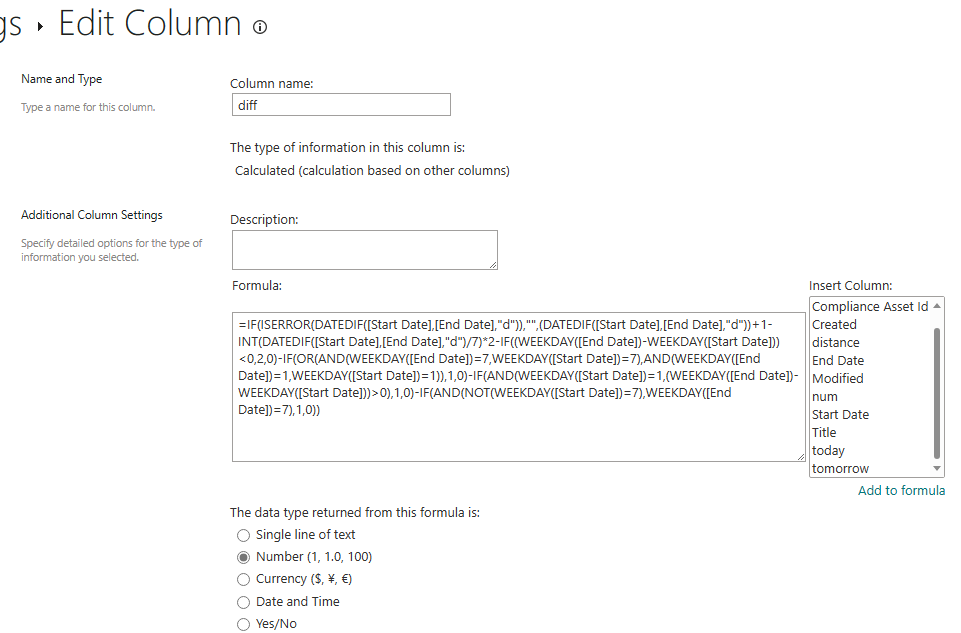
Try this formula:
IF(ISERROR(DATEDIF([Start Date],[End Date],"d")),"",(DATEDIF([Start Date],[End Date],"d"))+1-INT(DATEDIF([Start Date],[End Date],"d")/7)*2-IF((WEEKDAY([End Date])-WEEKDAY([Start Date]))<0,2,0)-IF(OR(AND(WEEKDAY([End Date])=7,WEEKDAY([Start Date])=7),AND(WEEKDAY([End Date])=1,WEEKDAY([Start Date])=1)),1,0)-IF(AND(WEEKDAY([Start Date])=1,(WEEKDAY([End Date])-WEEKDAY([Start Date]))>0),1,0)-IF(AND(NOT(WEEKDAY([Start Date])=7),WEEKDAY([End Date])=7),1,0))
If the answer is helpful, please click "Accept Answer" and kindly upvote it. If you have extra questions about this answer, please click "Comment".
Note: Please follow the steps in our documentation to enable e-mail notifications if you want to receive the related email notification for this thread.
Hi @Andy ,
I’m checking how the things are going on about this issue. Whether the answer helps you?