Microsoft 365 and Office | SharePoint | For business | Windows
A group of Microsoft Products and technologies used for sharing and managing content, knowledge, and applications.

This browser is no longer supported.
Upgrade to Microsoft Edge to take advantage of the latest features, security updates, and technical support.
' cx='32' cy='32' r='32' /%3E%3Ctext x='50%25' y='55%25' dominant-baseline='middle' text-anchor='middle' fill='%23FFF' %3EJ%3C/text%3E%3C/svg%3E)
Added a URL field in a Teams/SharePoint list and as I was testing the use of this list I found an error message stating "URL may not contain more than 255 characters". The URL in question is coming from the Teams/SharePoint "Copy link" selection. From Teams the link is 500+ characters and from SharePoint direct the link is 264 characters. Why is this limit lower than what is generated as a link in Teams and SharePoint and is there a plan to remove this limit in the future?
I've found a workaround to use the Multiline field but that seems like a very unnecessary step for such a straightforward application.
A group of Microsoft Products and technologies used for sharing and managing content, knowledge, and applications.
' cx='32' cy='32' r='32' /%3E%3Ctext x='50%25' y='55%25' dominant-baseline='middle' text-anchor='middle' fill='%23FFF' %3EJ%3C/text%3E%3C/svg%3E)
I'm getting the same message that Joe is getting -- I've created a file structure in the Files sections of teams, and then in a custom list I created a Hyperlink column to reference the newly created file. In Files I'm selecting the file and clicking "Copy Link", and when I paste this link into the Hyperlink field it says there's a 255 character limit. I'm guessing the reason I'm over the 255 character limit is because I have a layer of folders to navigate through to get to the file: Annual Batch Processes --> Infinite Campus --> Infinite Campus Roll-Forward Calendars.docx -- that alone is like 82 characters.
' cx='32' cy='32' r='32' /%3E%3Ctext x='50%25' y='55%25' dominant-baseline='middle' text-anchor='middle' fill='%23FFF' %3ECM%3C/text%3E%3C/svg%3E)
"The URL field in a SharePoint list or library that you used single line of text column or hyperlink column have 255 characters limit. This is by design." : this is exactly my problem. URL of 300 characters in a SP list is rejected.
' cx='32' cy='32' r='32' /%3E%3Ctext x='50%25' y='55%25' dominant-baseline='middle' text-anchor='middle' fill='%23FFF' %3EFF%3C/text%3E%3C/svg%3E)
The practical solution I use is to copy and paste the link in the grid view mode. In this case there is no 255 limit.

Hi @Joe ,
As per my tests, this problem cannot be reproduced from my end, I did not receive this error when I click "Copy Link" copy to the URL field. If using another language, you may have more than 255 characters in the link.
Currently, there is no official article says to remove this restriction and limitation. You could make your suggestion in this feedback portal to improve user experience.
This is screenshot about my test.

No error reported.

Different apps and Office versions have different limits, and the combination of limitations may be unique to your setup.
The entire decoded file path, including the file name, can't contain more than 400 characters for SharePoint Online. The limit applies to the combination of the folder path and file name after decoding.
The URL field in a SharePoint list or library that you used single line of text column or hyperlink column have 255 characters limit. This is by design.
I have found this official article to show you character restrictions and limitations in SharePoint for you reference, hope it would help you.
Thanks for your understanding and support!
If the answer is helpful, please click "Accept Answer" and kindly upvote it. If you have extra questions about this answer, please click "Comment".
Note: Please follow the steps in our documentation to enable e-mail notifications if you want to receive the related email notification for this thread.
Thanks for the reply JinweiLi, looking at your example, it looks like the link you got was a hashed link, whereas the links that I am getting are showing the full folder path and filenames. I took a sample of 10 links in different channels of one Teams and more than half of them were greater than 255 characters.
Is this a Teams or SharePoint setting that changes the link from a full folder path to a short URL? Or is something I can request from the IS team to change in the servers?
Hi @Joe ,
I suggest you could use the shorter link.
Please go to your SharePoint Admin Center > Sharing
Select Use short links for sharing files and folders.
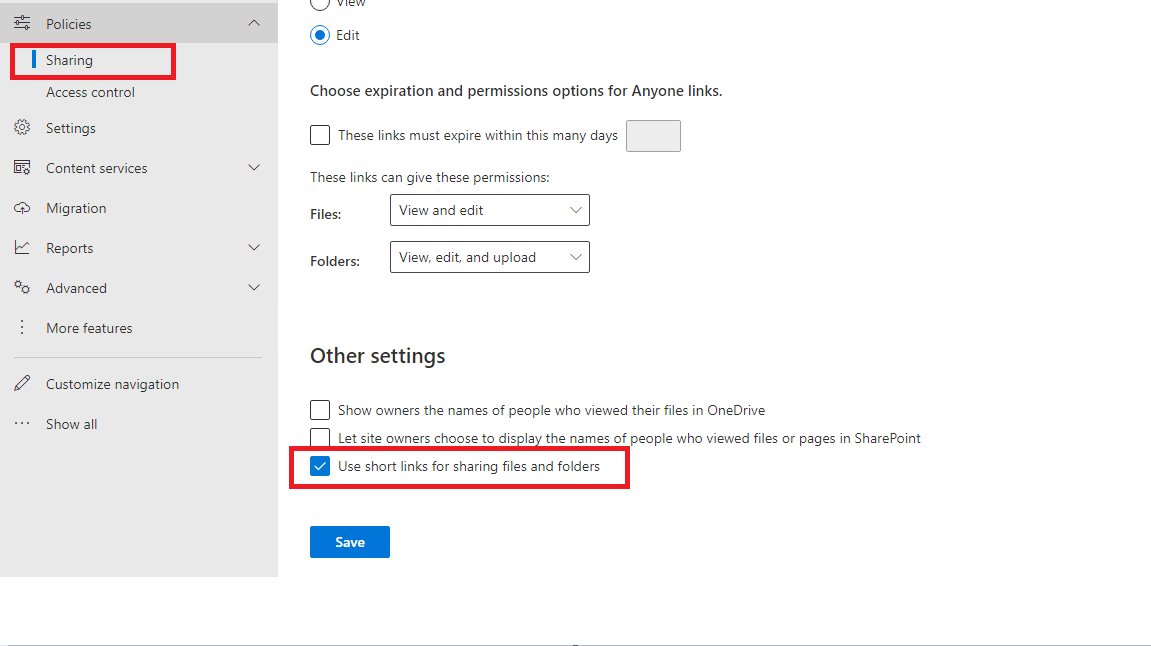
Note: you need to have SharePoint admin permission to meet it.
If the answer is helpful, please click "Accept Answer" and kindly upvote it. If you have extra questions about this answer, please click "Comment".

@Joe Do you have further questions about this thread? If you still have concerns, please feel free to reply.
If the above answer helps you, please remember to accept it as answer via "Accept Answer" button, it will make others who may meet the similar issue find the correct answer quickly.
Thanks for your understanding. :)