Microsoft 365 and Office | SharePoint | Development
The process of building custom applications and tools that interact with Microsoft SharePoint, including SharePoint Online in Microsoft 365.

This browser is no longer supported.
Upgrade to Microsoft Edge to take advantage of the latest features, security updates, and technical support.
' cx='32' cy='32' r='32' /%3E%3Ctext x='50%25' y='55%25' dominant-baseline='middle' text-anchor='middle' fill='%23FFF' %3EDR%3C/text%3E%3C/svg%3E)
We created a small desktop app (in c#) which reads and writes lists from SharePoint site, and it worked fine. But once we moved to SharePoint Online we can't connect with this SharePoint site. We get 401 UNAUTHORIZED message. We connect thru Graph API. What type of permissions we need to request and configure in this application?
' cx='32' cy='32' r='32' /%3E%3Ctext x='50%25' y='55%25' dominant-baseline='middle' text-anchor='middle' fill='%23FFF' %3ETZ%3C/text%3E%3C/svg%3E)
Hi @Dariusz Roszak ,
According to my research and testing, we need to request one of the following permissions in this application: Sites.Read.All, Sites.ReadWrite.All, and the Permission type is ** Application **:
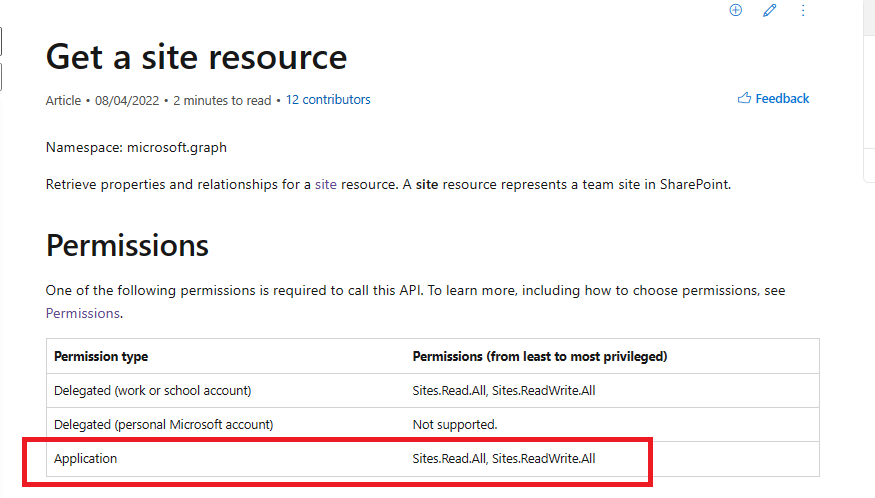
More information for reference:
Working with SharePoint sites in Microsoft Graph
Get a site resource
Hope it can help you. Thanks for your understanding.
If the answer is helpful, please click "Accept Answer" and kindly upvote it. If you have extra questions about this answer, please click "Comment".
Note: Please follow the steps in our documentation to enable e-mail notifications if you want to receive the related email notification for this thread.
Hi @Dariusz Roszak ,
Do you have any further questions about this thread?
If you have any questions or progress, you can contact me in time.
Looking forward to your reply.
Thanks for your understanding.
Dear Tong Zhang_MSFT,
thank you for the answer. We are analyzing it and will be back with confirmation of more questions.
Hi @Dariusz Roszak ,
Thanks for your reply. If there are any progress or updates, feel free to reply. Thanks for your understanding.
Dear Tong Zhang_MSFT,
thank you for the response. It is really helpful. I am a little confused of permission type ‘application’ for mentioned desktop type app. Is the ‘Delegated (work or school account)’ permission would be also appropriate for our purpose, or ‘Application’ is the only option?