Developer technologies | Transact-SQL
A Microsoft extension to the ANSI SQL language that includes procedural programming, local variables, and various support functions.
This browser is no longer supported.
Upgrade to Microsoft Edge to take advantage of the latest features, security updates, and technical support.
' cx='32' cy='32' r='32' /%3E%3Ctext x='50%25' y='55%25' dominant-baseline='middle' text-anchor='middle' fill='%23FFF' %3EMK%3C/text%3E%3C/svg%3E)
Hi, I want result in particular location in text format. Why I am not getting the expected result from the following query?
Code column's data should start from column 1
Ecode column's data should start from column 4
INA column's data should start from column 13
SPAC column's data should start from column 19
drop table #Pos
Create table #Pos (Code char(10), ECode char(40), INA varchar(9), SPAC char(10))
insert into #Pos values ('FC','000001507 ','000001','6574')
declare @Start Code int=1
declare @StartECode int=4
declare @StartINA int=13
declare @StartSPAC int=19
declare @alenzi varchar(max)
set @alenzi ='
SELECT CAST(Code as char('+CAST(@StartECode-@StartCode-1 AS CHAR(2))+')) as Code,
CAST(ECode as char('+CAST(@StartINA-@StartECode-1 AS CHAR(2))+')) as ECode,
CAST(INA as char('+CAST(@StartSPAC-@StartINA-1 AS CHAR(2))+')) as INA,
SPAC
from #Pos'
exec (@alenzi )
A Microsoft extension to the ANSI SQL language that includes procedural programming, local variables, and various support functions.
Answer accepted by question author

No need for dynamic SQL. Here is a solution:
select rtrim(Code) + space(@StartECode - @StartCode  - len(Code)) +
       rtrim(ECode) + space(@StartINA - @StartECode - len(ECode)) +
       rtrim(INA) + space(@StartSPAC - @StartINA  - len(INA)) +
       rtrim(SPAC)
FROM #Pos
Note, though, that if some value is too long for a row, the output will be NULL for that row.
Thanks a lot for your help. Works perfectly, as espected.
Thanks Melissa. My question is Code column has 2 digit data and I want Ecode from Location-4 so why Ecode is not displaying data on Column-4. Ecode is displaying on colunm-6
drop table #Pos
Create table #Pos (A char(6), B char(22), C varchar(22), D char(6))
insert into #Pos values ('FC','000001507 ','000001','6574')
declare @Start Code int=1 --It is correct
declare @StartECode int=4 --It is displaying on column-6 location instead of column-4
declare @StartINA int=14 --It is displaying on column-16 location instead of column-14
declare @StartSPAC int=21 --It is displaying on column-23 location instead of column-21
declare @alenzi varchar(max)
set @alenzi ='
SELECT CAST(A as char('+CAST(@StartECode-@StartCode-1 AS CHAR(2))+')) as A,
CAST(B as char('+CAST(@StartINA-@StartECode-1 AS CHAR(2))+')) as B,
CAST(C as char('+CAST(@StartSPAC-@StartINA-1 AS CHAR(2))+')) as C,
D
from #Pos'
exec (@alenzi )

Hi @Martin Kevin ,
Thanks for posting here and your update.
Code column's data should start from column 1
Ecode column's data should start from column 4
INA column's data should start from column 13
SPAC column's data should start from column 19
In your situation, Ecode start from location 4, but the length of first column name 'Code' is already 4, so they are conflicted.
Besides, INA should start from location 13, then your desired length of Ecode should be less than 8(13-4-length of space between each column), but the length of your value '000001507' is already 9 which is larger than 8. So the output of Ecode and INA will be truncated.
Per my understanding, it could be better to increase the number of each location number manually or make it automatially.
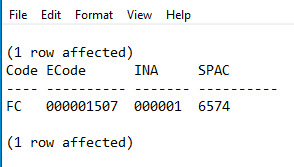
Please refer below as an example:
drop table #Pos
Create table #Pos (Code char(10), ECode char(40), INA varchar(9), SPAC char(10))
insert into #Pos values ('FC','000001507 ','000001','6574')

declare @StartCode int=1
declare @StartECode int=4
declare @StartINA int=13
declare @StartSPAC int=19

select @StartECode=
(select max(length) from
(select len('Code')+2 length  --length of column name (including the length of space between each column)
union all
select max(len(code))+2 length from #Pos --max of length of value  (including the length of space between each column)
union all
select @StartECode-@StartCode-1 length  --length of defined
) a)

select @StartINA=@StartECode+(select max(length)
from
(select len('ECode')+2 length
union all
select max(len(ECode))+2 length from #Pos
union all
select @StartINA-@StartECode-1 length) a)

select @StartSPAC=@StartINA+(select max(length)
from
(select len('INA')+2 length
union all
select max(len(INA))+2 length from #Pos
union all
select @StartSPAC-@StartINA-1 length) a)

declare @sql varchar(max)

set @sql='
SELECT CAST(Code as char('+CAST(@StartECode-@StartCode-1 AS CHAR(2))+')) as Code,
CAST(ECode as char('+CAST(@StartINA-@StartECode-1 AS CHAR(2))+')) as ECode,
CAST(INA as char('+CAST(@StartSPAC-@StartINA-1 AS CHAR(2))+')) as INA,
SPAC
from #Pos'

exec (@sql)
Output:
Best regards
Melissa
If the answer is helpful, please click "Accept Answer" and upvote it.
Note: Please follow the steps in our documentation to enable e-mail notifications if you want to receive the related email notification for this thread.