Exchange | Exchange Server | Management
The administration and maintenance of Microsoft Exchange Server to ensure secure, reliable, and efficient email and collaboration services across an organization.
This browser is no longer supported.
Upgrade to Microsoft Edge to take advantage of the latest features, security updates, and technical support.
' cx='32' cy='32' r='32' /%3E%3Ctext x='50%25' y='55%25' dominant-baseline='middle' text-anchor='middle' fill='%23FFF' %3EA%3C/text%3E%3C/svg%3E)
While trying to Add/Remove user from a Mail Enabled Security Azure AD group, not able to perform the the action. Getting exception as:
"Response Code - 400 Error - Cannot Update a mail-enabled security groups and or distribution list."
We are trying to use Microsoft Graph API to Add/Remove a user from a mail-enabled Azure AD group.

Mail-enabled security groups are Exchange Online objects, as such they cannot be managed via the Azure AD tools or the Graph API. Use the Exchange admin center or Exchange Online PowerShell to make the changes.

Hi,
Thank you for posting the question to the Q&A forum.
The graph cannot update mail-enabled security groups or distribution groups. It was a bug that is now fixed. You can up-vote this feature request below and maybe the Graph team will look into adding it.. The only thing you can do is use the Add-DistributionGroupMember command for distro lists.
Mail-enabled security groups can't be created through the API, but other group operations work. Mail-enabled security groups are read-only.
Mail-enabled security groups can be managed via Exchange. You can find more details on this here: https://learn.microsoft.com/en-us/Exchange/recipients/mail-enabled-security-groups?redirectedfrom=MSDN&view=exchserver-2019
I hope the above information can help you.
If the ANSWER is helpful, please click "Accept Answer" and upvote it. Thanks
Hi @Martin Dimovski ,
Can you please help with the powershell commands which will help in Adding/Removing Mail-Enabled Azure AD groups?
' cx='32' cy='32' r='32' /%3E%3Ctext x='50%25' y='55%25' dominant-baseline='middle' text-anchor='middle' fill='%23FFF' %3EAL%3C/text%3E%3C/svg%3E)
Hi @Anonymous ,
You could refer to the following commands to create / remove a mail-enabled security group:
New-DistributionGroup -Name "File Server Managers" -Alias fsadmin -Type security
Remove-DistributionGroup -Identity " File Server Managers "
Then you could refer to the following command to verity that you've successfully created a mail-enabled security group:
Get-DistributionGroup <Name> | Format-List Name,RecipientTypeDetails,PrimarySmtpAddress
More information for your reference:
Manage mail-enabled security groups in Exchange Online | Microsoft Learn
New-DistributionGroup (ExchangePowerShell) | Microsoft Learn
Remove-DistributionGroup (ExchangePowerShell) | Microsoft Learn
If the answer is helpful, please click "Accept Answer" and kindly upvote it. If you have extra questions about this answer, please click "Comment".
Note: Please follow the steps in our documentation to enable e-mail notifications if you want to receive the related email notification for this thread.
Thankyou so much for the suggestion regarding the powershell commands. However, I am in need to add/remove a group member from a mail-enabled azure ad group.
Using the same link you provided, i can see the powershell command provided:
add-distributiongroupmember
I ran the command, however, i am facing the same exception for the mail-enabled groups as well.
Hi @Anonymous ,
I wonder if the azure ad group that mail-enabled is the security group as shown in the image below?
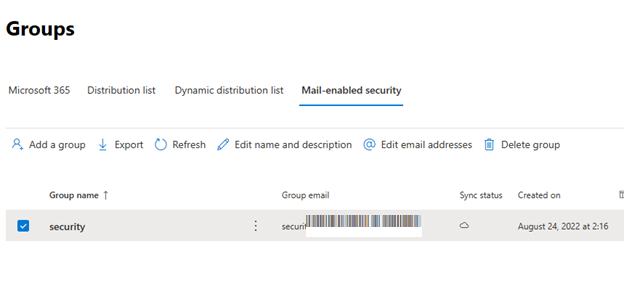
Can you provide a complete screenshot of the error for us to research?
(Kindly note: Please be careful to hide your personal information . Thank you!)
Hi,
It has been a few days and I am checking in to see how things are going on with this issue.
Hi @Aholic Liang-MSFT ,
Yes those are Mail-enabled security groups
Hi,
Can you provide a complete screenshot of the error in PowerShell for us to research?
(Kindly note: Please be careful to hide your personal information. Thank you!)
Hi @Anonymous ,
Does this issue have any updates? If it has been resolved, please share your solution, your action would benefit others who have similar issues. If you have any questions or need further assistance, please feel free to post back. Thanks!