Microsoft 365 and Office | Development | Other
Building custom solutions that extend, automate, and integrate Microsoft 365 apps.

This browser is no longer supported.
Upgrade to Microsoft Edge to take advantage of the latest features, security updates, and technical support.
' cx='32' cy='32' r='32' /%3E%3Ctext x='50%25' y='55%25' dominant-baseline='middle' text-anchor='middle' fill='%23FFF' %3ETD%3C/text%3E%3C/svg%3E)
Hi everyone,
in an Excelworksheet, i want to run an OfficeScript with arguments.
This sheet got some tables, and in condition, wich table (-name) i want to "analyze", the OfficeScript got in addtion to the standard-argument a second argument.
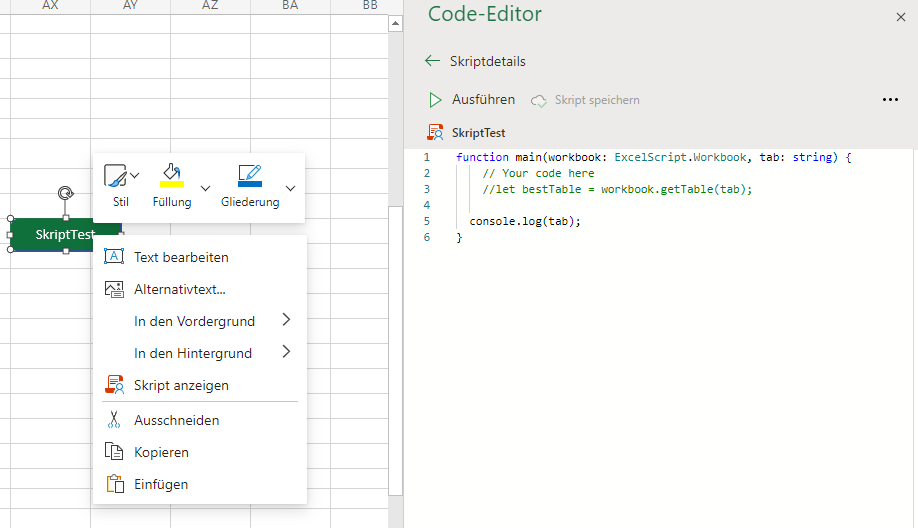
So i created a script with the following signature: "function main(workbook: ExcelScript.Workbook, tabName: string)".
My first idea is, to place some buttons in my sheet, and give them an argument. Is there a pissibility, to give my buttons some arguments?
' cx='32' cy='32' r='32' /%3E%3Ctext x='50%25' y='55%25' dominant-baseline='middle' text-anchor='middle' fill='%23FFF' %3EMT%3C/text%3E%3C/svg%3E)
It is unclear what kind of "arguments" you actually are needing. Do you want to prompt the user for some input? Is the data coming from a row that the button is on or the worksheet it is contained in?
In general, you can get to the active worksheet that is triggering a macro and the data in that spreadsheet (such as the selected rows). So you don't need to pass any data to a handler for this. If you want user input when the button is clicked then the handler is responsible for getting that from the user. But ideally your macro shouldn't need any data outside the spreadsheet itself.
Hi cooldadtx,
i want to have an solution, like this question on stackoverflow: https://stackoverflow.com/questions/71444677/is-there-any-way-to-have-event-handling-with-excelscript-excel-for-web
"[...] For every worker in the form, there has to be in the adjacent rows a Check IN and a Check OUT button that will stamp in the cell underneath the button the current time [...]"
There is posted a solution with using the add-in JADE, but since my administrator disallow to add some addins, this is no option for me.
--------------------------------------------------------------------
In my case, i've got 4 different tables in the worksheet, and for each table, i need to handle content with a button.
for example in vba i would create a solution like this:
sub button1_clicked()
makeSomething "table1"
end sub
sub button2_clicked()
makeSomething "table2"
end sub
sub makeSomething(ByVal tableName as string)
... some code ...
end sub
------------------------------------------------------
First, i will create now 4 different scripts with nearly the same content.
It still isn't clear to me where your arguments are coming in. Button click handlers cannot have data so everything you need must either be hard coded, input by the user or calculated based upon the existing active worksheet. You could create a single function that has arguments and does the work and then create separate button handlers for each button you need. Then have each button handler call your helper function with the correct data. But of course this wouldn't work if you need a button per row. That is where getting the active worksheet would come in.
I don't see how the related SO post connects here. Your screenshots would indicate you're trying to do this in Excel but the SO post seemed more related to doing all this work in the newer scripting API for the version of Excel on the web. I have no experience in that so I cannot help you there if that is what you need.
I don't think I'm going to be of much more help to you here. Maybe someone else can better assist you.
' cx='32' cy='32' r='32' /%3E%3Ctext x='50%25' y='55%25' dominant-baseline='middle' text-anchor='middle' fill='%23FFF' %3EWL%3C/text%3E%3C/svg%3E)
It sounds like you are currently able to achieve your goal but need to maintain multiple scripts. Is the goal to create a single script and indicate which table you would like the script to run against?
Hi Cooldadtx,
that would help me. An idea, to manage my button handler. Did you know, how to manage this in Excel-Online?
Hi WeyLove,
that is my point. I think that handler, wich cooldadtx describes is going in the right direction. But how to manage this?
I do not have an Office 365 account that allows the use of Automate. I believe the documentation gives you sample code for almost everything you need as discussed here. You just need to put it together. Here's the general algorithm I believe.
I assume you want to create a single handler for all your buttons(rows) and not a separate one for each. Therefore the script needs to figure out what it needs. Let's assume the data you need sits in the column to the left of the button and you're putting text into the row (same column) below the button.
Hi cooldadtx,
this API-documentation i've already read. But if i click the button, there is no option, to know, wich cell i've clicked.
So if the active cell switches, where the button is, then i could read the xy-position of the button, but the active cell doesen't change while clincking the button. So i need the info about the button-handler.
Excample in .net Framework:
private void Btn_Click(object sender, EventArgs e)
=> in this case, i can manage the sender-object and know, wich button i clicked.