Microsoft 365 and Office | Excel | For business | Windows
A family of Microsoft spreadsheet software with tools for analyzing, charting, and communicating data

This browser is no longer supported.
Upgrade to Microsoft Edge to take advantage of the latest features, security updates, and technical support.
' cx='32' cy='32' r='32' /%3E%3Ctext x='50%25' y='55%25' dominant-baseline='middle' text-anchor='middle' fill='%23FFF' %3ERG%3C/text%3E%3C/svg%3E)
We use excel for all of our work orders. There is a workbook for each work order. We have hundreds of work orders.. The naming convention for all work orders is as follows
• Work Order 12090
• Work Order 12091
• Work order 12092
• Etc
In a summary workbook I am calling data from each work order. The data is in the same location in each work order workbook. Is it possible to make the numerical portion of the work order workbook name a variable so that I can easily call data from the summary sheet.
Cell XXX ='[Work Order 12091.xls]Job Specifications '!$J$7

Hi @Rob Granatelli ,
I am just writing to see if you have obtained the opportunity to test the solution. If anything is unclear with the previous information I've provided to you, please don't hesitate to let me know. I am glad to be of assistance.
If the response is helpful, please click "Accept Answer" and upvote it.
Note: Please follow the steps in our documentation to enable e-mail notifications if you want to receive the related email notification for this thread.
Hi @Rob Granatelli ,
I created the sample about 3 Workbooks:
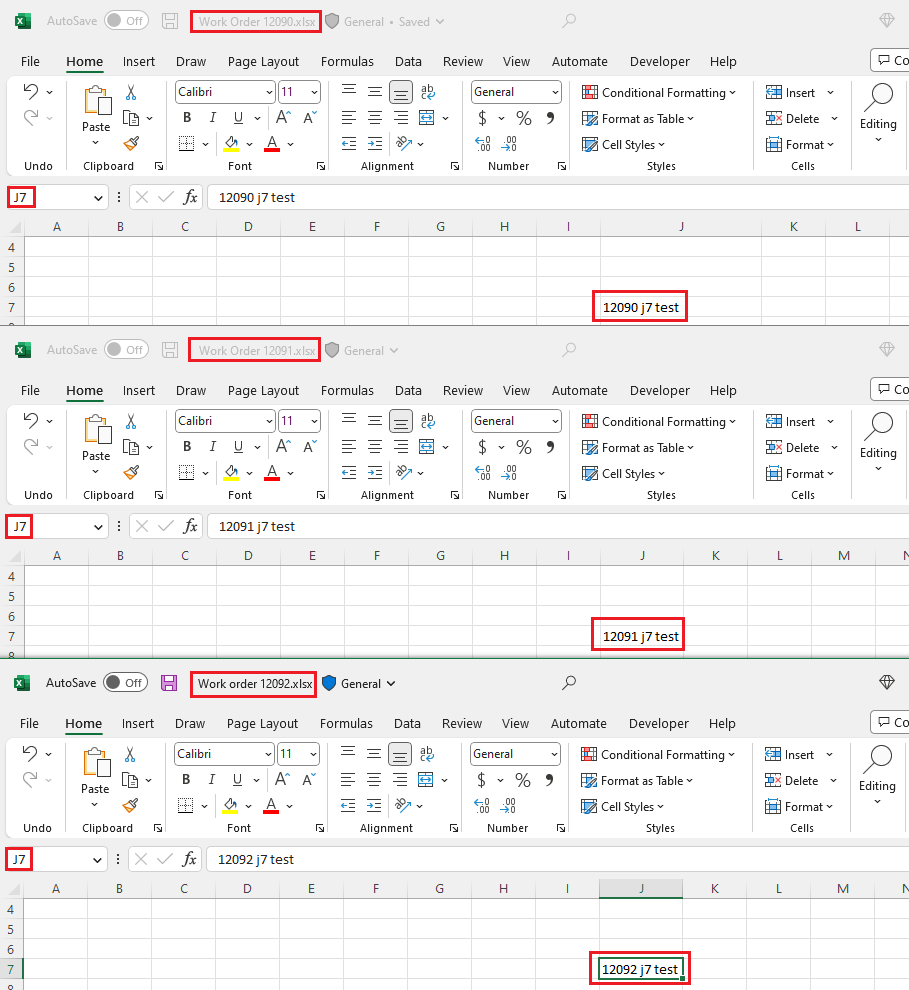
Then you can run this formula to get the result:
=INDIRECT("'["&A1&".xlsx]Job Specifications'!$J$7")
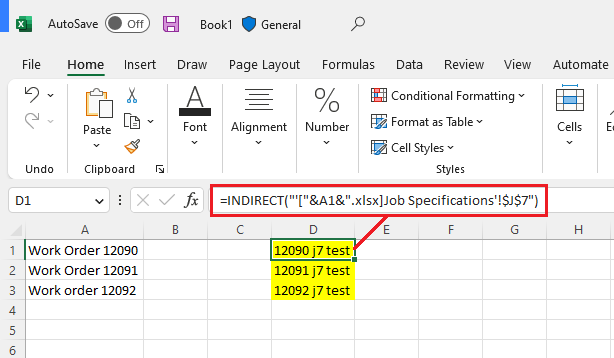
Just checking in to see if the information was helpful. Please let us know if you would like further assistance.
If the response is helpful, please click "Accept Answer" and upvote it.
Note: Please follow the steps in our documentation to enable e-mail notifications if you want to receive the related email notification for this thread.
It did work - thank you