Microsoft Security | Intune | Configuration Manager | Other
Other Configuration Manager-related features and issues

This browser is no longer supported.
Upgrade to Microsoft Edge to take advantage of the latest features, security updates, and technical support.

Dear experts,
We use SCCM CB for client push, a few computers are failed to get the client installed.
It was confirmed that the client machine changed its default 443 port for remote control, seems that interrupted our SCCM connection to that machine.
Any idea?

Hi @Eaven HUANG
Thanks for posting in our Q&A.
1, Please help upload full ccm.log and ccmsetup.log for our reference.
ccm.log(server): C:\Program\Microsoft Configuration Manager\Logs\ccm.log
ccmsetup.log(client): C:\Windows\CCM\Logs\ccmsetup.log
> It was confirmed that the client machine changed its default 443 port for remote control
2, To narrow down the problem, could you please let me know why you confirmed that the issue is caused by the client machine changed its default 443 port for remote control?
Thanks for your time.
Best regards
Cherry
Hi @CherryZhang-MSFT ,
Honestly I'm not sure if that was the cause, it was just my guess. Here is the log for your information
---> WNetAddConnection2 failed (LOGON32_LOGON_NEW_CREDENTIALS) using account testing\CM_CPI (00000574)	SMS_CLIENT_CONFIG_MANAGER	06/01/2023 15:36:25	2424 (0x0978)
---> Attempting to connect to administrative share '\\DELL3620-user1.testing.edu.cn\admin$' using machine account.	SMS_CLIENT_CONFIG_MANAGER	06/01/2023 15:36:25	2424 (0x0978)
---> Failed to connect to \\DELL3620-user1.testing.edu.cn\admin$ using machine account (1396)	SMS_CLIENT_CONFIG_MANAGER	06/01/2023 15:36:25	2424 (0x0978)
---> ERROR: Failed to connect to the \\DELL3620-user1.testing.edu.cn\admin$ share using account 'Machine Account'	SMS_CLIENT_CONFIG_MANAGER	06/01/2023 15:36:25	2424 (0x0978)
---> Trying each entry in the SMS Client Remote Installation account list	SMS_CLIENT_CONFIG_MANAGER	06/01/2023 15:36:25	2424 (0x0978)
---> Attempting to connect to administrative share '\\DELL3620-user1\admin$' using account 'testing\CM_CPI'	SMS_CLIENT_CONFIG_MANAGER	06/01/2023 15:36:25	2424 (0x0978)
---> WNetAddConnection2 failed (LOGON32_LOGON_NEW_CREDENTIALS) using account testing\CM_CPI (00000574)	SMS_CLIENT_CONFIG_MANAGER	06/01/2023 15:36:25	2424 (0x0978)
---> Attempting to connect to administrative share '\\DELL3620-user1\admin$' using machine account.	SMS_CLIENT_CONFIG_MANAGER	06/01/2023 15:36:25	2424 (0x0978)
Hi @Eaven HUANG ,
Please help modify your client push installation accounts to an account that has local admin permissions on the target clients. For example, domain administrator.
To do it please navigate to Administrator > Sites > Settings > Client Installation Settings > Client Push Installation
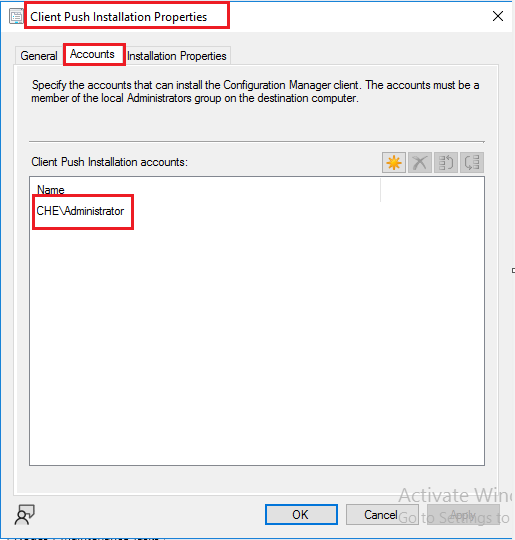
Looking forward to your feedback.
Best regards,
Cherry
Hi Cherry @CherryZhang-MSFT ,
It was an service account that has local admin permission. To be clear, it should not be something to do with the server side since we have no issues pushing clients to most of other machines in the same collection.
' cx='32' cy='32' r='32' /%3E%3Ctext x='50%25' y='55%25' dominant-baseline='middle' text-anchor='middle' fill='%23FFF' %3ELT%3C/text%3E%3C/svg%3E)
Hello,
By default SCCM will try to communicate through 80HTTP or 443 HTTPS if for some reasons the port 443 is changed for this clients you may need to add the port into the configuration, using the next article for reference, but all in all, Clients should use the default ports.
--If the reply is helpful, please Upvote and Accept as answer--
Hello thanks a lot.
There are a few admin level users they insisted to use custom port for RDP in consideration of their data security. Looks like there is no other way out of this..
I didn't see any way that they can also allow 443 communication in client machine for just CM server. either?
Hi @Eaven HUANG ,
According to your description. All machines that have modified the port number cannot be install the client, right?
