Azure Logic Apps
An Azure service that automates the access and use of data across clouds without writing code.
This browser is no longer supported.
Upgrade to Microsoft Edge to take advantage of the latest features, security updates, and technical support.

Hi Experts,
I have a requirement to make an API call by reading the PlanningMarketCode from the JSON. If the response is valid then pass the line item to the next step which is mapping else I need to ignore that line item for my mapping. I am somehow a bit confused about how to achieve this.
Source JSON:
276725-sourcejson.txt
From the attached JSON,
Any help/lead will be really grateful.
Regards,
Pavan

@Pavan G Thanks for reaching out. Logic app does provide filter array that can help you with your use case. For more details on filter array and Parse Json action please refer to this document. You need to first parse your JSON value using Parse Json action and for individual values (1044 and 1045) you need to leverage individual filter array to get your desire result. You can refer to expression function in logic app to know more details on the available functions
Code View:
 "Filter_array": {
                "inputs": {
                    "from": "@body('Parse_JSON')?['data']?['orderLineShipments']",
                    "where": "@equals(item()?['orderReference']['orderReferenceAttributes'][3]['value'], '1044')"
                },
                "runAfter": {
                    "Parse_JSON": [
                        "Succeeded"
                    ]
                },
                "type": "Query"
            },
            "Filter_array_2": {
                "inputs": {
                    "from": "@body('Parse_JSON')?['data']?['orderLineShipments']",
                    "where": "@equals(item()?['orderReference']['orderReferenceAttributes'][4]['value'], '1045')"
                },
                "runAfter": {
                    "Filter_array": [
                        "Succeeded"
                    ]
                },
                "type": "Query"
            },
Workflow:
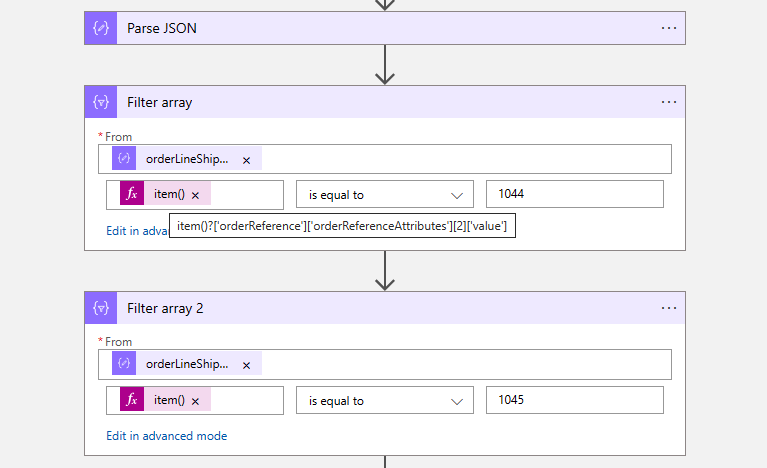
**Note: ** The above is only for reference and please modify/test it as per your needs.
Thanks a lot for the help @MayankBargali-MSFT
I took this as a reference and implemented it below, which worked fine for me.