Azure Synapse Analytics
An Azure analytics service that brings together data integration, enterprise data warehousing, and big data analytics. Previously known as Azure SQL Data Warehouse.
This browser is no longer supported.
Upgrade to Microsoft Edge to take advantage of the latest features, security updates, and technical support.
' cx='32' cy='32' r='32' /%3E%3Ctext x='50%25' y='55%25' dominant-baseline='middle' text-anchor='middle' fill='%23FFF' %3EA%3C/text%3E%3C/svg%3E)
This error message is driving me crazy!!!
Error :
{"message":"Job failed due to reason: at Source 'rawRecords': Path /DataLake-Bronze/Folder/part-00000-74f8b50e-67cf-4106-a04f-79d55b4b6243-c000.csv does not resolve to any file(s). Please make sure the file/folder exists and is not hidden. At the same time, please ensure special character is not included in file/folder name, for example, name starting with _. Details:","failureType":"UserError","target":"IncrementalLoad","errorCode":"DF-Executor-InvalidPath"}
I have two pipes, first pipe P1 is for getting CDC records from SQL table and loading them to Data lake bronze layer in the .csv format. This Pipe runs a very simple data flow which contains of a Source and a Sink. I give each file a name by passing “triggerStartTime” parameter from the pipe.
@markus.bohland@hotmail.de (formatDateTime(pipeline().parameters.triggerStartTime,'yyyyMMddHHmmssfff'),'.csv') (For Example files are called
P1 runs by a Tumbling window trigger, Adding file to Data lake bronze layer in turn fires the storage event trigger and runs the second pipe, P2.
The second pipe, P2, runs a dataflow in which it checks records within the new file and decides if they are new records, or they are an update of existing records, etc then does required transformation and finally load the new and updated records (via Sink activity) to Silver layer. Name of the new arrived file to the bronze layer, will be passed from storage event trigger to the Pipe P2 and its flow via @Trigger ().outputs.body.fileName
However, running Pipe P2 fails in the first step of data flow i.e. Source with the error message that is driving me crazy (above). Problem is that name of the file that has been passed from trigger to the pipe (part-00000-74f8b50e-67cf-4106-a04f-79d55b4b6243-c000.csv) does not exist in the bronze layer since when I load files to bronze, I have already renamed it ,as mentioned above.
Any advice to help me to resolve this issue would be greatly appreciated.

Hi @Anonymous ,
You mentioned that pipeline(P1) creates file in ADLS bronze layer with naming convention as yyyyMMddHHmmssfff.csv. But from the error message it seems your pipeline(P2) actually looking for file with name part-00000-74f8b50e-67cf-4106-a04f-79d55b4b6243-c000.csv. Since no file with above name its erroring out.
I feel, your P1 dataflow sink transformation may not configured properly. could you please try to use output to single file setting in Sink transformation and give your file name dynamically there and see if that helps?
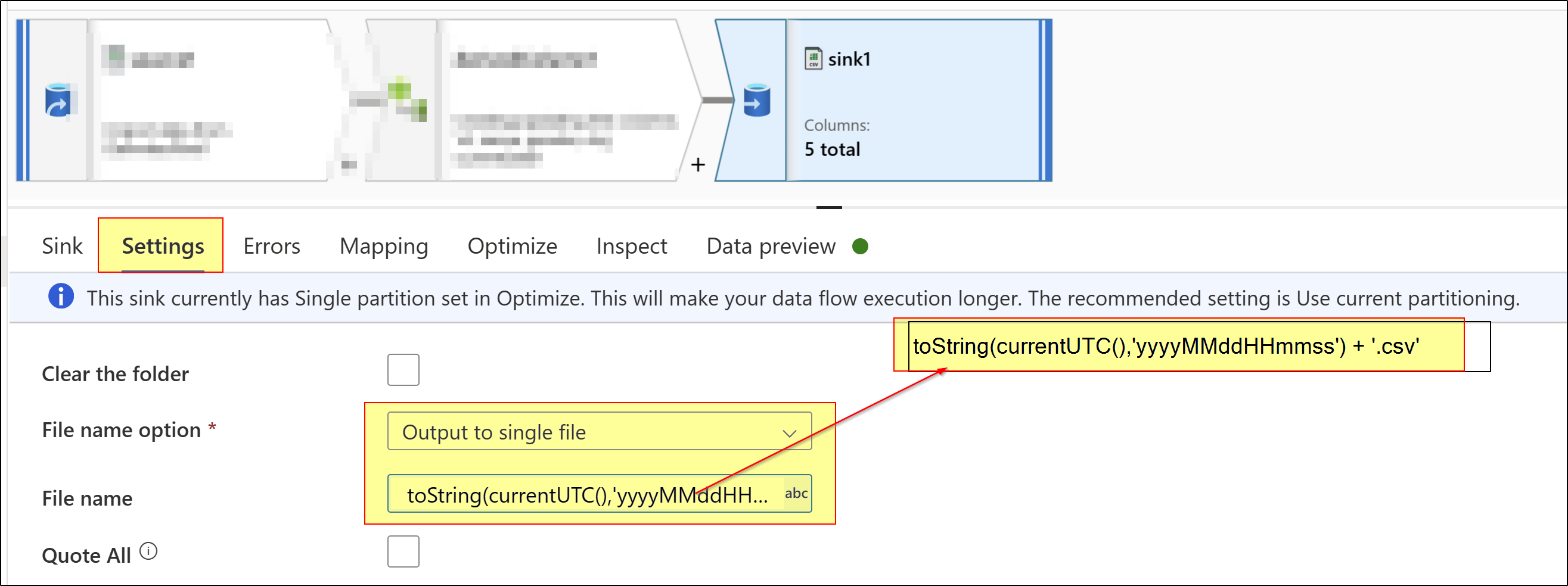
Hope this helps. Please let me know how it goes. If this does not help, kindly share your P1 and P2 dataflow implementations and configurations along with screenshots to understand your configurations better so that I can repro same and help with better debug.
Please consider hitting Accept Answer button. Accepted answers help community as well.
Hi @Afsaneh Mirazimi ,
Just checking if above help? If yes, please consider marking it as Accepted Answer. Accepted answers help community as well. Please let me know if any further queries. Thank you.