Share via

ADMX upload stuck in limbo

Steven Thomas 16 Reputation points
2023-01-06T20:40:41.657+00:00

Trying to configure our third-party applications with Administrative templates I have run into an issue in Microsoft Endpoint Manager.

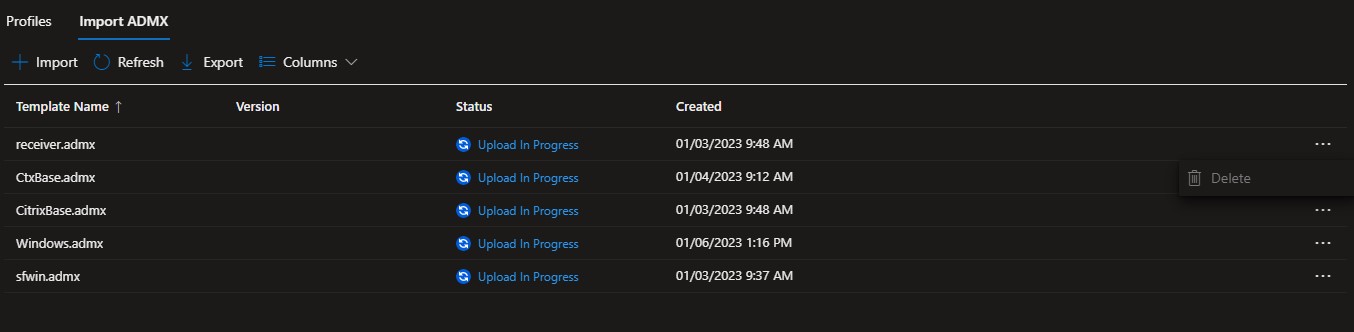
In Devices > Configuration Profiles > Import ADMX
They have not succeeded or failed. They have been stuck at "Upload in Progress" for days. I am unable to delete them, all have the delete button greyed out.

276930-admx-stuck.jpg

Support says they are unable to access my tenant to clear the uploads. They suggested using Graph but can not give detailed instructions on how to do this. I need to get all of them removed so that I may start over.

Anyone have suggestions on how to get this fixed?

Thanks in advance!

Microsoft Security | Intune | Configuration
Microsoft Security | Intune | Other

1 answer

Sort by: Most helpful
  1. Steven Thomas 16 Reputation points
    2023-05-19T15:41:29.5866667+00:00

    I was able to get them cleared out. MS support sent the case to engineering. After more than a month of engineering looking into it, they made a change on the back end. That change allowed the stuck files to fail so that I could delete them. After getting them deleted I was able to upload them in the correct order and have it working. I posted this question on Jan 6, 2023 and issue was resolved by support on Feb 21, 2023. All I got about the issue was "the backend team, they've mentioned that there was a specific issue to your tenant"

    Good luck!

    Was this answer helpful?

    1 person found this answer helpful.

Your answer

Answers can be marked as 'Accepted' by the question author and 'Recommended' by moderators, which helps users know the answer solved the author's problem.