Microsoft 365 and Office | Development | Other
Building custom solutions that extend, automate, and integrate Microsoft 365 apps.

This browser is no longer supported.
Upgrade to Microsoft Edge to take advantage of the latest features, security updates, and technical support.
' cx='32' cy='32' r='32' /%3E%3Ctext x='50%25' y='55%25' dominant-baseline='middle' text-anchor='middle' fill='%23FFF' %3ENZ%3C/text%3E%3C/svg%3E)
My table in excel/power pivot
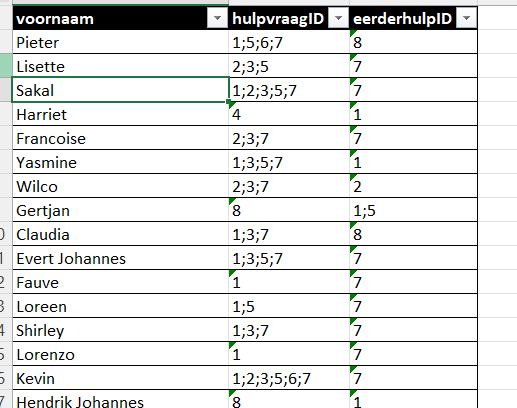
For counting I need different rows with the number answer in second column
Not in different columns!
And I also need that for the third column
name hulpvraagID eerderhulpID
pieter 1 8
Pieter 5
Pieter 6
Pieter 7
and futher example
Gertjan 8 1
Gertjan 5
I have found it is possible in power bi with Text.Split(HulpvraagID),";",) and then from list to row
But I need it for this table in excel/power pivot
Excuse me for language, I'm Dutch and speak better Netherlands...
Is there a possibility in excel/power pivot? And how?
' cx='32' cy='32' r='32' /%3E%3Ctext x='50%25' y='55%25' dominant-baseline='middle' text-anchor='middle' fill='%23FFF' %3EA%3C/text%3E%3C/svg%3E)
Hi Nelleke,
The Office Development tag is for developing Office Add-ins. I think you'll get a quicker answer from places like r/excel or Stack Overflow.