Microsoft 365 and Office | SharePoint | For business | Windows
A group of Microsoft Products and technologies used for sharing and managing content, knowledge, and applications.

This browser is no longer supported.
Upgrade to Microsoft Edge to take advantage of the latest features, security updates, and technical support.
' cx='32' cy='32' r='32' /%3E%3Ctext x='50%25' y='55%25' dominant-baseline='middle' text-anchor='middle' fill='%23FFF' %3EMA%3C/text%3E%3C/svg%3E)
i have a list in sharepoint and i want to share it to a third party application by power automate flow (using HTTP connector ) by REST API. how can i achieve this
' cx='32' cy='32' r='32' /%3E%3Ctext x='50%25' y='55%25' dominant-baseline='middle' text-anchor='middle' fill='%23FFF' %3ETZ%3C/text%3E%3C/svg%3E)
According to my research and testing, I agree with Vladilen's answer. You can generate a client-id and client-secret, and then use the Rest API in your third-party application to get SharePoint List data. You can follow these steps to generate a client-id and client-secret:
1.Navigate to a site in your tenant (e.g. https://xxxx.sharepoint.com) and then call the appregnew.aspx page (e.g. https://xxxx.sharepoint.com/_layouts/15/appregnew.aspx).
2.In this page click on the Generate button to generate a client-id and client-secret and fill the remaining information like shown in the screenshot below:
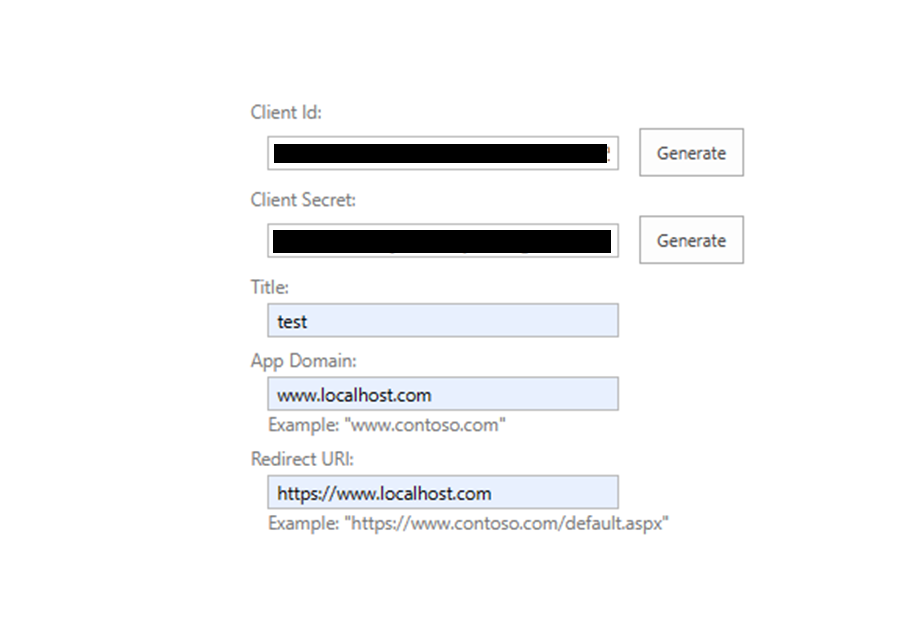
3.Click "Create" and “OK”.
4.Then grant permissions to the newly created principal. You can reach this site via https://xxxx-admin.sharepoint.com/_layouts/15/appinv.aspx:
5.Add the client-id (generated in the above step) to the App Id, and click "Lookup"
6.To grant permissions, you'll need to provide the permission XML that describes the needed permissions. For example:
<AppPermissionRequests AllowAppOnlyPolicy="true">
  <AppPermissionRequest Scope="http://sharepoint/content/tenant" Right="FullControl" />
</AppPermissionRequests>
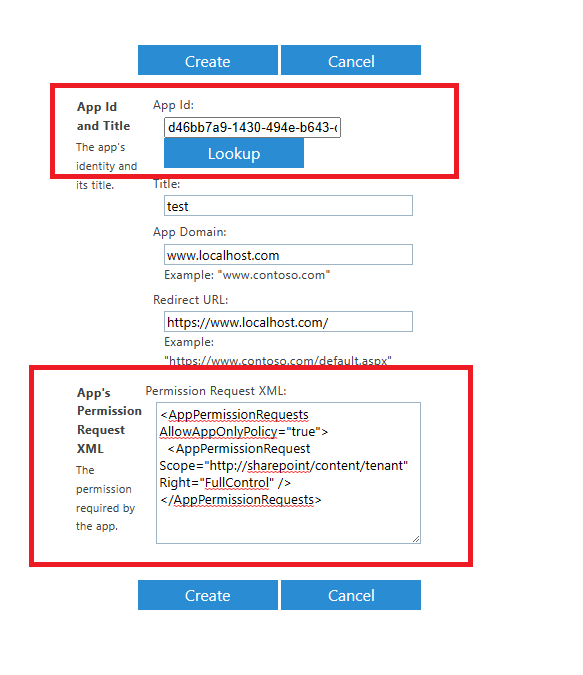
7.When you click on "Create" you'll be presented with a permission consent dialog. Press Trust It to grant the permissions:
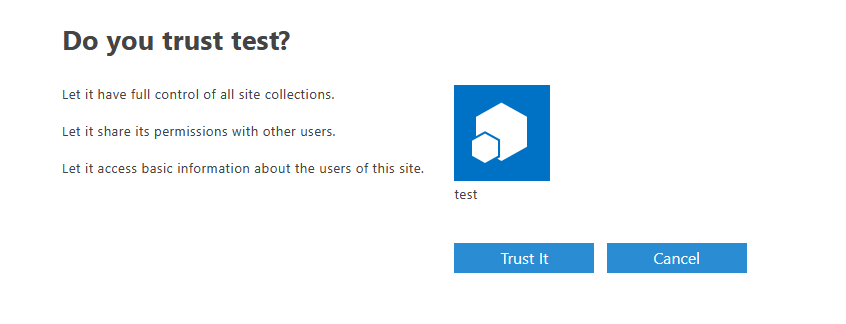
Note: Please safeguard the created client id/secret combination as would it be your administrator account. Using this client id/secret one can read/update all data in your SharePoint Online environment!
Then your third-party applications can get data in SharePoint via the SharePoint Rest API. You can use the following REST API to get items in a SharePoint list:
GET https://{site_url}/_api/web/lists/GetByTitle('Test')/items
More information for reference: Granting access using SharePoint App-Only (generate client-id and client-secret) Working with lists and list items with REST (Rest API) Complete basic operations using SharePoint client library code (CSOM)
Hope it can help you. Thanks for your understanding.
If the answer is helpful, please click "Accept Answer" and kindly upvote it. If you have extra questions about this answer, please click "Comment". Note: Please follow the steps in our documentation to enable e-mail notifications if you want to receive the related email notification for this thread.

It all starts from registering your App in Azure. You'd configure your app registration - authentication and API Sites.Selected permissions, then having Client ID and Clint secret (certificate) your 3-rd party app can consume resources from SharePoint via SharePoint CSOM or Graph API.
can you please explain in detail