Azure VPN Gateway
An Azure service that enables the connection of on-premises networks to Azure through site-to-site virtual private networks.
This browser is no longer supported.
Upgrade to Microsoft Edge to take advantage of the latest features, security updates, and technical support.
' cx='32' cy='32' r='32' /%3E%3Ctext x='50%25' y='55%25' dominant-baseline='middle' text-anchor='middle' fill='%23FFF' %3EV%3C/text%3E%3C/svg%3E)
I created a local network gateway. The local site has some different IP address range because of VLAN but when setting in Azure, the Azure only accepted the first IP Address parameter, the others IP Address parameters is ignored
How do I solve this?
This is the settings
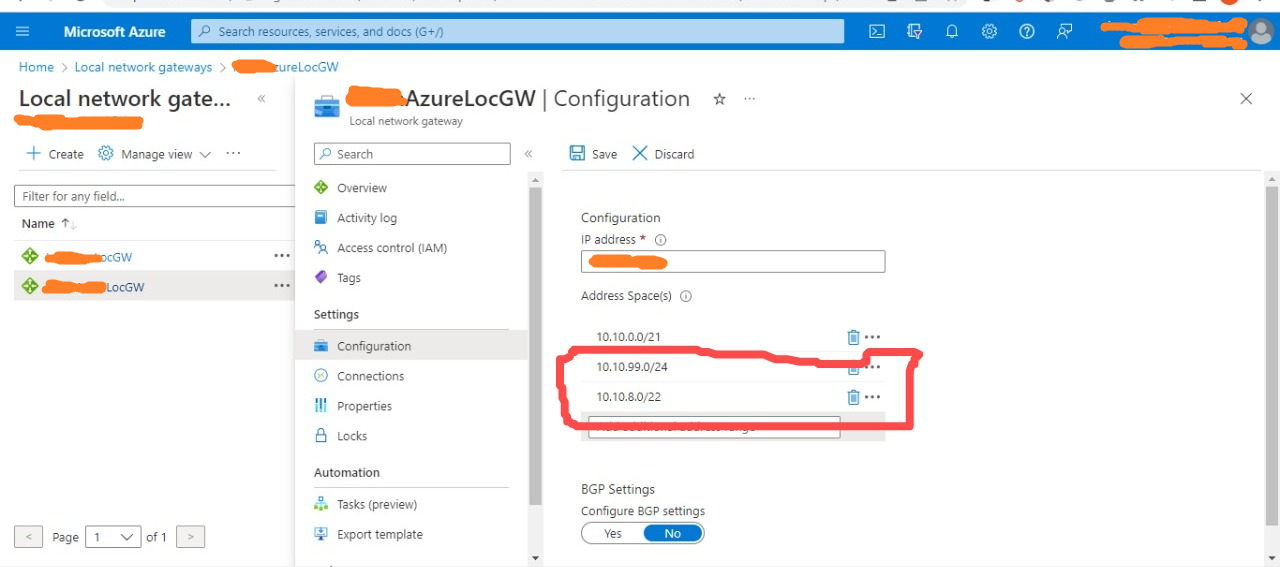

Can you confirm how you mean it is ignored? Does the setting save correctly but the routing doesn't work? Usually these kind of issues are routing related on the local (on premises) side.

Hi @Vincent ,
Welcome to the Microsoft Q&A Platform. Thank you for reaching out & I hope you are doing well. From your verbatim, I understand that Azure LNG is only considering the first address range in the list of Address space(s).
Can you provide more information on what you mean by "only accepted the first IP Address parameter".
Cheers, Kapil
I use 2 PC/laptops side to side, so any local network configuration (ex: wifi, firewall etc) should be the same. One is on the first IP range 10.10.5.x the second one is on the second IP range 10.10.9.x
The first one has no issue connecting to Azure The second one cannot connect to Azure, but when the second one I change the IP Address to be included in first IP range (10.10.7.x) then the second PC can connect to Azure.
Hi @Vincent ,
Thanks for the info
There is also a chance that the OnPrem device is not properly routing the traffic for the 10.10.9.x
In order to check if Azure has learned the routes to all the range in S2S Tunnel established,
Using NIC Effective Routes
Also, I would suggest you to check the actual OnPrem device logs and see if the Traffic Selector for the S2S Connection contains all the three address ranges.
Cheers, Kapil.
Hi @Vincent
May I know if you got a chance to review my previous comment?
Please let me know if you are facing any challenges or if there are any follow-up questions, I shall be glad to address them.
Thanks,
Kapil
Thanks all for the comment and feedback.
The issue has been resolved.
Since the Azure has been set with 3 different IP address range, it has to match with the onPrem device. The setting on the Phase 2 IP Sec Tunnel also need to acomodating the 3 IP Address Range also.
After that has been done, just reset the SiteToSite Connection and it should be working normal.