Microsoft 365 and Office | SharePoint Server | For business
A family of Microsoft on-premises document management and storage systems.

This browser is no longer supported.
Upgrade to Microsoft Edge to take advantage of the latest features, security updates, and technical support.
' cx='32' cy='32' r='32' /%3E%3Ctext x='50%25' y='55%25' dominant-baseline='middle' text-anchor='middle' fill='%23FFF' %3ET0%3C/text%3E%3C/svg%3E)
(SharePoint server 2019)
I need the Adobe files within the document libraries on my communications site set to open up in Adobe Reader rather than in the browser as users will need to fill out and sign each pdf. Some users have to receive a lot of guidance when the pdf doesn't open directly up into the Adobe reader. What would be the best way to rectify this in Firefox primarily as well as Microsoft Edge. Please detail or provide screenshots for understanding.
Thank you in advance!!!
' cx='32' cy='32' r='32' /%3E%3Ctext x='50%25' y='55%25' dominant-baseline='middle' text-anchor='middle' fill='%23FFF' %3EA%3C/text%3E%3C/svg%3E)
You could make that change here.
--please don't forget to upvote and Accept as answer if the reply is helpful--
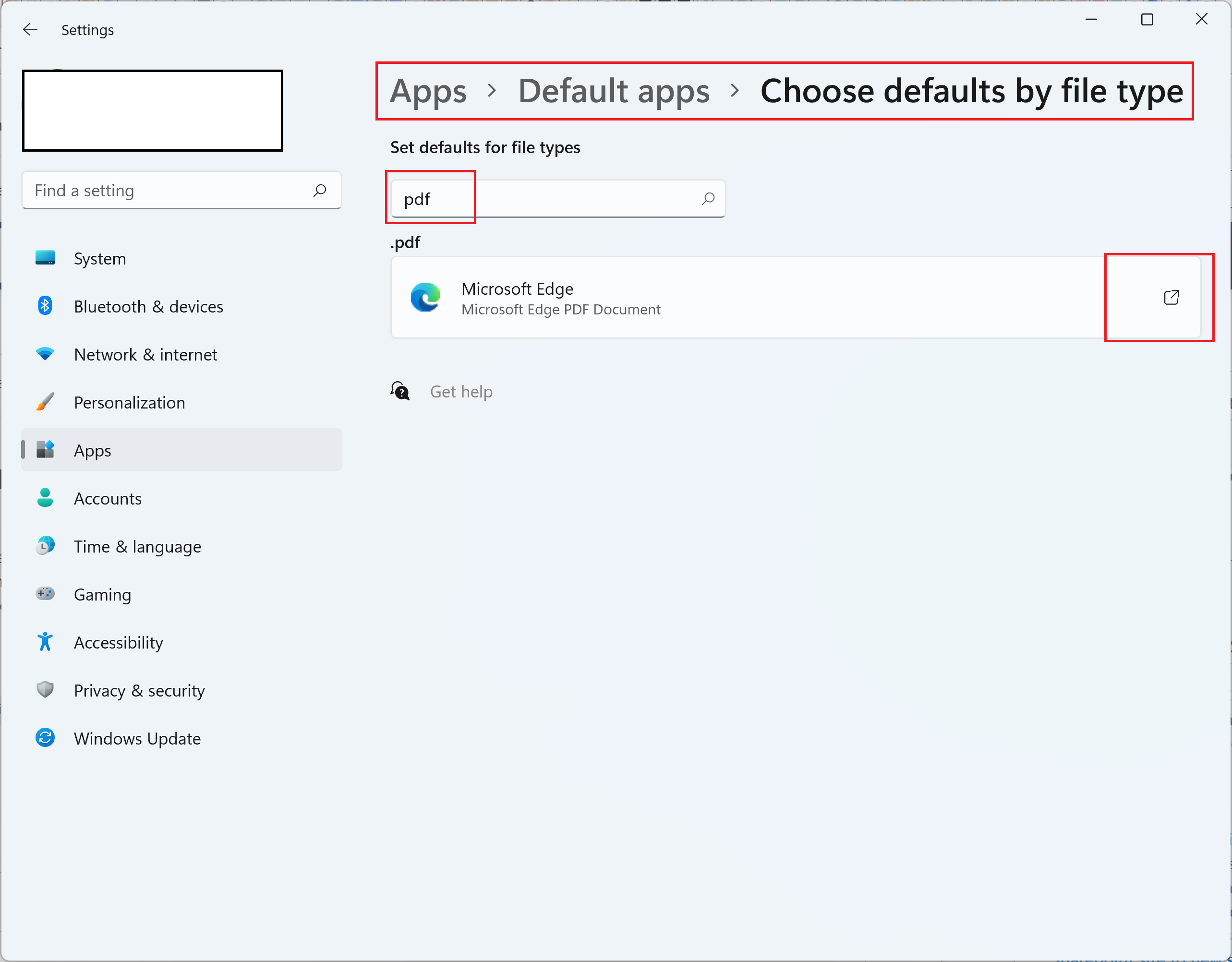
How do you get to this screen. Sorry but could more detail be provided for the screenshot? Would this method need to be done by every user of my site or would this implement it for every user?
Yes each user's windows settings default apps would need to be updated. Something here could help with that.
[https://woshub.com/managing-default-file-associations-in-windows-10/
--please don't forget to upvote and Accept as answer if the reply is helpful--

Hi @Tevon2.0 ,
We are checking how the things are going on about this issue. Whether the answer helps you?
If there is any problem with this issue, feel free to let me know.
If the answer is helpful, please click "Accept Answer" and kindly upvote it. If you have extra questions about this answer, please click "Comment".

Hi Tevon,
I am checking to see if the problem has been resolved . If you have any questions you can feel free to contact us.
' cx='32' cy='32' r='32' /%3E%3Ctext x='50%25' y='55%25' dominant-baseline='middle' text-anchor='middle' fill='%23FFF' %3EYJ%3C/text%3E%3C/svg%3E)
Hi @Tevon2.0 ,
Would you please provide us with an update on the status of your issue?
If the answer is helpful, please click "Accept Answer" and kindly upvote it. If you have extra questions about this answer, please click "Comment".