Share via

Problems in Calculation groups with SSAS

Rajeev Shah 1 Reputation point
2020-10-05T08:42:36.48+00:00

I have created calculation groups viz. Current, Prev Day, Growth, Growth%.
I am facing the following problems:

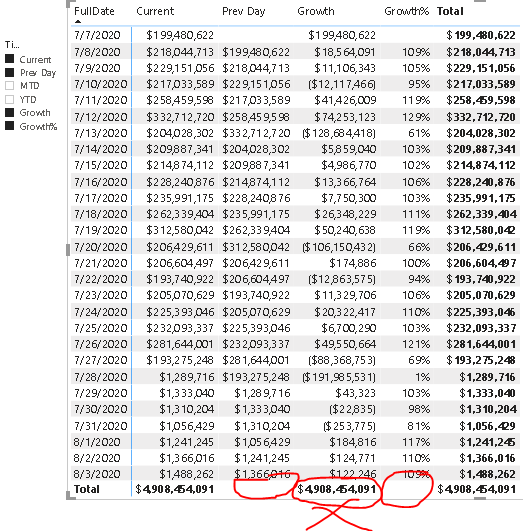
  1. I am unable to get grand totals for the Prev Day column.
  2. Hence when you look at Growth, it gives an incorrect figure which is the same as the base measure, since the Prev day measure total is blank.
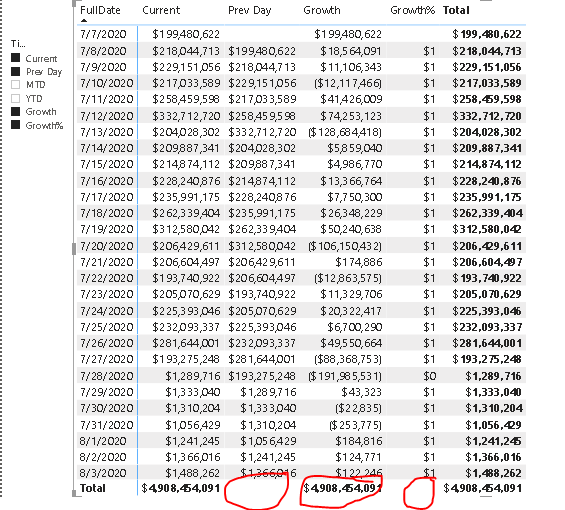
  3. When I format the Growth% as "0.00%;-0.00%", it converts it to a string. when I plot this in a matrix, I do not get an overall %age of growth in the total. It comes blank. Even when you don't format it with a string, it does not give the total.

30116-calculation-groups2.png

30068-calculation-groups1.png

i am using SQL Server 2019 CU5, VS 2017.

pl. help.
Rajeev

SQL Server Analysis Services

A Microsoft online analytical data engine used in decision support and business analytics, providing the analytical data for business reports and client applications such as Power BI, Excel, Reporting Services reports, and other data visualization tools.

SQL Server | Other
SQL Server | Other

Additional SQL Server features and topics not covered by specific categories

0 comments No comments

4 answers

Sort by: Most helpful
  1. Darren Gosbell 2,376 Reputation points
    2020-10-06T03:35:48.82+00:00

    I don't believe the blank is the issue, it's the fact your expression for the Previous Day calc item is not handling the scenario where multiple days are in present in the filter context. Can you post the expression you are using for this?

    Was this answer helpful?

    1 person found this answer helpful.

  2. Rajeev Shah 1 Reputation point
    2020-10-10T13:16:07.33+00:00

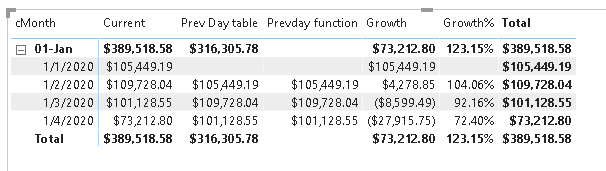
    Sorry forgot to add the screenshot.

    31327-calculation-groups-solved.png

    Was this answer helpful?

    0 comments No comments

  3. Rajeev Shah 1 Reputation point
    2020-10-10T13:15:11.713+00:00

    hi Lukas, dgosbell
    Thanks for your answers.
    The requirement was that when previous days are rolled up into the date aggregations viz. week, month i was expecting that it would roll up and show me the total for the previous corresponding days.
    Turns out, blanks are not an issue. the behaviour of Previous day does not work on rolled up data. it still shows the previous day itself even when seeing a roll up for a week/month. i guess it was designed that way.
    hence i had to change my logic to store the previous date in the date dimension and use a filter in the calculation to get the previous days total. then it aggregates based on the date roll up.

    is there another way to do this that i am missing?

    Thanks again.

    Was this answer helpful?


  4. Lukas Yu -MSFT 5,826 Reputation points
    2020-10-06T01:56:18.067+00:00

    Hi Rajeev,

    It seems like you haven't handle the the Blank in the data specifically. We could use the if clause in dax to omit the blank row.

    So we could sum the total only if the prev is not blank. And so the same for growth ratio.

    You could check this article for detail Dax : How to handle blank in DAX measures.

    Regards,
    Lukas


    If the answer is helpful, please click "Accept Answer" and upvote it.

    Note: Please follow the steps in our documentation to enable e-mail notifications if you want to receive the related email notification for this thread.

    Was this answer helpful?


Your answer

Answers can be marked as 'Accepted' by the question author and 'Recommended' by moderators, which helps users know the answer solved the author's problem.