- SQL Version is - Microsoft SQL Server 2019 (RTM-CU16-GDR) (KB5014353) - 15.0.4236.7 (X64) Copyright (C) 2019 Microsoft Corporation Standard Edition (64-bit) on Windows Server 2019 Standard 10.0 <X64> (Build 17763: )
- I need to display totals from a rating table and display the results via 5 column pivot table
- DDL and sample data
DECLARE @T AS TABLE
(

    id int identity(1,1),

	BName			Varchar (50),

	Adress1			Varchar(50),

    City		    Varchar(10),

	BState			Varchar(2),

	ARatingClass1	Varchar(1),

	ARatingClass2   Varchar(1),

	ARatingClass3   Varchar(1),

	PRatingClass1	Varchar(1),

	PRatingClass2	Varchar(1),

	PRatingClass3	Varchar(1),

	IRatingClass1   Varchar(1),

	IRatingClass2   Varchar(1),

	IRatingClass3   Varchar(1),

	IRatingClass4   Varchar(1),

	IRatingLimited  VarChar(1),

	FloatsLimited   VarChar(1),

	RadioLimited    Varchar(1)


)


INSERT INTO @T VALUES

('Alpha','128 Alpha Street','New York','NY',     'N','Y','N','Y','Y','Y','N','Y','Y','N','Y','N','N'),

('Bravo','126 Bravo Street','Van Nuys','CA',     'Y','N','Y','N','N','n','y','N','N','Y','N','Y','Y'),

('Charlie','124 Charlie Street','Chicago','IL',  'Y','N','Y','N','N','n','y','N','N','N','Y','N','N'),

('Delta','121 Delta Street','Miami','FL',        'N','N','N','N','N','N','N','N','N','N','Y','N','N'),

('Echo','119 Echo Street','Augusta','GA',        'N','N','N','N','N','N','N','N','N','N','Y','Y','Y')
;with mycte as (
select BName,Col,Sum(case when val='Y' then 1 else 0 end) cnt from @t
t
CROSS APPLY (Values
	('ARatingClass1',  ARatingClass1),

	('ARatingClass2',  ARatingClass2),

	('ARatingClass3',  ARatingClass3),

	('PRatingClass1',  PRatingClass1),

	('PRatingClass2',  PRatingClass2),

	('PRatingClass3',  PRatingClass3),

	('IRatingClass1',  IRatingClass1),

	('IRatingClass2',  IRatingClass2),

	('IRatingClass3',  IRatingClass3),

	('IRatingClass4',  IRatingClass4),

	('IRatingLimited', IRatingLimited),

	('FloatsLimited ', FloatsLimited),

	('RadioLimited',   RadioLimited)


	)  d(Col,val)
Group by Col,BName)
,cteUnDesignated as (
select 'UnDesignated' Col, count(distinct BName) cnt
from mycte
group by BName
Having(sum(cnt)=0)
)
,mycteFinal as
(
select Col, Sum(cnt) cnt from mycte
group by Col
UNION ALL
select Col,sum(cnt) cnt from cteUnDesignated
group by Col
)
,myPivot as (
select Col, cnt ,row_number()Over(partition by left(Col,10) Order by Right(Col,1) )
rn from mycteFinal)
Select
max(Case when rn=1 then Col else null end) 'Class 1',
max(Case when rn=1 then cnt else null end) 'Total',
max(Case when rn=2 then Col else null end) 'Class 2',
max(Case when rn=2 then cnt else null end) 'Total',
max(Case when rn=3 then Col else null end) 'Class 3',
max(Case when rn=3 then cnt else null end) 'Total',
max(Case when rn=4 then Col else null end) 'Class 4',
max(Case when rn=4 then cnt else null end) 'Total',
max(Case when rn=5 then Col else null end) 'Limited',
max(Case when rn=5 then cnt else null end) 'Total'
from mypivot
group by left(Col,10)
- results i'm getting now

- Desired Results
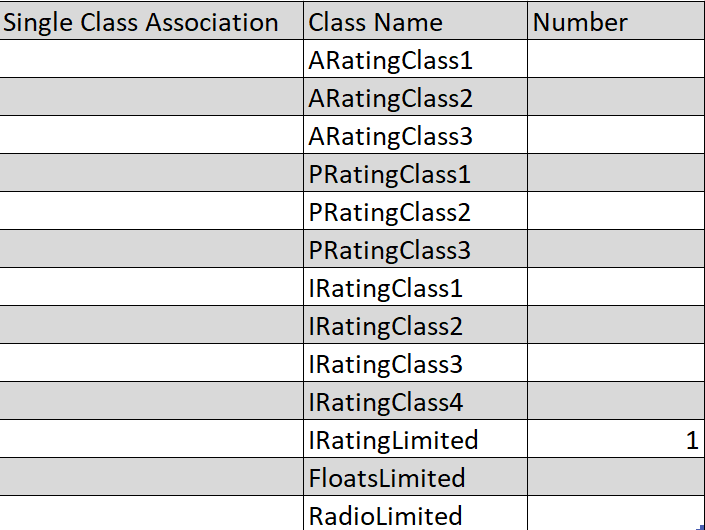
All Classes, 1 - 4 under appropriate pivot table columns, per table definition. if a class doesn't exist column remains empty
5.1 if limited class for rating is available limited should follow class 4 (as in IRating Class)
5.2 If Only limited class exist, then class 1- 4 displays nothing (as in Radio Limited & floats limited)
5.3 Null Value should display nothing.

- Additional output desired:
A count of all the businesses that has only a single class association.
totals to be displayed by total count of class.
DECLARE @T AS TABLE
    (
        id int identity(1,1),
		BName			Varchar (50),
		Adress1			Varchar(50),
        City		    Varchar(10),
		BState			Varchar(2),
		ARatingClass1	Varchar(1),
		ARatingClass2   Varchar(1),
		ARatingClass3   Varchar(1),
		PRatingClass1	Varchar(1),
		PRatingClass2	Varchar(1),
		PRatingClass3	Varchar(1),
		IRatingClass1   Varchar(1),
		IRatingClass2   Varchar(1),
		IRatingClass3   Varchar(1),
		IRatingClass4   Varchar(1),
		IRatingLimited  VarChar(1),
		FloatsLimited   VarChar(1),
		RadioLimited    Varchar(1)


    )

    INSERT INTO @T VALUES
    ('Alpha','128 Alpha Street','New York','NY',     'N','Y','N','Y','Y','Y','N','Y','Y','N','Y','N','N'),
	('Bravo','126 Bravo Street','Van Nuys','CA',     'Y','N','Y','N','N','n','y','N','N','Y','N','Y','Y'),
	('Charlie','124 Charlie Street','Chicago','IL',  'Y','N','Y','N','N','n','y','N','N','N','Y','N','N'),
	('Delta','121 Delta Street','Miami','FL',        'N','N','N','N','N','N','N','N','N','N','Y','N','N'),
	('Echo','119 Echo Street','Augusta','GA',        'N','N','N','N','N','N','N','N','N','N','Y','Y','Y')


;with mycte as (
select BName,Col,Sum(case when val='Y' then 1 else 0 end) cnt from @t
  t
CROSS APPLY (Values
		('ARatingClass1',  ARatingClass1),
		('ARatingClass2',  ARatingClass2),
		('ARatingClass3',  ARatingClass3),
		('PRatingClass1',  PRatingClass1),
		('PRatingClass2',  PRatingClass2),
		('PRatingClass3',  PRatingClass3),
		('IRatingClass1',  IRatingClass1),
		('IRatingClass2',  IRatingClass2),
		('IRatingClass3',  IRatingClass3),
		('IRatingClass4',  IRatingClass4),
		('IRatingLimited', IRatingLimited),
		('FloatsLimited ', FloatsLimited),
		('RadioLimited',   RadioLimited)


		)  d(Col,val)
Group by Col,BName)
,cteUnDesignated as (
select 'UnDesignated'   Col, count(distinct BName) cnt
from mycte
group by BName
 Having(sum(cnt)=0)
 )

 ,mycteFinal as
 (
 select Col, Sum(cnt) cnt from mycte
  group by Col
 UNION ALL
  select Col,sum(cnt) cnt from cteUnDesignated
 group by Col
 )


,myPivot as (
 select Col, cnt ,row_number()Over(partition by left(Col,10)  Order by Right(Col,1) )
 rn from mycteFinal)

 Select
  max(Case when rn=1 then Col else null end) 'Class 1',
  max(Case when rn=1 then cnt else null end) 'Total',
  max(Case when rn=2 then Col else null end) 'Class 2',
  max(Case when rn=2 then cnt else null end) 'Total',
  max(Case when rn=3 then Col else null end) 'Class 3',
  max(Case when rn=3 then cnt else null end) 'Total',
  max(Case when rn=4 then Col else null end) 'Class 4',
  max(Case when rn=4 then cnt else null end) 'Total',
  max(Case when rn=5 then Col else null end) 'Limited',
  max(Case when rn=5 then cnt else null end) 'Total'
  from mypivot
 group by  left(Col,10)
' cx='32' cy='32' r='32' /%3E%3Ctext x='50%25' y='55%25' dominant-baseline='middle' text-anchor='middle' fill='%23FFF' %3ED%3C/text%3E%3C/svg%3E)

' cx='32' cy='32' r='32' /%3E%3Ctext x='50%25' y='55%25' dominant-baseline='middle' text-anchor='middle' fill='%23FFF' %3ENN%3C/text%3E%3C/svg%3E)