PowerShell use "msiexec" why can't use variable?

Hsieh, Iverson 65 Reputation points
2023-03-13T05:36:55.5066667+00:00

Hi All,

I created PowerShell script to remote install msp file.

my script:

$computer = "pcct0211"

$Version = "2300120064"

$tt = "C:\temp\AcroRdrDCUpd$($Version)_MUI.msp"

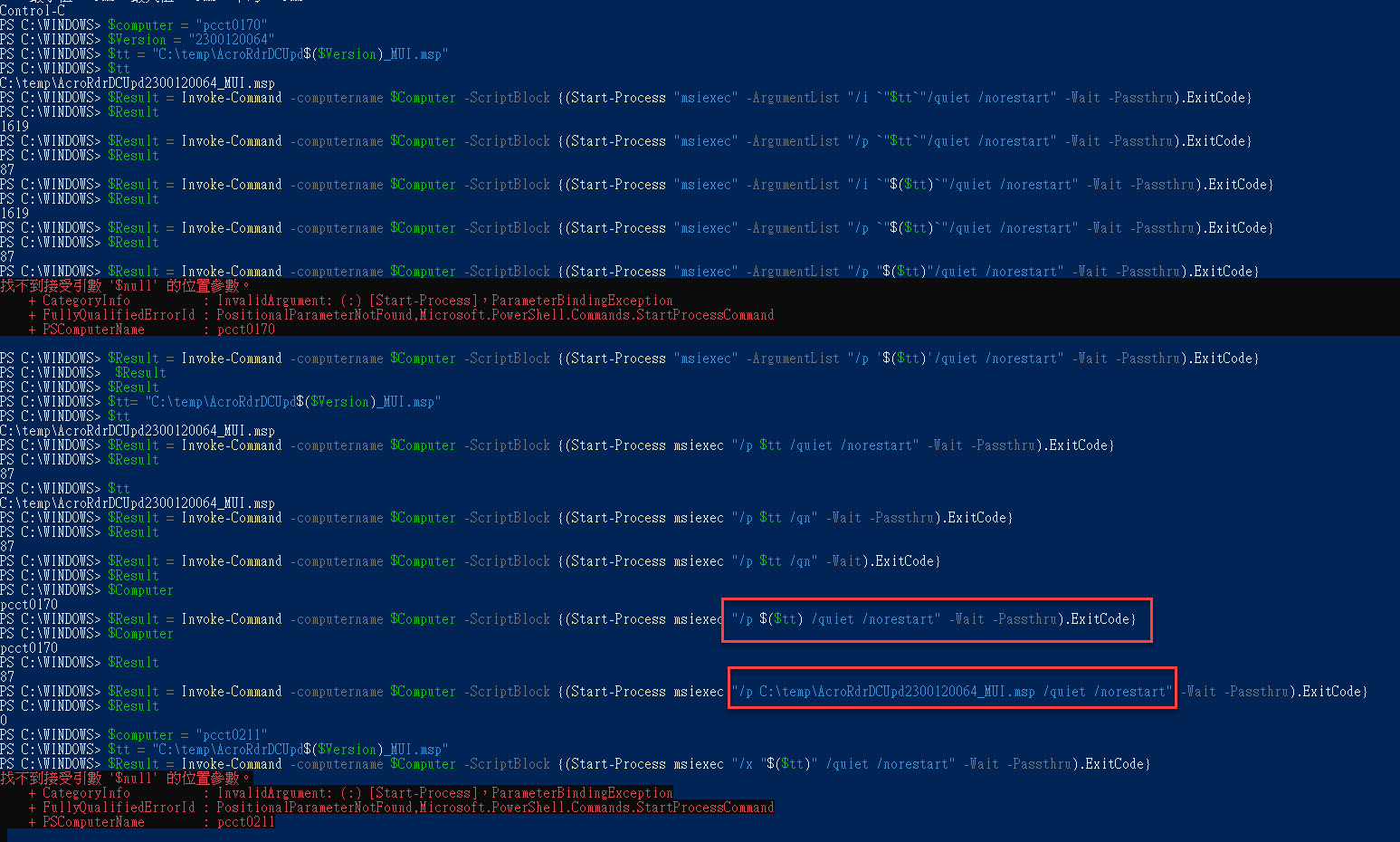
$Result = Invoke-Command -computername $Computer -ScriptBlock {(Start-Process msiexec "/p $($tt) /quiet /norestart" -Wait -Passthru).ExitCode}

why can't used $tt replace ArcoRdrDCUpd2300120064_MUI.msp?

if used $Result = Invoke-Command -computername $Computer -ScriptBlock {(Start-Process msiexec "/p C:\tem[\ArcoRdrDCUpd2300120064_MUI.msp /quiet /norestart" -Wait -Passthru).ExitCode}

get successfully , but use $tt will update fail and exit code: 87
2023-03-10_9-46-02

Windows for business | Windows Server | User experience | PowerShell
{count} votes

Answer accepted by question author
  1. Zeeshan Nasir Bajwa 691 Reputation points
    2023-03-13T05:44:01.86+00:00
    It looks like the issue is with the way you are passing the $tt variable into the Invoke-Command script block.
    
    When you use $tt inside the script block, PowerShell interprets it as a local variable within the script block, which means the $tt variable defined outside the script block is not accessible.
    
    To pass the value of $tt defined outside the script block into the script block, you can use the -ArgumentList parameter of the Invoke-Command cmdlet.
    
    Here's an updated version of your script that should work:
    
    
    Copy
    $computer = "pcct0211"
    $Version = "2300120064"
    $tt = "C:\temp\AcroRdrDCUpd$($Version)_MUI.msp"
    $Result = Invoke-Command -ComputerName $Computer -ScriptBlock {
        param($tt)
        (Start-Process msiexec "/p $tt /quiet /norestart" -Wait -PassThru).ExitCode
    } -ArgumentList $tt
    
    In this updated script, the $tt variable is passed as an argument to the script block using the -ArgumentList parameter. Inside the script block, the $tt variable is then accessed using the param statement.
    
    This should allow you to use the $tt variable to specify the path to the MSI file and successfully install it on the remote computer.
    
    1 person found this answer helpful.

1 additional answer

Sort by: Most helpful
  1. Hsieh, Iverson 65 Reputation points
    2023-03-13T09:07:29.9966667+00:00

    Thanks Zeeshan Bajwa for your tech!

    1 person found this answer helpful.

Your answer

Answers can be marked as 'Accepted' by the question author and 'Recommended' by moderators, which helps users know the answer solved the author's problem.