Microsoft 365 and Office | SharePoint Server | For business
A family of Microsoft on-premises document management and storage systems.

This browser is no longer supported.
Upgrade to Microsoft Edge to take advantage of the latest features, security updates, and technical support.
' cx='32' cy='32' r='32' /%3E%3Ctext x='50%25' y='55%25' dominant-baseline='middle' text-anchor='middle' fill='%23FFF' %3EKN%3C/text%3E%3C/svg%3E)
Hello!
I have a list with 500+ row. I created folders in that list.
Each folder of corse cointain a list exactly like the main. Now i want to sort my 500+ row in those lists.
For this i wanted to use Export to Excel and then Import to Access. Just a few click and the job is done.
BUT! I cant open the sublist in access.
When i select sharepoint fundation connection it only allow me to open the main list. the sublist is not there. Is there any way to open the sublist in Access?
(In sharepoint open in Access funcion is grayed out in every browser)
Or is there an easy way to move (or copy-paste) rows into the sublist based on their names?
Thanks in advance.

In my test, I can use access to open in the sublist. But after opening with access in the sublist, it will also include the contents of the minlist:
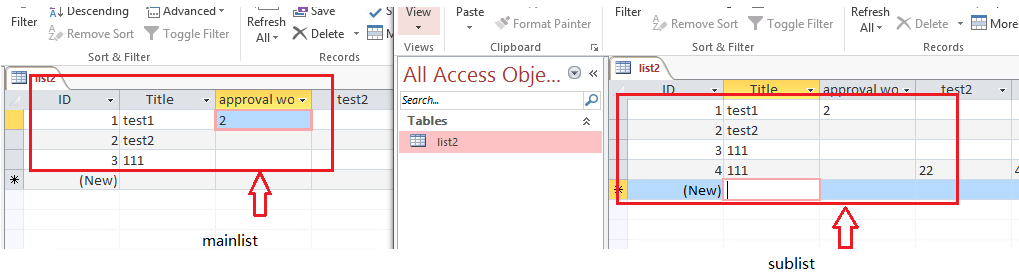
It seems to be a by-design behavior.
As a workaround, I recommend that you use the quick edit function to directly copy the content in the main list and paste it into the sublist:
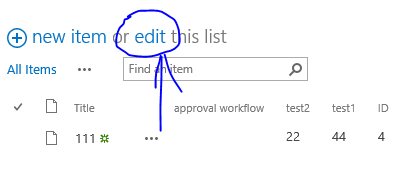
If an Answer is helpful, please click "Accept Answer" and upvote it.
Note: Please follow the steps in our documentation to enable e-mail notifications if you want to receive the related email notification for this thread.
No. I want to import the main list content to the sublist. But lets forget that part.
List inside folder inside a list. And i want to open it from Access. But it like Access can't see it.
As far as I know, there is no other solution. 😔
I have updated my original reply, If you think the replies are helpful to you, please remember to accept them Answer. It will help others who meet the similar question in this forum.
Thanks.