Share via

[VS2019]App Packaging Problem - Windows App Certification Error

RobDev 431 Reputation points
2020-10-07T14:55:20.307+00:00

Greetings All,

I'm trying to create a package for my app for the MS Store. The package built correctly but when I ran the Windows App Certification kit I got the following error:

API __CxxFrameHandler4 in vcruntime140_1_app.dll is not supported for this application type. Microsoft.Graphics.Canvas.dll calls this API.

The version of VS2019 I'm using is 16.7.5 and, as far as I can ascertain, the version of the Windows App Certification kit is 10.0.18362.1.

This seems to be a known error with the kit which was supposedly fixed in version 10.0.18999.0 as shown in the following link:

https://social.msdn.microsoft.com/Forums/en-US/10712943-b0be-4b83-a36a-169debd2d7b1/known-issue-windows-app-certification-kit-reports-supported-apis-test-due-to-cxxframehandler4?forum=Win10SDKToolsIssues

If this error has been fixed in version 10.0.18999.0 where can I download it and will it integrate seamlessly with VS2019?

Also, I've been updating VS2019 every time a new version is released. Why wasn't a new version of the Windows App Certification kit released with VS2019 when it became available?

Kind regards

Developer technologies | Visual Studio | Other

A family of Microsoft suites of integrated development tools for building applications for Windows, the web, mobile devices and many other platforms. Miscellaneous topics that do not fit into specific categories.

0 comments No comments

Answer accepted by question author

Tianyu Sun-MSFT 34,836 Reputation points Microsoft External Staff
2020-10-08T06:35:46.817+00:00

Hello Robert,

Thank you for taking time to post this issue in Microsoft Q&A forum.

Where can I download it and will it integrate seamlessly with VS2019?

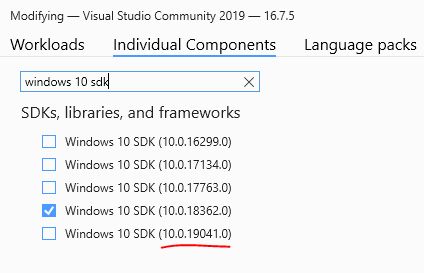
You can download it from here: Windows 10 SDK or install it from Visual Studio Installer > VS 2019 > Modify > Individual Components > Windows 10 SDK (XXXX).(The latest version of Windows 10 SDK is 10.0.19041.0) To integrate seamlessly with VS2019, I suggest you install it from VS Installer.

Why wasn't a new version of the Windows App Certification kit released with VS2019 when it became available?

The Windows App Certification Kit is included in Windows SDK, it can be installed by installing Windows 10 SDK package or selecting Windows 10 SDK (XXXXX) in the optional components of the Visual Studio 2019 Installer.

For installing from Visual Studio 2019 (VS Installer), the Windows 10 SDK will not automatically be selected and updated when you update Visual Studio. So you need to select one proper version and install it manually.
30699-1.png

Sincerely,
Tianyu

  • If the answer is helpful, please click "Accept Answer" and upvote it.
    Note: Please follow the steps in our documentation to enable e-mail notifications if you want to receive the related email notification for this thread.

Was this answer helpful?

1 person found this answer helpful.

0 additional answers

Sort by: Most helpful

Your answer

Answers can be marked as 'Accepted' by the question author and 'Recommended' by moderators, which helps users know the answer solved the author's problem.