Microsoft 365 and Office | SharePoint Server | For business
A family of Microsoft on-premises document management and storage systems.

This browser is no longer supported.
Upgrade to Microsoft Edge to take advantage of the latest features, security updates, and technical support.
' cx='32' cy='32' r='32' /%3E%3Ctext x='50%25' y='55%25' dominant-baseline='middle' text-anchor='middle' fill='%23FFF' %3EBT%3C/text%3E%3C/svg%3E)
Hi All,
I am formatting a list view to display items as tile/card view using Json formatting. but it is showing only first 30 items. There is no option for paging and its not loading on the scroll down also. How can I solve this.
Below is the formatting I am using. Its displaying the user details based on a people field.
Thanks in advance.
{
"schema": "https://developer.microsoft.com/json-schemas/sp/view-formatting.schema.json",
"hideSelection": true,
"hideListHeader": true,
"rowFormatter": {
"elmType": "div",
"style": {
"float": "left",
"display": "flex",
"flex-wrap": "wrap",
"flex-direction": "column",
"align-items": "center",
"justify-content": "space-around",
"min-width": "300px",
"min-height": "286px",
"border-radius": "8px",
"margin-right": "10px",
"margin-bottom": "10px",
"box-shadow": "2px 2px 4px darkgrey"
},
"attributes": {
"class": "ms-bgColor-neutralLighterAlt ms-bgColor-neutralLight--hover ms-fontColor-themePrimary--hover"
},
"children": [
{
"elmType": "div",
"style": {
"text-align": "center"
},
"children": [
{
"elmType": "div",
"style": {
"font-weight": "500",
"font-size": "1.5rem"
},
"txtContent": "[$person.title]"
},
{
"elmType": "div",
"style": {
"font-weight": "300",
"font-size": "1rem"
},
"txtContent": "[$person.jobTitle]"
}
],
"defaultHoverField": "[$person]"
}
]
}
}

As a workaround, you can create the Tile view with JSON definition added inside the property tileProps, then use the formatter element within tileProps property.
Here is a sample script for your reference:
{
  "schema": "https://developer.microsoft.com/json-schemas/sp/view-formatting.schema.json",
  "hideColumnHeader": "true",
  "hideSelection": true,
  "tileProps": {
    "hideSelection": true,
    "width": "300",
    "height": "286",
    "formatter": {
      "elmType": "div",
      "children": [
	  {
		"elmType": "div",
		"style": {
			"float": "left",
			"display": "flex",
			"flex-wrap": "wrap",
			"flex-direction": "column",
			"align-items": "center",
			"justify-content": "space-around",
			"min-width": "300px",
			"min-height": "286px",
			"border-radius": "8px",
			"margin-right": "10px",
			"margin-bottom": "10px",
			"box-shadow": "2px 2px 4px darkgrey"
		},
		"attributes": {
			"class": "ms-bgColor-neutralLighterAlt ms-bgColor-neutralLight--hover ms-fontColor-themePrimary--hover"
		},
          "children": [
            {
              "elmType": "div",
              "style": {
                "text-align": "center",
                "margin": "auto"
              },
              "children": [
                {
                  "elmType": "div",
                  "attributes": {
                    "class": "sp-row-title "
                  },
                  "txtContent": "[$Title]"
                }
              ]
            }
          ]
        }
      ]
    }
  }
}
It adds the Tiles view option to the list and allows you to show the tiles using the Tiles view.
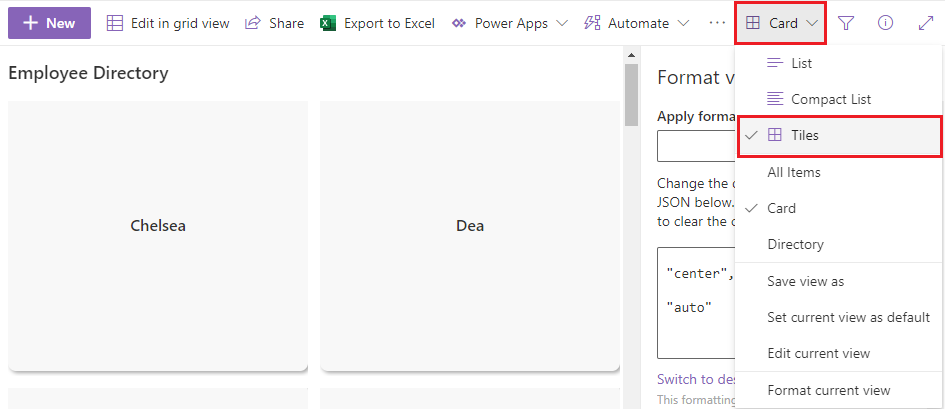
Reference: How to create a Tile view on modern SharePoint lists.
Thanks Chelsia, its shows all the items but is there a way to make tiles view as default view.
@Binu Thomas Please use Comment instead of Write an Answer section to post the reply unless when you provide a valid solution to the question. We will be converting this reply for you.
---
Please do as following:
I have tested in a few browsers and this should set the Tiles view as the default view.

@Chelsea Wu when I "save view as" its saving in the normal list format only, not the tiles view.
I get an error message when I save view as, but still it is saving and showing the list view

@Binu Thomas
Yes, that is the expected behavior when saving the view. You will have to manually switch to the Tiles view before setting it as default. I have updated the previous comment as well.
The error suggests that you are using invalid characters in XML elements (for example, "&"). Replace these characters in your column names or JSON code if any.
Reference: An error occurred while parsing EntityName. Line1, position 844.
@Chelsea Wu Thank you, its working fine. this gives a solution to my requirement.
Thanks again.
I can reproduce this issue in my SharePoint Online environment.
If I have more than 30 items in the list, they all show when I first save the view formatting, but then display only the first 30 when I switch views or refresh the page.
I have also found other posts reporting the same issue, according to which it is the "float": "left" style that is causing the issue:
View with row formatter emulating tiles behaves incorrectly on paged list #108
Elements in a list are not showing after applying custom formatting.
I have tried changing "float": "left" to "float": "none"/"float": "right" or removing this line. None of these fixes the issue.
It seems that this is a known issue in 'Tile' layout, and we do not have a solution for the time being.
If an Answer is helpful, please click "Accept Answer" and upvote it.
**Note: Please follow the steps in our documentation to enable e-mail notifications if you want to receive the related email notification for this thread. **
I also searched the issue before posting here, and found that "float": "left" is causing issue, but is there any other way we can achieve this tile view. My requirement is to create an employee directory. I use people picker field and shows few details in the tile.
@Binu Thomas
I have posted the following comment as a new Answer since it has exceeded 1000 characters. Please see the new Answer in this thread.