Microsoft 365 and Office | SharePoint | For business | Windows
A group of Microsoft Products and technologies used for sharing and managing content, knowledge, and applications.

This browser is no longer supported.
Upgrade to Microsoft Edge to take advantage of the latest features, security updates, and technical support.
' cx='32' cy='32' r='32' /%3E%3Ctext x='50%25' y='55%25' dominant-baseline='middle' text-anchor='middle' fill='%23FFF' %3EBM%3C/text%3E%3C/svg%3E)
Hi,
I have added a custom choice column (Department) to the "Selected Key Filter Fields" in "Metadata navigation settings" and it appeared in the library filter on the modern page. However, after a few weeks, it disappeared from the filter section even though it still appears in the Selected Key Filter Fields.
looked everywhere for a solution but with no luck.
Thank you in advance for your help.
Boris Manis
A group of Microsoft Products and technologies used for sharing and managing content, knowledge, and applications.
Answer accepted by question author
' cx='32' cy='32' r='32' /%3E%3Ctext x='50%25' y='55%25' dominant-baseline='middle' text-anchor='middle' fill='%23FFF' %3EMM%3C/text%3E%3C/svg%3E)
Hi anonymous userManis-5167,
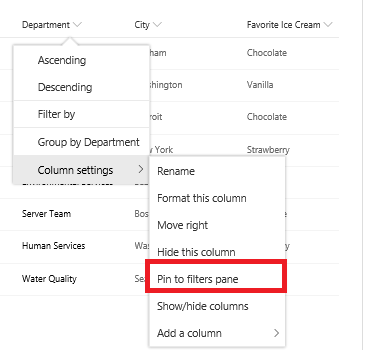
As far a I know, you could add the choice column to the Filters Pane through the pin feature. As the below picture shows:
If an Answer is helpful, please click "Accept Answer" and upvote it.
Note: Please follow the steps in our documentation to enable e-mail notifications if you want to receive the related email notification for this thread.