Microsoft Security | Intune | Configuration Manager | Other
Other Configuration Manager-related features and issues

This browser is no longer supported.
Upgrade to Microsoft Edge to take advantage of the latest features, security updates, and technical support.
' cx='32' cy='32' r='32' /%3E%3Ctext x='50%25' y='55%25' dominant-baseline='middle' text-anchor='middle' fill='%23FFF' %3ERA%3C/text%3E%3C/svg%3E)
Hi,
We are trying to retrieve the list of SCCM Site Maintenance Tasks via PowerShell. This is to replicate what is shown in the Config Mgr console - screen accessed via Administration --> Site Configuration --> Sites --> Site Maintenance. It provides a list in a pop up window of all the Site Maintenence tasks and if they are currently Enabled or not.
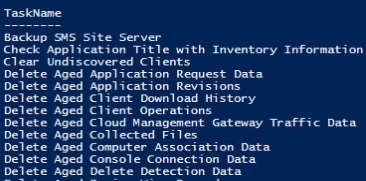
From PowerShell, we are using the Configuration Manager PowerShell module and command Get-CMSiteMaintenanceTask. But the list coming back is different. Some of the names of Tasks appear similar, but they are not the same. Also tried to query the database directly and also using command "SELECT * FROM SMS_SCI_SQLTask" using WMI. All these options give me the same list but it does not match what is in the Console window.
An example is the third item in the list from the Console called "Clear Install Flag". It does not come up in the PowerShell list at all, though there is "Clear Undiscovered Clients". I thought there was maybe a difference in description, there are columns such as TaskName, ItemName, but they are the same.
Powershell:
Console:
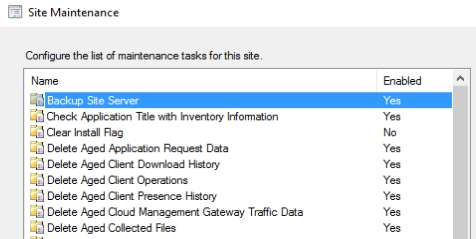
Does anyone know why it is different or what I am doing wrong? I don't think I am looking in the correct place.
Thanks,
Renae.

Hi @Renae Adams ,
The list you are seeing in PowerShell is the same maintenance tasks as shown in the ConfigMgr console, so you're not doing anything wrong, the naming is for some reason a bit different between the ConfigMgr console and the PowerShell output.
You can make a comparison for the tasks over at the official Microsoft documentation here:
Reference for maintenance tasks in Configuration Manager
https://learn.microsoft.com/en-us/mem/configmgr/core/servers/manage/reference-for-maintenance-tasks
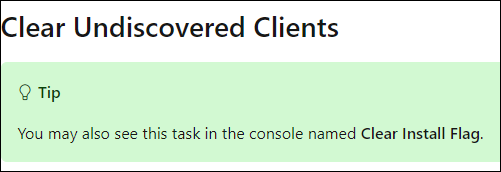
For example, the "Clear Install Flag" maintenance task is called "Clear Undiscovered Clients" in the ConfigMgr console, this is also noted in the reference documentation in the above link:
----------
(If the reply was helpful please don't forget to upvote or accept as answer, thank you)
Best regards,
Leon
Thank you @Leon Laude . Very confusing though, I assume there's no way to get the description as seen in the console. We are presenting a User with a list of enabled Site Maintenance Tasks as part of a wider report and then asking them to go to the console and disable. The list they see in their report is therefore not the same as what they will see in the console.
Ultimately, we will be using PowerShell to enable/disable these tasks. I can see that the Task Name I get from PowerShell via Get-CMSiteMaintenanceTask works when I pass it to the equivalent Set-CMSiteMaintenanceTask, so at least that won't be an issue for us.