Microsoft 365 and Office | Excel | For business | Windows
A family of Microsoft spreadsheet software with tools for analyzing, charting, and communicating data

This browser is no longer supported.
Upgrade to Microsoft Edge to take advantage of the latest features, security updates, and technical support.

Default data is input by date.
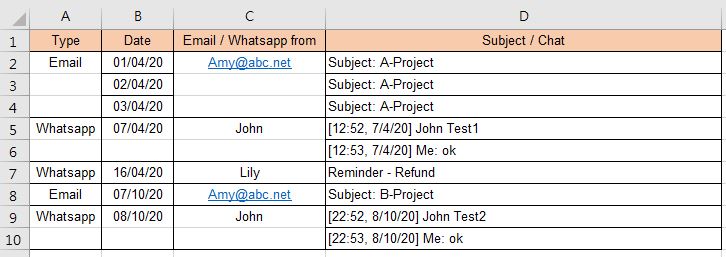
If want to sort by name for quick view as below, how can make the related rows follow the related name together. Is it possible to do? Please advise.

' cx='32' cy='32' r='32' /%3E%3Ctext x='50%25' y='55%25' dominant-baseline='middle' text-anchor='middle' fill='%23FFF' %3EHS%3C/text%3E%3C/svg%3E)
Excel 365 Pro Plus with PowerPivot and Power Query.
Filter with Slicer.
Oodles of other plays possible.
http://www.mediafire.com/file/6r9jr12jdniiyzu/10_14_20.xlsx/file
http://www.mediafire.com/file/su2ugxub70139ho/10_14_20.pdf/file

Hi,
Select range C3:C10 and press Ctrl+G > Special > Blanks > OK. Now press = and up arrow. Press Ctrl+Enter. Select range C3:C10, copy it, right click and paste special > values > OK.
Hope this helps.