Microsoft Security | Microsoft Entra | Microsoft Entra ID
A cloud-based identity and access management service for securing user authentication and resource access

This browser is no longer supported.
Upgrade to Microsoft Edge to take advantage of the latest features, security updates, and technical support.
' cx='32' cy='32' r='32' /%3E%3Ctext x='50%25' y='55%25' dominant-baseline='middle' text-anchor='middle' fill='%23FFF' %3EA%3C/text%3E%3C/svg%3E)
Hello,
When a user logins into Oracle cloud via SSO, the application provides a 30min timeout. However, the current behaviour we see is that when the dialog pops up about the timeout being reached, the user is allowed straight back into the application without re-authenticating. Is there an AD timeout setting, and what is it set to?
Thanks
A cloud-based identity and access management service for securing user authentication and resource access
Answer accepted by question author

Hello @Alex · Welcome to Q&A platform and thanks for your query.
This can be configured by using Sign-in frequency feature in Conditional Access policy. Minimum frequency that can be set is 1 Hour after which user would be required to sign-in again. Maximum value can be 365 days.
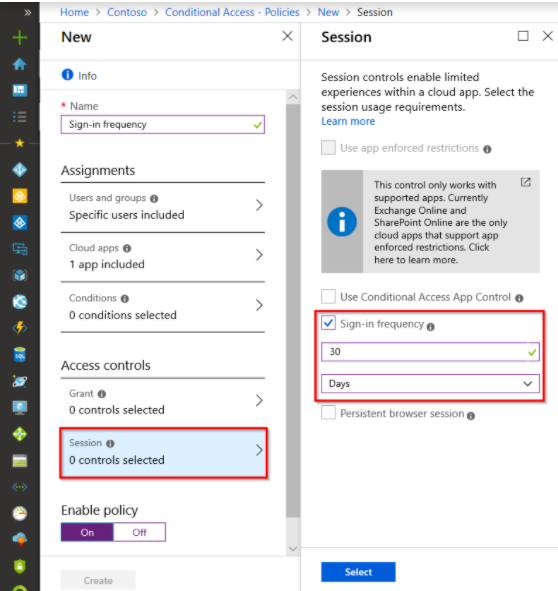
Read More: Sign-in frequency control
-----------------------------------------------------------------------------------------------------------
Please "Accept the answer" if the information helped you. This will help us and others in the community as well.