Microsoft 365 and Office | Excel | For business | Windows
A family of Microsoft spreadsheet software with tools for analyzing, charting, and communicating data

This browser is no longer supported.
Upgrade to Microsoft Edge to take advantage of the latest features, security updates, and technical support.
' cx='32' cy='32' r='32' /%3E%3Ctext x='50%25' y='55%25' dominant-baseline='middle' text-anchor='middle' fill='%23FFF' %3EHS%3C/text%3E%3C/svg%3E)
Hello!
I have a problem with an Excel formula.
I have a column of text. Each line should be checked if it contains a word from a matrix. If the word was found from the matrix, the value right of the found word should be inserted.
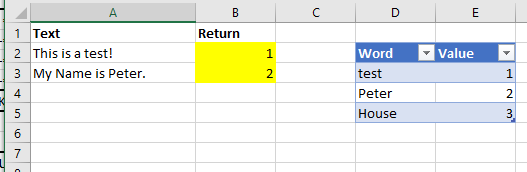
A2:Axxx is the Text.
B2:Bxxx are the returned value of Matrix
Matrix D3:E5
How can I do this?
rg
Hansi
I have found the solution:
=VERWEIS(2;1/SUCHEN($D$3:$D$5;A2);$E$3:$E$5)


Hi,
In cell B2, enter this formula
=XLOOKUP(TRUE,REGEXTEST(A2,$D$2:$D$4,1),$E$2:$E$4)
Hope this helps.