Share via

Windows latest update problem

Kargo 1 Reputation point
2020-10-19T09:58:32.237+00:00

I'm currently using 1903 version of windows.
1 ) Do I have to upgrade to the 2004 version? I have 40 GB space left in my C drive with a bunch of software .
2 ) Does this process of update can cause any problem like OS crash ?
3 ) And if I don't update, features like Word, Power Point, Excel, Edge will still be working well or not ? and
4 ) How much does it take to finish the update ?
( I tried last time and it stopped at 44 %, after 3 hours and then I re-started the PC. Now, windows is prompting to do the update continuously)

HELP ME !!!!
Thank You .

Windows for business | Windows Client for IT Pros | User experience | Other
0 comments No comments

2 answers

Sort by: Most helpful
  1. Anonymous
    2020-10-26T06:46:52.713+00:00

    Hi,

    You can refer to the link below to update:
    https://www.microsoft.com/en-us/software-download/windows10

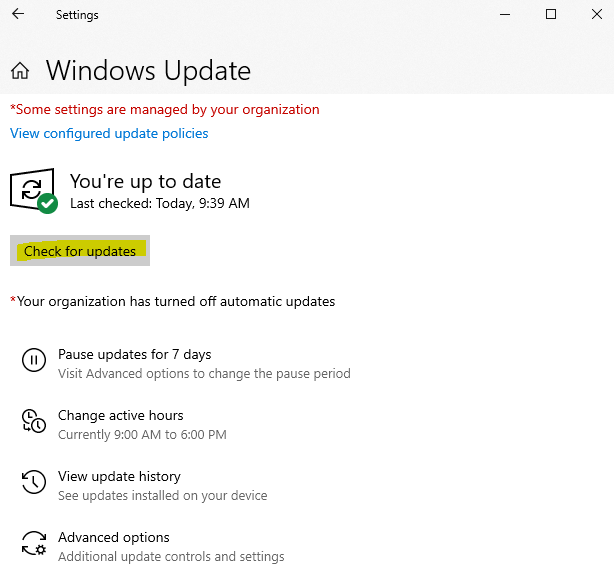
    You can also click settings--> Update & Security --> Windows Update --> Check for updates
    34929-1.png

    Best regards,
    Molly

    --------------------------------------------------------------------------------

    If the Answer is helpful, please click "Accept Answer" and upvote it.
    Note: Please follow the steps in our documentation to enable e-mail notifications if you want to receive the related email notification for this thread.

    Was this answer helpful?

    0 comments No comments

  2. Kapil Arya 37,826 Reputation points Volunteer Moderator
    2020-10-20T09:58:03.117+00:00

    Hello,

    It is often recommended that you use latest version of Windows. V2004 is the current latest version.

    You can try upgrading to V2004 via ISO file, which is one of the best way to upgrade:

    Refer this step-by-step guide:

    https://www.kapilarya.com/how-to-upgrade-to-windows-10-using-iso-file

    The time taken to complete upgrade is not fixed and completely depends upon your system resources.

    Don't worry, if you face some issues with V2004, you can downgrade back to previous version within 10 days after upgrade.

    Regards.

    Note: Included link in this reply refers to blog post by a trusted Microsoft MVP.

    Was this answer helpful?

    0 comments No comments

Your answer

Answers can be marked as 'Accepted' by the question author and 'Recommended' by moderators, which helps users know the answer solved the author's problem.
