SQL Server Reporting Services
A SQL Server technology that supports the creation, management, and delivery of both traditional, paper-oriented reports and interactive, web-based reports.
This browser is no longer supported.
Upgrade to Microsoft Edge to take advantage of the latest features, security updates, and technical support.
' cx='32' cy='32' r='32' /%3E%3Ctext x='50%25' y='55%25' dominant-baseline='middle' text-anchor='middle' fill='%23FFF' %3ES%3C/text%3E%3C/svg%3E)
Hi Team,
I need dymanic logos based on my Country filter
I have logo store in Azure blob after I have created Table Country and LOGO(Nvarchar(MAX) i have store the LINK URL in the LOGO colors
I have two dataset
1st dataset :Countrydetails
below is sample data
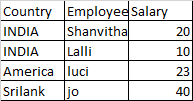
I have logo are store in Azure blob and we create one table and stored those Link URL in table bleow
2nd dataset :LOGO

When i am select the Country Filter its should display based logo in the SSRS report
Thanks
Shanvitha
A SQL Server technology that supports the creation, management, and delivery of both traditional, paper-oriented reports and interactive, web-based reports.
Answer accepted by question author

Hi @Shanvitha ,
I found two ways to meet your needs.
(1)In the Dataset1 query, enter a query
where Country in (@country)
In the Dataset2 query, enter a query
where COUNTRY in (@country)
When you select the Country Filter,you may see logo as well.
(2)You may add a new right column besides Salary, we could named it as logo.
And then enter the expression using the lookup function.
=lookup(Fields!Country.Value,Fields!COUNTRY.Value, Fields!LOGO.Value,"DataSet2")
In this way you could combine the two datasets and when you select the Country Filter, it will also show the related logo.
Regards,
Zoe
If the answer is helpful, please click "Accept Answer" and upvote it.
Note: Please follow the steps in our documentation to enable e-mail notifications if you want to receive the related email notification for this thread.
Hi Zoehui,
Thanks you replay and suggest and helping.
I am happy you are solution.
Thanks
Shanvitha

Off topic:
Could you please close previous posts by clicking Accept as answer or revert if any questions
https://learn.microsoft.com/en-us/answers/questions/129102/temporary-table-query-error-in-copy-data-in-adf.html
https://learn.microsoft.com/en-us/answers/questions/128955/please-help-my-query-join-two-table.html
https://learn.microsoft.com/en-us/answers/questions/125061/i-have-source-is-one-tenant-and-destination-anothe.html
https://learn.microsoft.com/en-us/answers/questions/125061/i-have-source-is-one-tenant-and-destination-anothe.html
Hi Zoehui-MSFT /SSRS export
Thank you are replay but my image didnt display in the report.
below is error(mean didnt display)

My logo store in Azure Blob and I am create one table Country name and respective logo link (logo column is NVarchar(MX))
like below

after running my report i didnt display image.
please any body help on this
Hi @Shanvitha ,
The logo didn't display cause the logo images didn't store in the database.
You may need to store the images to the database so the logo can be shown in the reports.
Here is a way to insert local picture to the SQL database, and then you may use it in the report without issues.
https://www.sqlshack.com/upload-multiple-images-sql-server/
I didn't find a nice way to store url image to the database temporarily.
For now, we'll focus on the issue on "Dynmic Logos based databse URL" .If this issue has been resolved, I'd suggest you "accept the correct answer" and raise the new issue "image didnt display in the report" in our forum and more people will see the precise titles and give more help.