Microsoft Teams | Development
Building, integrating, or customizing apps and workflows within Microsoft Teams using developer tools and APIs

This browser is no longer supported.
Upgrade to Microsoft Edge to take advantage of the latest features, security updates, and technical support.
' cx='32' cy='32' r='32' /%3E%3Ctext x='50%25' y='55%25' dominant-baseline='middle' text-anchor='middle' fill='%23FFF' %3EA%3C/text%3E%3C/svg%3E)
Our company's executives have developed a custom application using the Teams development portal. An error occurred when calling the API. I want to try to modify the log. What problems can Changelog solve?
' cx='32' cy='32' r='32' /%3E%3Ctext x='50%25' y='55%25' dominant-baseline='middle' text-anchor='middle' fill='%23FFF' %3ESM%3C/text%3E%3C/svg%3E)
Hi
Is there any progress on this issue? Is the following suggestion useful?
If the reply is helpful, please click "Accept Answer" as an answer.It will help others who encounter the same issue and read this thread.
Thank you for your understanding and patience!
' cx='32' cy='32' r='32' /%3E%3Ctext x='50%25' y='55%25' dominant-baseline='middle' text-anchor='middle' fill='%23FFF' %3ENM%3C/text%3E%3C/svg%3E)
@KanhdLhdhwnv-0708 - Changelog for Developer Portal allows you to stay engaged with the latest updates in Teams. You can view the updates about features, recent changes in APIs, and important bug fixes.
To view Changelog, sign in to Developer Portal and select Changelog from the left pane.
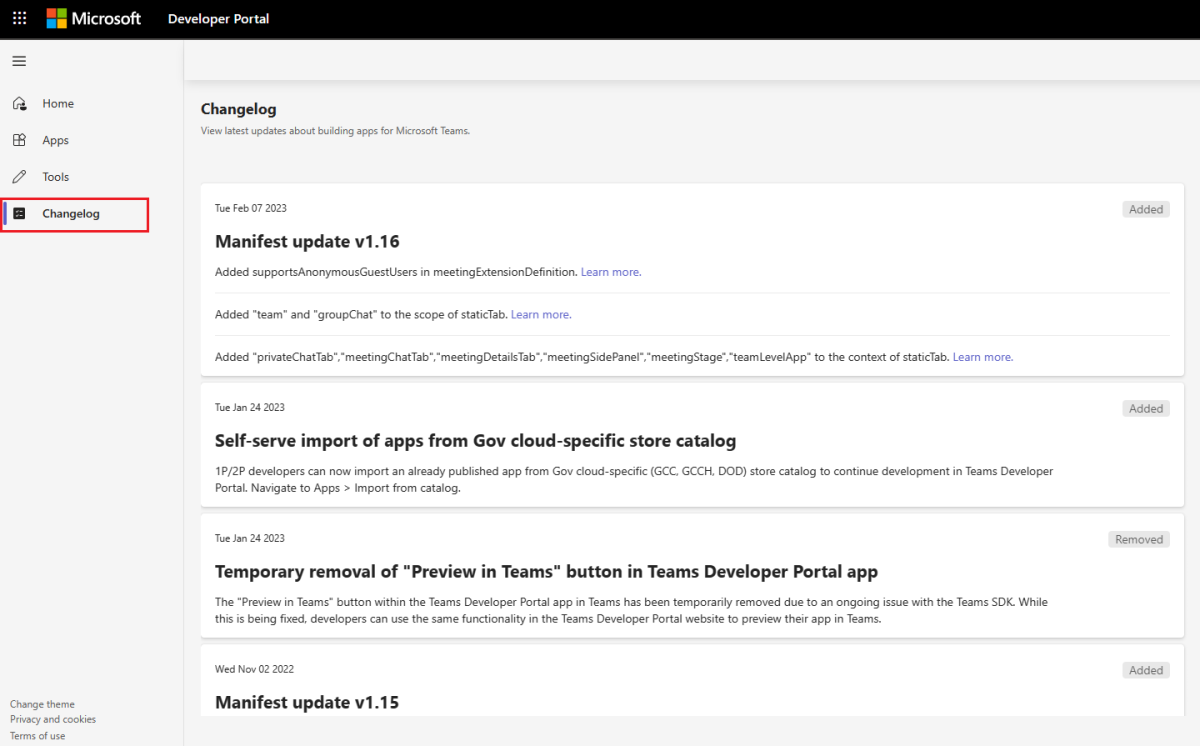
The updates for Changelog in Developer Portal are categorized based on the following:
Thanks,
Nivedipa
If the response is helpful, please click "Accept Answer" and upvote it. You can share your feedback via Microsoft Teams Developer Feedback link. Click here to escalate.