Exchange | Exchange Server | Management
The administration and maintenance of Microsoft Exchange Server to ensure secure, reliable, and efficient email and collaboration services across an organization.
This browser is no longer supported.
Upgrade to Microsoft Edge to take advantage of the latest features, security updates, and technical support.
' cx='32' cy='32' r='32' /%3E%3Ctext x='50%25' y='55%25' dominant-baseline='middle' text-anchor='middle' fill='%23FFF' %3EEY%3C/text%3E%3C/svg%3E)
After you migrate mailboxes from Exchange 2010 to Exchange 2016, autoconfiguration of user profiles does not work by giving two errors:
The first one keeps requesting the password.
The second does not connect to the Exchange 2016 server.
The only solution I've been finding is to create a new profile with it and leave it as a child so that the profile that was first in place can connect to the Exchange 2016 server.
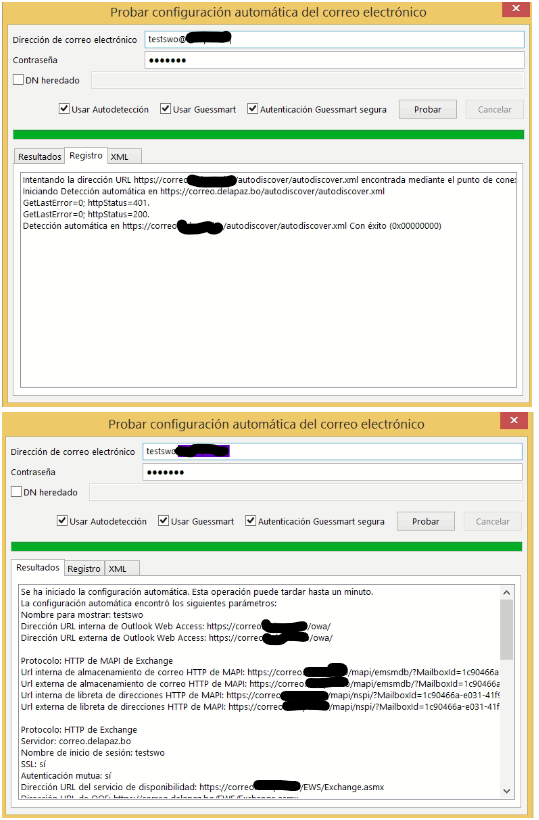
You have already performed the self-configuration tests by giving me as the only match on all migrated accounts:
GetLastError-0; httpStatus-401 and GetLastError-0; httpStatus-200
The administration and maintenance of Microsoft Exchange Server to ensure secure, reliable, and efficient email and collaboration services across an organization.
Hi,
I'm not familiar with language shown in picture, can you run the test again in English?
Let's get started with basic settings:
The users you talking about are all internal, right?
After you migrated the mailboxes, have you changed SCP and the URLs in virtual directories pointing to Ex2016?
See Client Connectivity in an Exchange 2016 Coexistence Environment with Exchange 2010 if you need further guidance.
Run "Restart-WebAppPool MSExchangeAutodiscoverAppPool" in Powershell as administrator manually on all your servers.
Since creating a new profile would work, what if you re-create the old profiles, would they work?
Also, check the authtification of MAPI virtual directory in Ex2016, make sure "Negotiate" is ticked.
If an Answer is helpful, please click "Accept Answer" and upvote it.
Note: Please follow the steps in our documentation to enable e-mail notifications if you want to receive the related email notification for this thread.