Developer technologies | Windows Presentation Foundation
A part of the .NET Framework that provides a unified programming model for building line-of-business desktop applications on Windows.
This browser is no longer supported.
Upgrade to Microsoft Edge to take advantage of the latest features, security updates, and technical support.
' cx='32' cy='32' r='32' /%3E%3Ctext x='50%25' y='55%25' dominant-baseline='middle' text-anchor='middle' fill='%23FFF' %3EAS%3C/text%3E%3C/svg%3E)
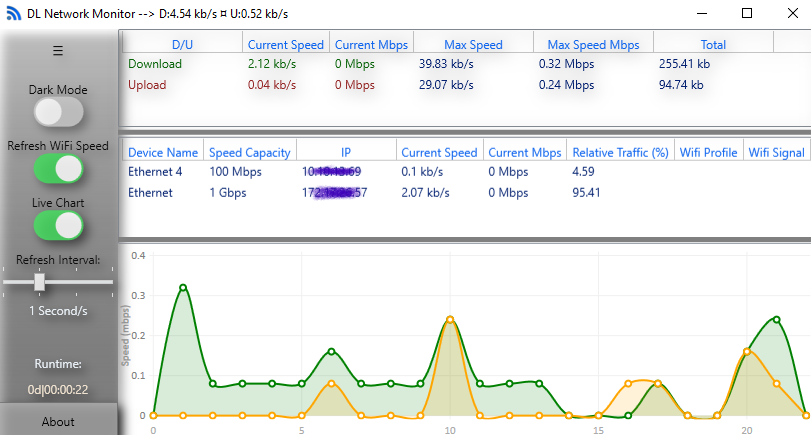
I've submitted an app to the store ("DL Network Monitor") and noticed that when running, there are few things missing: 1. TaskbarItemInfo.ProgressValue/State are not showing (using this to provide visual traffic stats in the App Icon) 2. Some stats are not showing: Wi-Fi Profile/Signal strength I noticed that this happens when I launch the App. However, if I copy the app from the installation folder to a different location (say, c:\temp) everything works just fine. Additional notes: - This is a WPF project wrapped in a UWP package (to get it deployed to the store) - Tested on multiple machines with the same result Here's the link to the app: https://www.microsoft.com/store/apps/9NHW8HQ6KVQ4 Has anyone experienced a similar behavior? Thanks!
A part of the .NET Framework that provides a unified programming model for building line-of-business desktop applications on Windows.

If your PC has meet the requirement of this DL Network Monitor but still missing functionalities, I suggest to consult the app’s developer for help.
Test on my 19041.572 machine, result seems to be same as yours.
-------------------------------------------------------------------------------------
If the Answer is helpful, please click "Accept Answer" and upvote it.
Note: Please follow the steps in our documentation to enable e-mail notifications if you want to receive the related email notification for this thread.
Thanks for your answer. One thing I should clarify - I am the app developer. My question was towards Store 'experts' who may know what's the root cause.
The App only has this issue when installed through the store. As per my example below - if you take it as-is and copy to a different location (that's not under WindowsApps) it works fine
I assume it has something with permissions on these folders but not sure...
Ok, I know… you need to contact Windows Store app support for help, tell them your product’s abnormal when it installed from Store, hope you could get a good result.
