Intellicode Suggestions Style

Thibault Monnier 0 Reputation points
2023-10-02T17:30:40.18+00:00

Hi. I don't like the writing style of intellicode suggestions and can't find a setting to change it. The font seems to be different and same for the size. It does a really weird animation to go from italic to normal when writing the same letters than suggested which is really distracting. Is there any way to change it?

Thanks.

a

Developer technologies | Visual Studio | Other
A family of Microsoft suites of integrated development tools for building applications for Windows, the web, mobile devices and many other platforms. Miscellaneous topics that do not fit into specific categories.
{count} votes

2 answers

Sort by: Most helpful
  1. Anna Xiu-MSFT 31,151 Reputation points Microsoft External Staff
    2023-10-03T08:07:35.7466667+00:00

    Hi @Thibault Monnier

    Welcome to Microsoft Q&A!

    Do you mean that you want to change the font of the following section?
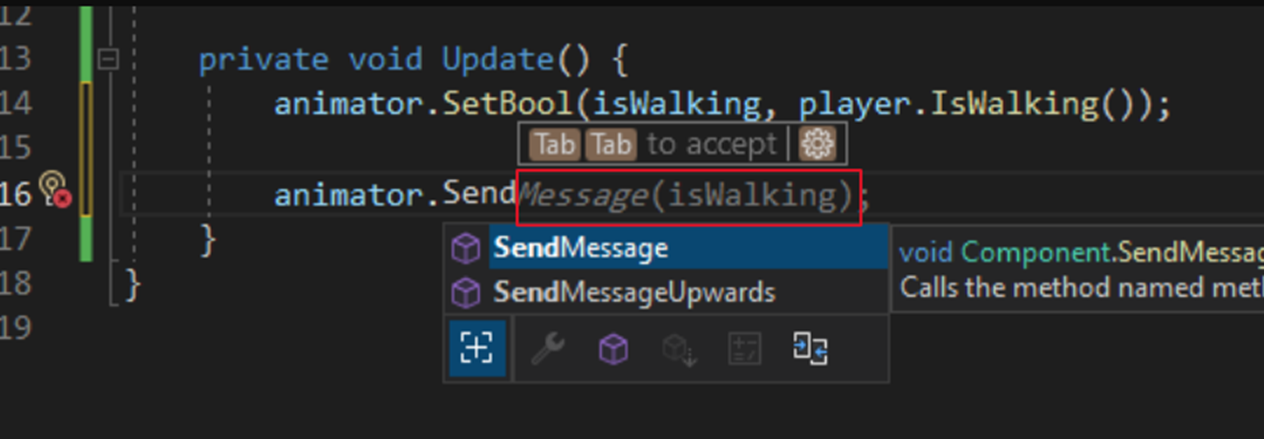
    User's image

    I tested on my side and was unable to change it. But you can disable it by going to Tools > Options > IntelliCode > General > uncheck “Show whole line completions” > OK.

    User's image

    Sincerely,

    Anna


    If the answer is the right solution, please click "Accept Answer" and kindly upvote it. If you have extra questions about this answer, please click "Comment". 
    Note: Please follow the steps in our documentation to enable e-mail notifications if you want to receive the related email notification for this thread.


    0 comments No comments

  2. Deleted

    This answer has been deleted due to a violation of our Code of Conduct. The answer was manually reported or identified through automated detection before action was taken. Please refer to our Code of Conduct for more information.


    Comments have been turned off. Learn more

Your answer

Answers can be marked as 'Accepted' by the question author and 'Recommended' by moderators, which helps users know the answer solved the author's problem.