Azure Data Factory
An Azure service for ingesting, preparing, and transforming data at scale.
This browser is no longer supported.
Upgrade to Microsoft Edge to take advantage of the latest features, security updates, and technical support.

How do we need to setup DNS so that we can use private endpoints for Data Factory portal with multiple environments ?
Data Factory private endpoint a non-unique FQDN portal.adf.azure.com
This is creating a problem since we are using Hub - Spoke network topology and all the Private DNS zones are linked to the HUB network
It's not possible to:
A diagram of the current solution:
' cx='32' cy='32' r='32' /%3E%3Ctext x='50%25' y='55%25' dominant-baseline='middle' text-anchor='middle' fill='%23FFF' %3EA%3C/text%3E%3C/svg%3E)
Thanks for Using Microsoft Q&A platform.
it is not possible to link multiple Private DNS zones with the same name adf.azure.com to HUB network or create multiple DNS records for portal.adf.azure.com in a single DNS zone. Currently, there is only one Data Factory portal endpoint, so there is only one private endpoint for the portal in a DNS zone.
One alternative is to remove the private endpoint and DNS configuration.
Another option is to use a managed virtual network in private endpoints in Azure Data Factory.
However, it is important to ensure that the DNS settings are correct when using the fully qualified domain name (FQDN) for the connection, and the settings must resolve to the private IP address of the private endpoint.
for references: Azure Private Link for Azure Data Factory - Azure Data Factory | Microsoft Learn
If you have further queries, please do let us know.
Hi @Anonymous , Thanks for your input. I'll digest the proposed workaround and test it. The reference link you've shared seems to be broken. Could you please check it?
Hi @Anonymous , Could you please elaborate a bit more on this "Another option is to use a managed virtual network in private endpoints in Azure Data Factory." Could you please share a diagram representing this option?
Creating an integration runtime within a managed virtual network ensures the data integration process is isolated and secure. With a managed virtual network, you can offload the burden of managing the virtual network to Data Factory. You don't need to create a subnet for an integration runtime that could eventually use many private IPs from your virtual network and would require prior network infrastructure planning. Deep Azure networking knowledge isn't required to do data integrations securely. Instead, getting started with secure ETL is much simpler for data engineers. A managed virtual network along with managed private endpoints protects against data exfiltration.
Here is a diagram that shows the architecture of a Data Factory managed virtual network:
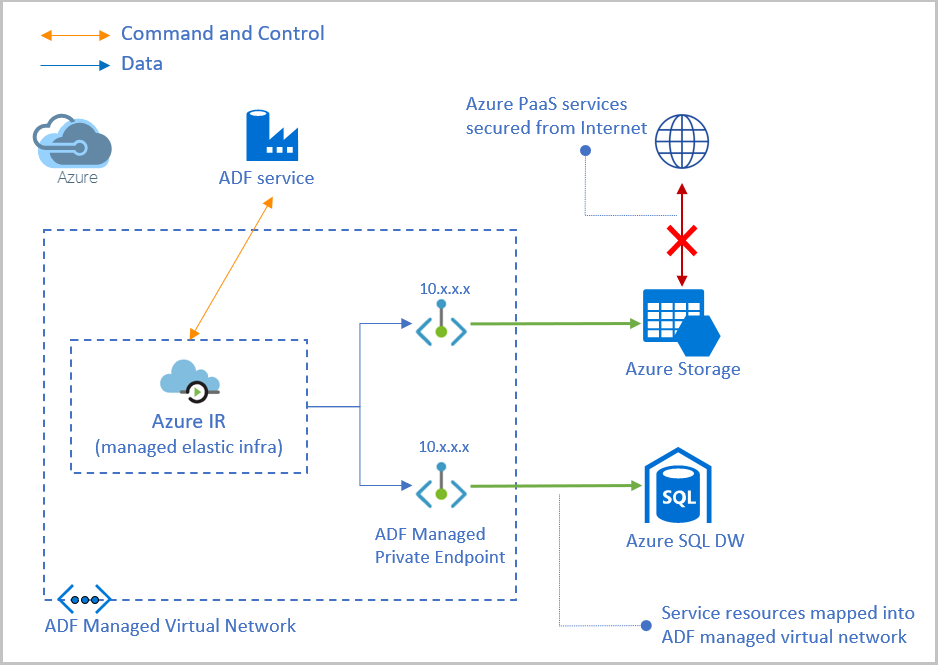
As you can see in the diagram, the managed virtual network is created within the data factory, and the integration runtime is provisioned within the managed virtual network. The integration runtime uses private endpoints to securely connect to supported data stores.
To use private endpoints with a managed virtual network in Azure Data Factory, you need to follow these steps:
For more information on how to create a managed virtual network and configure private endpoints in Azure Data Factory, please refer to the following documentation:
I hope this helps! Let me know if you have any further questions.
@Paul Hernandez We haven’t heard from you on the last response and was just checking back to see if you have a resolution yet. In case if you have any resolution please do share that same with the community as it can be helpful to others. Otherwise, will respond with more details and we will try to help.
Hi @Anonymous , thanks for the follow-up.
We accepted this as a current limitation:
And will continue with the hub-spoke architecture.
We are facing a similar situation with Azure Databricks and Purview.
could you please confirm us that you are satisfied with present situation?
if not please more details of your requirement .
I'm satisfied with the support you provided @Anonymous thanks
@Paul Hernandez Hope this helps. Do let us know if you any further queries.
please, do click Accept Answer and Yes for was this answer helpful. And, if you have any further query do let us know.
thanks for accepting the answer.