Exchange Online
A cloud-based service included in Microsoft 365, delivering scalable messaging and collaboration features with simplified management and automatic updates.
This browser is no longer supported.
Upgrade to Microsoft Edge to take advantage of the latest features, security updates, and technical support.
' cx='32' cy='32' r='32' /%3E%3Ctext x='50%25' y='55%25' dominant-baseline='middle' text-anchor='middle' fill='%23FFF' %3ERR%3C/text%3E%3C/svg%3E)
Hi All
i have a shared mailbox lets say shared@Company portal .com and user1@Company portal .com has full access and send as permissions.
user has updated calendar invite from october 20 to Nov05 from the shared mailbox, the calendar invite did not change on the original invite on the shard mailbox but at the particpant end it shows Nov05.Also when user updates upcoming meeting and tries to add someone new it sends invites to all participants instead of new only.
From owa its fine from outlook user is facing issue, outlook has been reconfigured but same issue.
A cloud-based service included in Microsoft 365, delivering scalable messaging and collaboration features with simplified management and automatic updates.
The administration and maintenance of Microsoft Exchange Server to ensure secure, reliable, and efficient email and collaboration services across an organization.

Hi @Roger Roger
According to your description, this question seems to be related to Exchange, so we would move the irrelevant tags.
' cx='32' cy='32' r='32' /%3E%3Ctext x='50%25' y='55%25' dominant-baseline='middle' text-anchor='middle' fill='%23FFF' %3EJS%3C/text%3E%3C/svg%3E)
Hi @Roger Roger
Is there any update about your issue?
Hi @Roger Roger , do suggestion below help?
Answer accepted by question author
Hi @Roger Roger
According to your information above, from OWA it's fine, the issue may related to outlook client.
First please check if you enabled any add-ins, you could try using safe mode to open outlook and verify the result again. Outlook.exe /safe
Then are you using Exchange cached mode? Check the below settings in outlook:

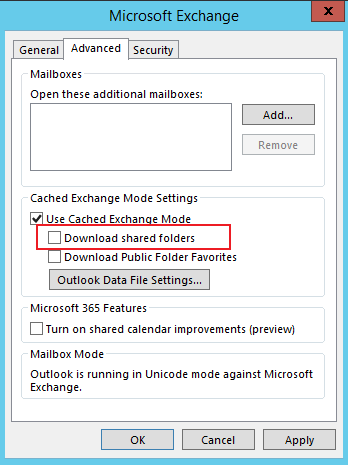
Here is also a related thread discussed about the issue for your reference Shared calendars not syncing correctly
If an Answer is helpful, please click "Accept Answer" and upvote it.
Note: Please follow the steps in our documentation to enable e-mail notifications if you want to receive the related email notification for this thread.