Azure SQL Database
An Azure relational database service.
This browser is no longer supported.
Upgrade to Microsoft Edge to take advantage of the latest features, security updates, and technical support.
' cx='32' cy='32' r='32' /%3E%3Ctext x='50%25' y='55%25' dominant-baseline='middle' text-anchor='middle' fill='%23FFF' %3ER%3C/text%3E%3C/svg%3E)
I have created a contained user in a database as follows:
CREATE USER devowner WITH PASSWORD = N'wombat'
And added it to dbowner role:
ALTER ROLE db_owner ADD MEMBER devowner;
But when trying to login, either via SSMS or sqlcmd, i get the error:

I am specifying the correct database in SSMS and in the connection string for sqlcommand.
If I create a login, and then a user associated with the login, I can connect just fine. But the contained user cannot login.
I have also tried GRANT CONNECT to the user, but it has not helped.
What am I missing?
Thanks
' cx='32' cy='32' r='32' /%3E%3Ctext x='50%25' y='55%25' dominant-baseline='middle' text-anchor='middle' fill='%23FFF' %3EAS%3C/text%3E%3C/svg%3E)
Hi @Richard , I was checking the solution provided by @Vaibhav Chaudhari and this looks correct but as you mentioned it does not work out for you.
There could be some configuration issue with respect to correct database. Could you please re-verify the database in which queries are being run (Create user, alter role, grant connect)?
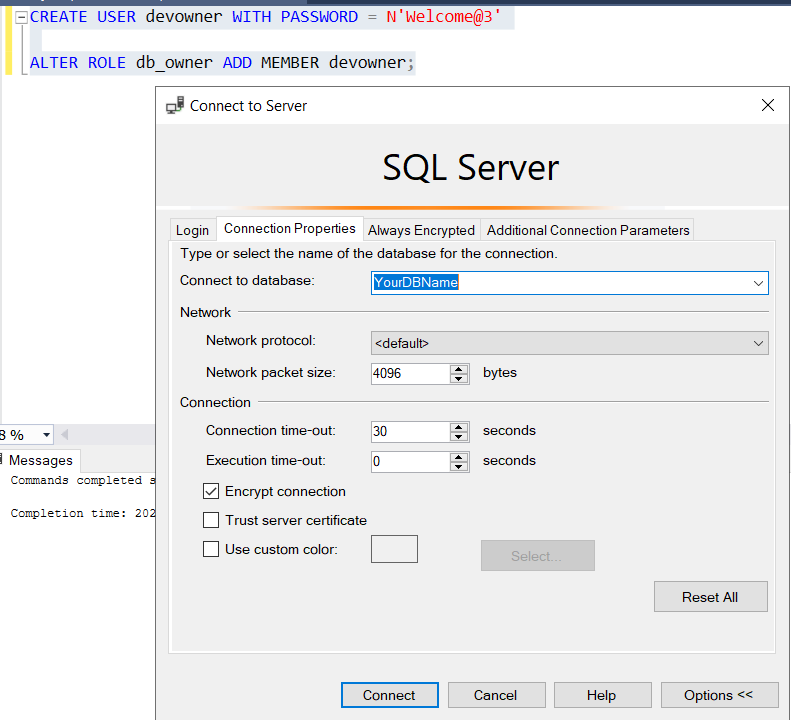
Also if possible, could you share the screenshot of connection properties of SSMS once?

I ran the same queries and it worked for me. Are you able to connect to the DB from SSMS? Ensure you specify the DB name as shown below
----------
Please don't forget to Accept Answer and Up-vote if the response helped -- Vaibhav
No, as mentioned it does not connect in SSMS, and I am already specifying the database name as per your image.