Exchange Online
A cloud-based service included in Microsoft 365, delivering scalable messaging and collaboration features with simplified management and automatic updates.
This browser is no longer supported.
Upgrade to Microsoft Edge to take advantage of the latest features, security updates, and technical support.
' cx='32' cy='32' r='32' /%3E%3Ctext x='50%25' y='55%25' dominant-baseline='middle' text-anchor='middle' fill='%23FFF' %3EC%3C/text%3E%3C/svg%3E)
Hello,
Based on my understanding from some board feedback/links, Exchange utilizes Health Mailboxes as it needs to. Question is pretty straight forward. Going through a mailbox migration now (2016 to 2016 - new datacenter) and we will be decommissioning the existing Exchange servers (existing datacenter). The Exchange servers are all a part of the same ORG, so do the Health Mailboxes need to migrate?
From reading, I do not believe they need to migrate, but to uninstall Exchange in the old datacenter we can't have any mailboxes on the databases. Do we just delete them in Exchange and then in ADUC?
Thanks for any clarification anyone can provide around this.
CWT
A cloud-based service included in Microsoft 365, delivering scalable messaging and collaboration features with simplified management and automatic updates.
Answer accepted by question author

New ones will be created as you bring up new servers and databases, no need to migrate any of those.
They will be removed when you remove the old databases and servers.
You can remove the old ones with powershell, yes
You can delete them all with powershell:
Get-Mailbox -Monitoring -Database <OLD DB> | Remove-Mailbox
Make sure you also read this and give the necessary permissions so the AD objects are removed:
https://learn.microsoft.com/en-us/exchange/troubleshoot/administration/remove-mailboxdatabase-cannot-remove-health-mailboxes
Otherwise, remove the specific AD objects manually from the Monitoring container
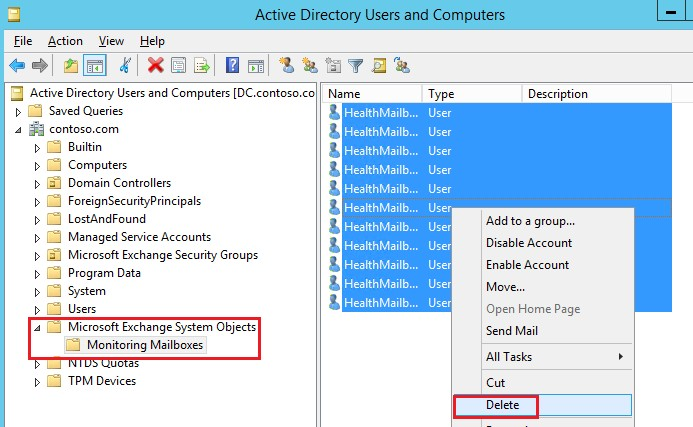
Even if you screw up and remove the wrong ones, its ok.
Simply restart the Microsoft Exchange Health Manager, MSExchangeHM service on each new server if that happens to recreate them
Thank you Andy for the help. As always much appreciated sir :o)
CWT