Exchange Online
A Microsoft email and calendaring hosted service.
6,181 questions
This browser is no longer supported.
Upgrade to Microsoft Edge to take advantage of the latest features, security updates, and technical support.
' cx='32' cy='32' r='32' /%3E%3Ctext x='50%25' y='55%25' dominant-baseline='middle' text-anchor='middle' fill='%23FFF' %3ENH%3C/text%3E%3C/svg%3E)
Need help with following
when Automatic reply/ Out of office reply send to external recipients, we can see that the return path is empty that the Email security appliance blocked the mail.
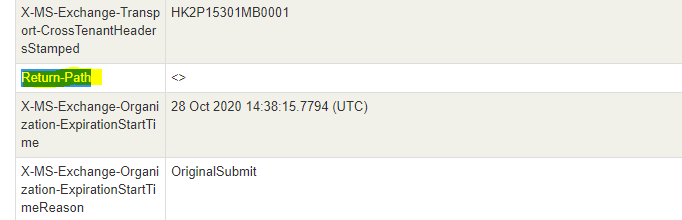
Is there any way to add a return path?
Thank You
Nur

No, that is by design. You will need to fix the email appliance. If its dropping those its doing it incorrectly. a null <> sender is perfectly legal .
I would ask support for that appliance on how to work-around this.
https://tools.ietf.org/html/rfc2298
https://support.hpe.com/hpesc/public/docDisplay?docId=emr_na-c03261672
Out of Office (OOF) Notification for remote users goes with blank sender and gets stuck in SmartHost or kind of products; Based on the research found With Exchange Server 2010 (and 2007's latest Service Pack) Microsoft has changed the behavior of automatic server based notifications, especially Out of Office (replies to rely on RFC 2298. As per RFC 2298 Message Disposition Notification (MDN) messages should be sent with a blank sender. The OOF reply messages are Message Disposition Notifications. This means that the HUB Server in the organization replaces the senders name with a blank one while transferring it to the internet.
' cx='32' cy='32' r='32' /%3E%3Ctext x='50%25' y='55%25' dominant-baseline='middle' text-anchor='middle' fill='%23FFF' %3ETG%3C/text%3E%3C/svg%3E)
This is fine and dandy, except when you start working on DMARC and have the DMARC record set to reject (which all organizations should look into).
A <null sender> is NOT a function that can be placed into a DNS record as a permitted sender.
' cx='32' cy='32' r='32' /%3E%3Ctext x='50%25' y='55%25' dominant-baseline='middle' text-anchor='middle' fill='%23FFF' %3ELZ%3C/text%3E%3C/svg%3E)
Agree with AndyDavid. I checked the message header of OOF in my environment, it's the same result. Also, yes, this is by design and cannot be configured from Exchange server side.
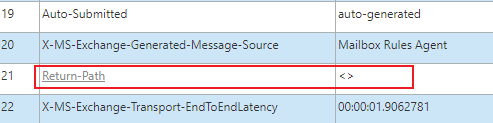
It's suggested to contact the vendor of the Email security appliance to see if any configuration can be set to accept these OOF messages.
If the response is helpful, please click "Accept Answer" and upvote it.
Note: Please follow the steps in our documentation to enable e-mail notifications if you want to receive the related email notification for this thread.
This is fine and dandy, except when you start working on DMARC and have the DMARC record set to reject (which all organizations should look into).
A <null sender> is NOT a function that can be placed into a DNS record as a permitted sender.