Microsoft 365 and Office | SharePoint Server | For business
A family of Microsoft on-premises document management and storage systems.

This browser is no longer supported.
Upgrade to Microsoft Edge to take advantage of the latest features, security updates, and technical support.
' cx='32' cy='32' r='32' /%3E%3Ctext x='50%25' y='55%25' dominant-baseline='middle' text-anchor='middle' fill='%23FFF' %3EJ%3C/text%3E%3C/svg%3E)
I have accidentally deleted the main web part in Web Part Gallery:
When I try to visit "_catalogs/wp" in browser, it shows "Page Not Found".
I would like to ask how to restore the Web Part Gallery?
Thanks a lot.
' cx='32' cy='32' r='32' /%3E%3Ctext x='50%25' y='55%25' dominant-baseline='middle' text-anchor='middle' fill='%23FFF' %3EMM%3C/text%3E%3C/svg%3E)
Hi @Jerry ,
Is there any update on your issue?
If my answer helps you , please click "Accept Answer" button and upvote it.
Hi @Jerry ,
How did you delete the Web Part Gallery? Could you please share more details.
As far as I know, the Web Part Gallery can not be deleted. Maybe you could check the site recycle bin, the items you deleted should be kept in the recycle bin. Maybe you could restore the Web part Gallery there.
Update:
Usually, there is a Web Parts link in Site Settings. You could go to the Web Part Gallery through that link.
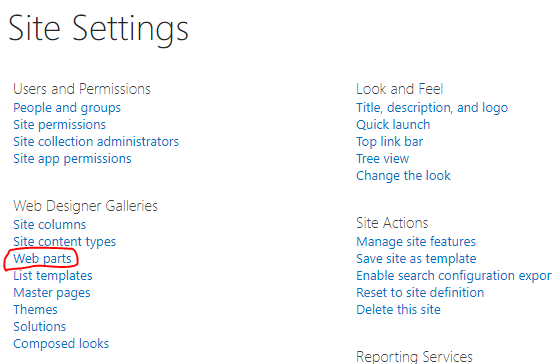
If you cannot see the Web Parts link, the Web Part Gallery may be deleted. You could create a new Web Part Gallery library with the below command:
$web=get-spweb http://sp/sites/yoursite
$ListTemplate = [Microsoft.Sharepoint.SPListTemplateType]::WebPartCatalog
$Web.Lists.Add("webpartgallery","description",$ListTemplate)
If an Answer is helpful, please click "Accept Answer" and upvote it.
Note: Please follow the steps in our documentation to enable e-mail notifications if you want to receive the related email notification for this thread.