Hello, i am using PSADTK with intune. I am stump. My goal is to deploy my chart folder with files to this location even if the folder already exist: "C:\Users%Username%\AppData\Roaming\Microsoft\Templates\Charts
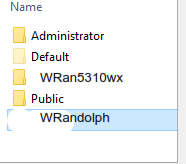
My problem is that instead of inserting the folder & files under the user profile it will create a new directory with the computername with the folder and files.
My current powershell script:
$CurrentUserName = $RunAsActiveUser.UserName
if ($CurrentUserName)
{
Copy-File -Path '$dirFiles\Charts' -Destination '$envSystemDrive\Users\$CurrentUserName\AppData\Roaming'
}
' cx='32' cy='32' r='32' /%3E%3Ctext x='50%25' y='55%25' dominant-baseline='middle' text-anchor='middle' fill='%23FFF' %3EK%3C/text%3E%3C/svg%3E)


' cx='32' cy='32' r='32' /%3E%3Ctext x='50%25' y='55%25' dominant-baseline='middle' text-anchor='middle' fill='%23FFF' %3ERM%3C/text%3E%3C/svg%3E)