Microsoft 365 and Office | Excel | For business | Windows
A family of Microsoft spreadsheet software with tools for analyzing, charting, and communicating data

This browser is no longer supported.
Upgrade to Microsoft Edge to take advantage of the latest features, security updates, and technical support.
' cx='32' cy='32' r='32' /%3E%3Ctext x='50%25' y='55%25' dominant-baseline='middle' text-anchor='middle' fill='%23FFF' %3EMJ%3C/text%3E%3C/svg%3E)
Hey guys!
I got this Table in the Power Query Editor. There are several Persons with different Attributes.
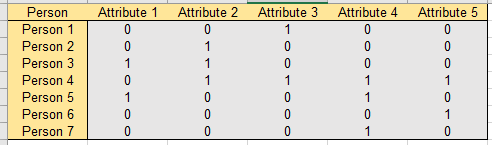
How can I get my table in a format like this in the Power Query Editor? The first row schould be the person and the second is filled with the attributes were the value is one. They should be in a single row with a seperating figure.
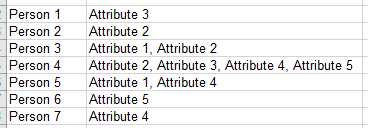
If you could help me that would be awesome and would safe my day!


Hi @
Just checking in to see if the information of Lz-3068 was helpful. Please let us know if you would like further assistance.
If the response is helpful, please click "Accept Answer" and upvote it.
Note: Please follow the steps in our documentation to enable e-mail notifications if you want to receive the related email notification for this thread.

Hi
    PreviousStepName = ...
    UnpivotedOtherColumns = Table.UnpivotOtherColumns(PreviousStepName, {"Person"}, "Attribute", "Value"),
    FilteredValues = Table.SelectRows(UnpivotedOtherColumns, each ([Value] = 1)),
    GroupedRows = Table.Group(FilteredValues, {"Person"},
        {{"Attributes", each Text.Combine([Attribute],", "), type text}}
    )
Thank you very much again! This helped a lot.

Hi,
This M code in Power Query works
let
    Source = Excel.CurrentWorkbook(){[Name="Data"]}[Content],
    #"Added Custom" = Table.AddColumn(Source, "Attributes", each Text.Combine(Table.SelectRows(Record.ToTable(_), each [Value]=1)[Name],", "))[[Person],[Attributes]]
in
    #"Added Custom"
Hope this helps.