SQL Server need to run compress commands for both Table & Clustered Index?

techresearch7777777 1,981 Reputation points
2020-10-29T22:26:18.867+00:00

Hello I have a particular Table that I want to compress and also any existing Indexes as well.

If I run the following to compress this particular Table first:

USE [DB_Name]
GO
ALTER TABLE [dbo].[Table_1] REBUILD PARTITION = ALL
WITH
(DATA_COMPRESSION = PAGE
)
go

Which has a Clustered Index within...do I also need to run the following...

USE [DB_Name]
GO
ALTER INDEX [ClusteredIndex_1] ON [dbo].[DB_Name] REBUILD PARTITION = ALL 
 WITH 
(DATA_COMPRESSION = PAGE
)
GO

...or above Clustered Index command can be skipped since I already ran Table level compression ?

Thanks in advance.

SQL Server | Other
0 comments No comments
{count} votes

Answer accepted by question author
  1. CathyJi-MSFT 22,406 Reputation points Microsoft External Staff
    2020-10-30T08:24:53.113+00:00

    Hi @techresearch7777777 ,

    >or above Clustered Index command can be skipped since I already ran Table level compression

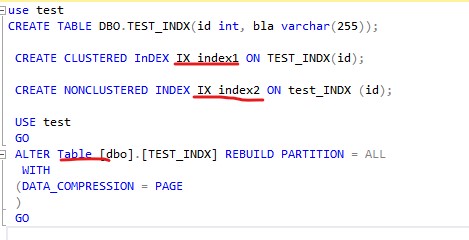
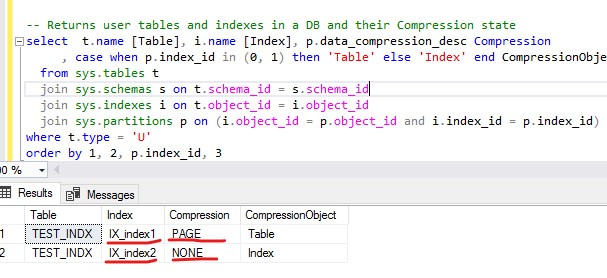
    Yes. When you run the table compression, the clustered index is also compressed. But the compression setting of a table is not automatically applied to its non-clustered indexes.

    And there's no inheritance for compression settings: "When you compress tables and indexes, it’s a one-time action. You’re only taking care of what exists today. If someone (or even you) turns around and creates an index on that same table tomorrow, it won’t be compressed by default. Whoever creates the index has to make sure that it’s compressed. We can use the second query to compress the index.
    36206-screenshot-2020-10-30-161112.jpg
    36207-screenshot-2020-10-30-162106.jpg

    Please refer to similar thread Does adding page compression to a table also compress existing indexes and this blog.

    Best regards,
    Cathy


    If the response is helpful, please click "Accept Answer" and upvote it.

    0 comments No comments

4 additional answers

Sort by: Most helpful
  1. techresearch7777777 1,981 Reputation points
    2020-10-29T22:28:49.74+00:00

    Sorry mistyped the Clustered Index statement to refer to the Table name not DB name as follows:

     USE [DB_Name]
     GO
     ALTER INDEX [ClusteredIndex_1] ON [dbo].[Table_1] REBUILD PARTITION = ALL 
      WITH 
     (DATA_COMPRESSION = PAGE
     )
     GO
    
    0 comments No comments

  2. Erland Sommarskog 128.7K Reputation points MVP Volunteer Moderator
    2020-10-29T22:45:29.81+00:00

    The clustered index is the table, so that is the same thing. But you need to compress non-clustered index separately if you want them to be compressed to.

    You can use this command to inspect your compression status

    SELECT * FROM sys.partitions WHERE object_id = object_id('YourTable)

    0 comments No comments

  3. Shashank Singh 6,251 Reputation points
    2020-10-30T06:49:54.167+00:00

    Adding to Erlands answer I would use the first command you have mentioned to page compress table that has no clustered index basically a heap table. Peopl can argue to create clustered index on it and compress like using the 2nd query but sometime we just need plain table nothing else.

    0 comments No comments

  4. techresearch7777777 1,981 Reputation points
    2020-10-30T18:41:45.157+00:00

    Interesting thanks bunch everyone for all the quick great answers.

    0 comments No comments

Your answer

Answers can be marked as 'Accepted' by the question author and 'Recommended' by moderators, which helps users know the answer solved the author's problem.
