Hi,
Is your device the domain joined system, or do you log on to the system using domain account? If so, specific Windows APP including Windows Security can be disabled via domain configurations including group policy, registry etc. We would recommend you contact your domain/IT admins and confirm with them about the limitations.
If it is personal device and in work group environment, you may check below setting:
- Press Win + S, type regedit and end with enter to open Registry Editor.
- Open location: HKEY_LOCAL_MACHINE\SYSTEM\CurrentControlSet\Services\wscsvc
- Double click Start and make sure it is configured as 2.
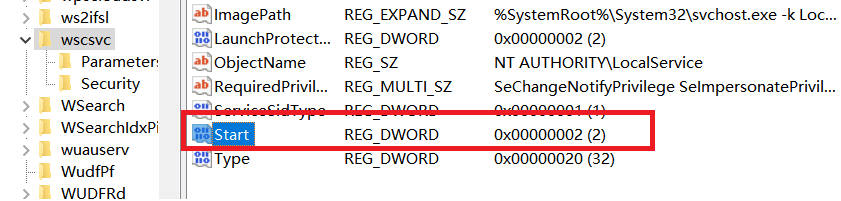
Then, open cmd and run below command, each line end with Enter to restart relate service:
net stop wscsvc
net start wscsvc
I hope this helps! Please let me know if you need any further assistance.
Kind Regards,
Karlie Weng
If the Answer is helpful, please click "Accept Answer" and upvote it.
' cx='32' cy='32' r='32' /%3E%3Ctext x='50%25' y='55%25' dominant-baseline='middle' text-anchor='middle' fill='%23FFF' %3ENA%3C/text%3E%3C/svg%3E)

' cx='32' cy='32' r='32' /%3E%3Ctext x='50%25' y='55%25' dominant-baseline='middle' text-anchor='middle' fill='%23FFF' %3EMA%3C/text%3E%3C/svg%3E)
' cx='32' cy='32' r='32' /%3E%3Ctext x='50%25' y='55%25' dominant-baseline='middle' text-anchor='middle' fill='%23FFF' %3ESS%3C/text%3E%3C/svg%3E)
' cx='32' cy='32' r='32' /%3E%3Ctext x='50%25' y='55%25' dominant-baseline='middle' text-anchor='middle' fill='%23FFF' %3EA%3C/text%3E%3C/svg%3E)
