' cx='32' cy='32' r='32' /%3E%3Ctext x='50%25' y='55%25' dominant-baseline='middle' text-anchor='middle' fill='%23FFF' %3ES%3C/text%3E%3C/svg%3E)
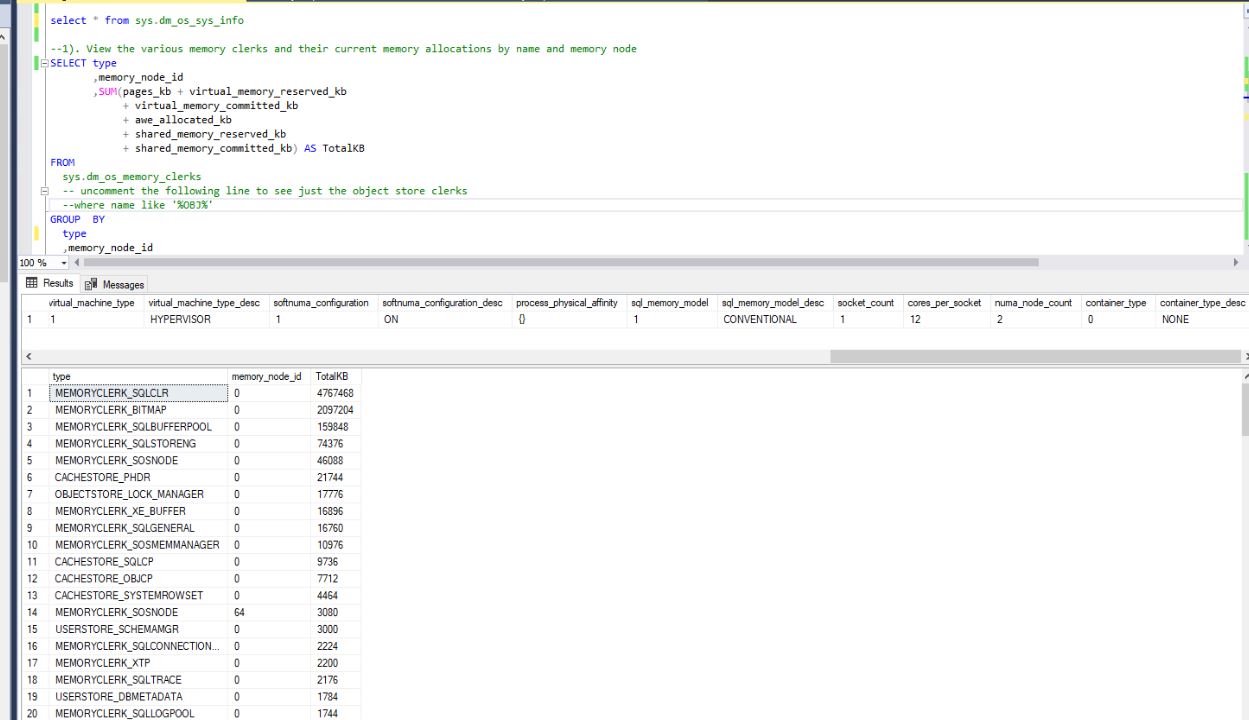


As per your below image and output from sys.dm_os_memory_nodes
You do not have 2 NUMA nodes. The Node ID 64 will not be counted as NUMA node.
EDIT: Answer to follow up question
but I have 2 node_id on select * from sys.dm_os_nodes
Sys.dm_os_nodes show you NUMA nodes created by SQLOS while sys.dm_os_memory_nodes shows that created of soft NUMA, done by engine. The structure of physical NUMA can be altered by soft numa. Also if you look BOL doc for sys.dm_os_memory_nodes it says
Nodes are created per physical NUMA memory nodes. These might be different from the CPU nodes in sys.dm_os_nodes.
Plus see the output you posted for DMV sys.dm_os_nodes. For node_id 0,1 they have same memory_node_id as 0.
To further understand see SQL Server: Clarifying The NUMA Configuration Information, in this blog see section I have a non-NUMA system and SQL Server Still Shows NUMA - why?. This section has detailed answer to your question.
To further confirm run sp_readerrorlog 0,1,'Node configuration: node'. It will return information like
2011-11-09 12:38:01.38 Server Node configuration: node 0: CPU mask: 0x000000000000000f:1 Active CPU mask: 0x000000000000000f:1.
2011-11-09 12:38:01.38 Server Node configuration: node 1: CPU mask: 0x000000000000000f:0 Active CPU mask: 0x000000000000000f:0.
EX: Above output says system has 2 NUMA nodes.
' cx='32' cy='32' r='32' /%3E%3Ctext x='50%25' y='55%25' dominant-baseline='middle' text-anchor='middle' fill='%23FFF' %3ECZ%3C/text%3E%3C/svg%3E)