Developer technologies | Windows Presentation Foundation
A part of the .NET Framework that provides a unified programming model for building line-of-business desktop applications on Windows.
This browser is no longer supported.
Upgrade to Microsoft Edge to take advantage of the latest features, security updates, and technical support.
' cx='32' cy='32' r='32' /%3E%3Ctext x='50%25' y='55%25' dominant-baseline='middle' text-anchor='middle' fill='%23FFF' %3EM%3C/text%3E%3C/svg%3E)
I'm using WPF C# and Entity Framework
I want to insert,delete,update directly in DataGrid in wpf project without anything else , just using DataGrid and KeyDown Event
So when insert or updating data in the cell after users press enter button or Tab button check the conditions for duplication next do it Save
Like this :
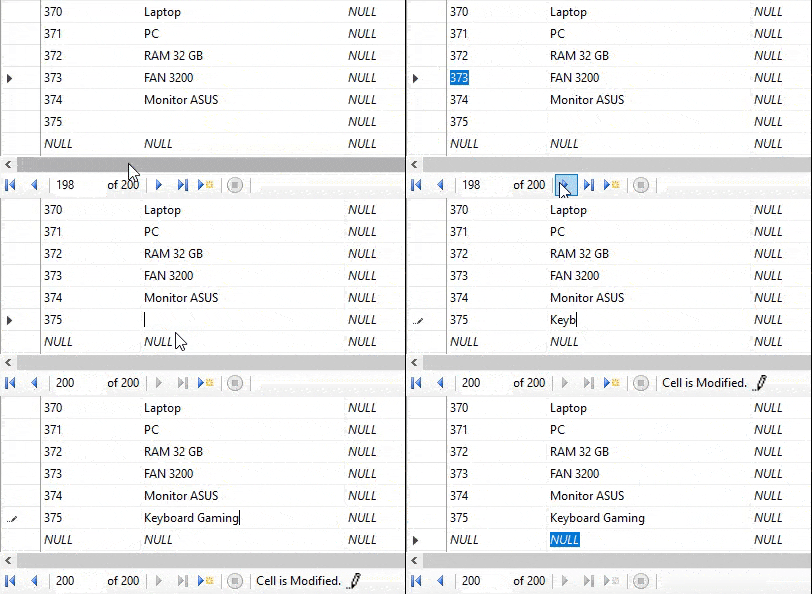

You can add a KeyDown event in EventSetter for DataGridRow, like below code shown:
<DataGrid.RowStyle>
                <Style TargetType="DataGridRow">
                    <EventSetter Event="KeyDown" Handler="personDataGrid_KeyDown"></EventSetter>
                </Style>
            </DataGrid.RowStyle>
And the code for updating is:
private void personDataGrid_KeyDown(object sender, KeyEventArgs e)
        {
            try
            {
                if (e.Key == Key.Enter || Key.Tab == e.Key)
                {
                    e.Handled = true;
                    Person newP = (sender as DataGridRow).Item as Person;

                    //Delete the Old item from DB
                    Person old = context.People.Where(t => t.ID.Equals(newP.ID)).FirstOrDefault();
                    context.People.Remove(old);
                    context.SaveChanges();

                    //Check for duplication  and Add the new Items
                    foreach (Person p in personDataGrid.Items)
                    {
                        if (p.ID != newP.ID) { context.People.Add(newP);  context.SaveChanges();}
                    }

                }
            }
            catch (Exception)
            {
                throw;
            }
        }
If the response is helpful, please click "Accept Answer" and upvote it.
Note: Please follow the steps in our documentation to enable e-mail notifications if you want to receive the related email notification for this thread.
Thanks so much
Can you help more about it
my means insert and Update