I've been stuck for a couple of days already with the failing installation of SQL Server 2022 Dev edition on win11 10.0.22621. The current error message I get during installation:
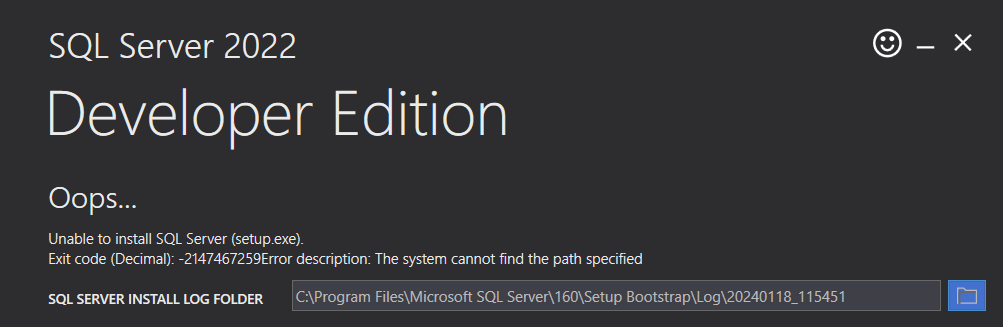
I tried Repairing, reinstalling, removing all related registry keys, and renaming related folders in system files. No luck. I am aware of the issue related to system disk sector size greater than 4 KB. Output of the fsutil fsinfo sectorinfo C:
LogicalBytesPerSector :                                 512
PhysicalBytesPerSectorForAtomicity :                    4096
PhysicalBytesPerSectorForPerformance :                  4096
FileSystemEffectivePhysicalBytesPerSectorForAtomicity : 4096
Device Alignment :                                      Aligned (0x000)
Partition alignment on device :                         Aligned (0x000)
No Seek Penalty
Trim Supported
Not DAX capable
Not Thinly-Provisioned
Log error summary:
Detailed results: Feature: Database Engine Services Status: Failed Reason for failure: An error occurred during the setup process of the feature. Next Step: Use the following information to resolve the error, uninstall this feature, and then run the setup process again. Component name: SQL Server Database Engine Services Instance Features Component error code: 0x80004005 Error description: The system cannot find the path specified
Has anyone stumbled upon a similar issue?
' cx='32' cy='32' r='32' /%3E%3Ctext x='50%25' y='55%25' dominant-baseline='middle' text-anchor='middle' fill='%23FFF' %3EMS%3C/text%3E%3C/svg%3E)



' cx='32' cy='32' r='32' /%3E%3Ctext x='50%25' y='55%25' dominant-baseline='middle' text-anchor='middle' fill='%23FFF' %3EAV%3C/text%3E%3C/svg%3E)